TL;DR:
iOS 27 introduces a completely rebuilt Siri AI powered by Apple Intelligence that moves beyond simple web retrieval to understand personal context, analyze on-screen content, and execute complex actions directly inside your apps.
● While the base iOS 27 update runs on older devices, Siri AI strictly requires an iPhone 15 Pro, iPhone 15 Pro Max, or an iPhone 16 or 17 series model, with advanced expressive voice features exclusively reserved for the iPhone 17 Pro, iPhone 17 Pro Max, and iPhone Air.
● The upgrade will roll out as a user beta later in 2026 restricted to English-language settings, with initial availability excluding mainland China entirely and omitting iPhones, iPads, and Apple Watches in the EU due to regulatory requirements.
● Processing architecture splits tasks between local on-device execution and Private Cloud Compute, which expands Apple's zero-retention privacy framework to include Google Cloud infrastructure powered by NVIDIA hardware for complex requests.
Ask AI for a summary
 ChatGPT
 Perplexity
 Gemini
 Claude
 Grok
Grok
iOS 27 introduces Siri AI, a major leap forward powered by next-generation Apple Intelligence. This redesigned assistant brings fluid conversations, personal context, on-screen awareness, system actions, world knowledge, and Visual Intelligence to your device.
Built on advanced Apple Foundation Models with robust privacy protections, the system handles complex requests locally or via Private Cloud Compute. Scheduled to roll out as a user beta later in 2026, this upgrade transforms daily Apple device interactions. To learn all its features and supported iPhone models, review this guide in detail.
In this article


Part 1. What Is Siri AI in iOS 27?
Apple rebuilt Siri from the ground up for iOS 27 rather than treating Siri AI as a minor assistant update. This complete architectural shift explains why the new branding comes with a massive leap in capability.
What Is Apple Siri AI?
Apple calls it an entirely new version of Siri, and the description holds up. This siri ai assistant answers open-ended questions, stays in context across follow-ups, and reasons over content rather than just retrieving it. It reaches into your messages, mail, photos, and notes, understands what is on screen, and completes tasks inside apps instead of handing you a web link.
How Apple Intelligence Powers the Siri AI Assistant
The engine is the next generation of Apple Intelligence, built on Apple Foundation Models that run on-device where they can and escalate to Private Cloud Compute where they cannot. Apple documents state that Siri AI focuses on personal context, world knowledge, on-screen awareness, and systemwide app actions.
Part 2. 8 Biggest Siri AI Features in iOS 27
To further know about the apple ai siri key features, go through this section in detail:
1. Natural Back-and-Forth Conversations
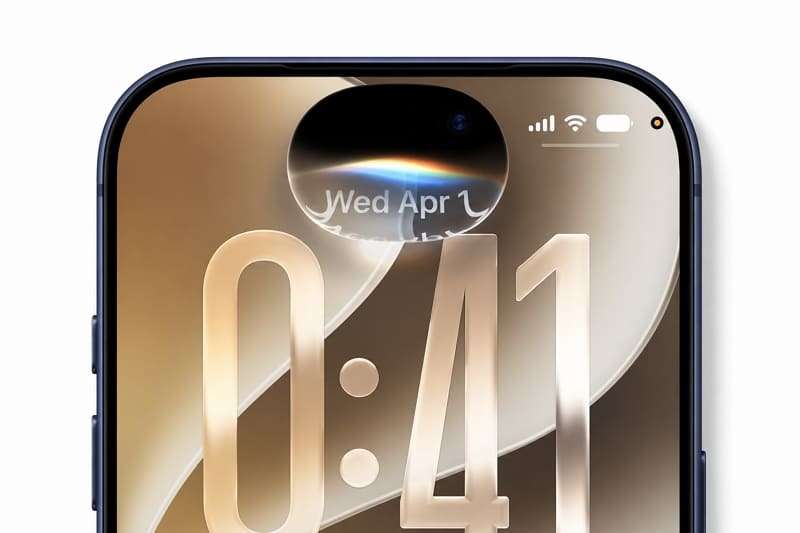
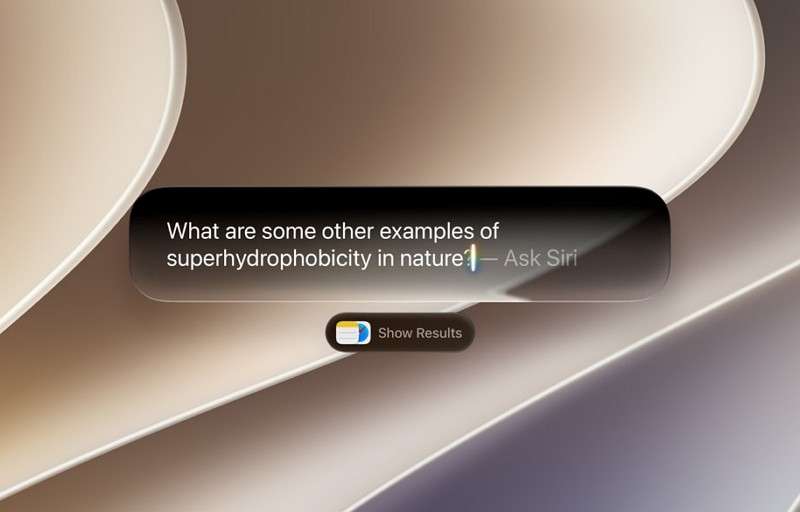
Ask something open-ended, refine it with follow-ups that build on the conversation, and continue naturally without restarting. You can speak or interact with Siri across the system. Swipe down from the Dynamic Island to start a Siri AI conversation or use supported context menus to ask Siri about images, files, or on-screen text.
2. Personal Context Understanding
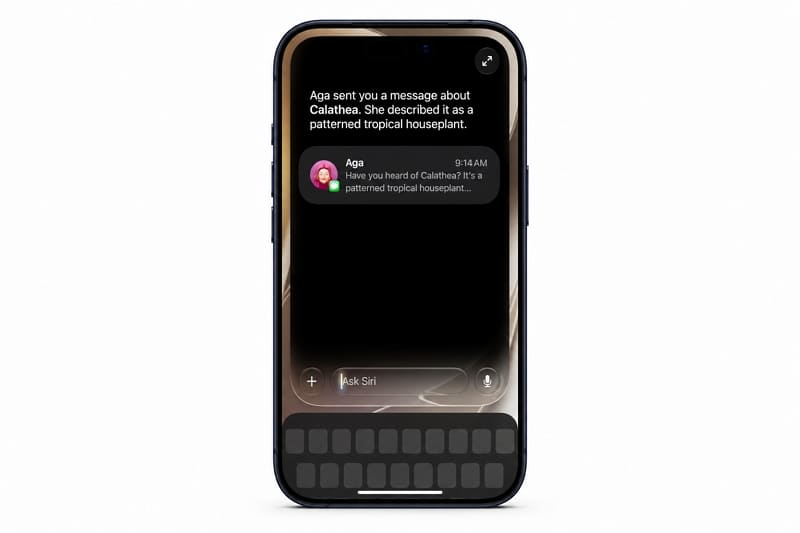
Apple uses Spotlight’s semantic search capabilities to make personal context understanding work across apps. Siri can find relevant messages, emails, or photos even when you describe them vaguely. Third-party apps can extend the same reach by indexing their content in Spotlight through App Intents and supported schemas.
3. On-screen Awareness
Siri AI can understand on-screen content and answer questions about what you are viewing. It can help explain information, work with displayed content, or take relevant actions. By combining on-screen awareness with personal context, Siri can handle requests involving information already visible without making you switch apps or repeat details manually.
4. Actions Across Apps
App Actions let ios 27 siri ai use supported tools inside apps instead of simply opening them. Apple’s own apps provide built-in support, while third-party functionality depends on developers adopting the relevant App Intents and supported frameworks.
5. Broad World Knowledge
Siri can search the web for current information and provide a direct answer using relevant sources. It can also analyze documents or other content you provide, combine that material with web knowledge when needed, and continue the conversation through follow-up questions.
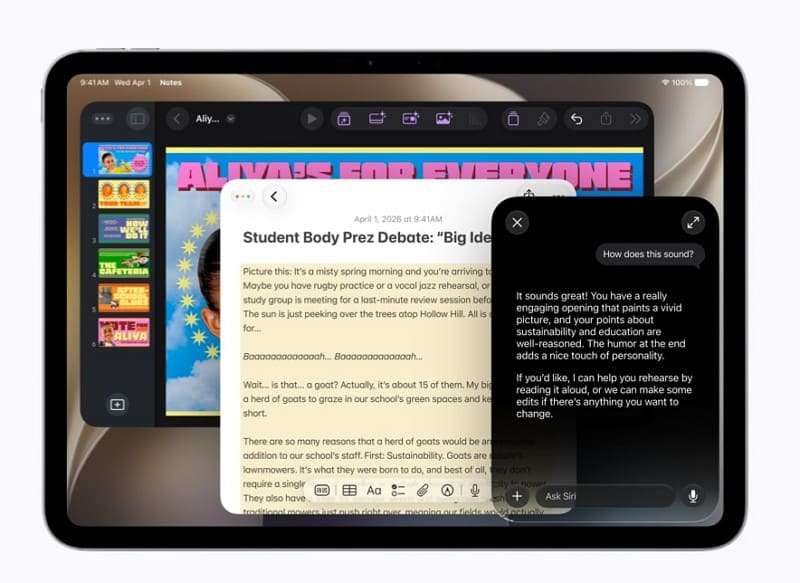
6. Dedicated Siri App and Conversation History
Apple AI Siri now has its own app with a card interface listing recent conversations. You can search past threads, pin the ones you return to, and resume any at any time. Conversations sync privately across your Apple devices, so a question started on iPhone continues on a Mac, and the assistant reaches CarPlay and AirPods too. Separately, a new Search and Ask interface replaces Spotlight.
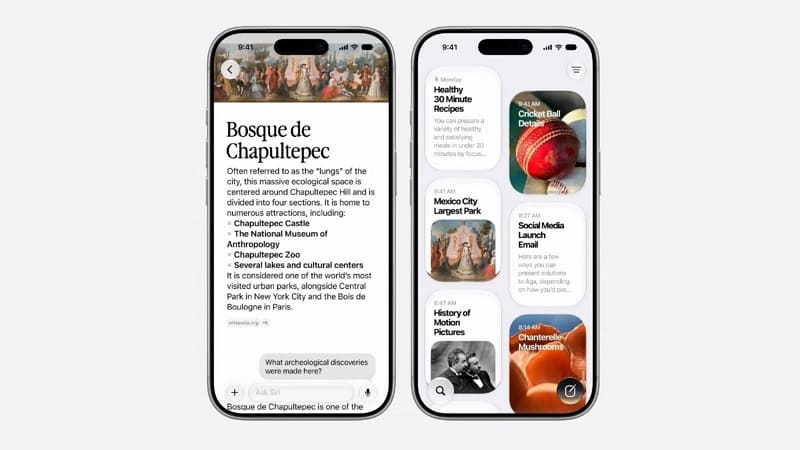
7. Siri Mode in Camera with Visual Intelligence
Apple describes an expanded Visual Intelligence experience that lets you point Siri at what the camera sees. Frame an object or scene, ask a question, and get an answer with relevant actions when available. This capability also works across the system, letting you select an image in Safari, long-press it, and ask Siri without leaving the page.

8. Writing, Voice, and Dictation Upgrades
Write with Siri works anywhere you type, helping you draft, rewrite, adjust tone, and proofread text. In Mail and Messages, it can adapt writing to your personal style. On iPhone 17 Pro and iPhone Air, a larger on-device model enables more expressive voice options, including adjustable pace, while improving systemwide dictation accuracy.
Part 3. How Does Siri AI Work?
The architecture matters because it determines which requests stay on your device and which require cloud processing. Anyone evaluating apple siri artificial intelligence for privacy should understand these mechanics, not just the features. The following details explain how the new Siri AI processes requests, combines context, and decides where each task runs.
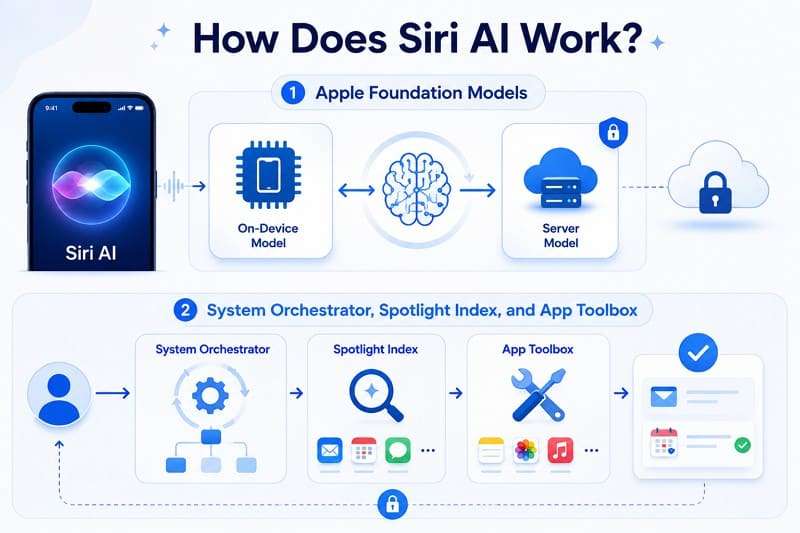
Apple Foundation Models
Multiple models work together, including on-device models for local requests and server-based models for more complex tasks. Google collaborated with Apple on the next-generation model architecture, which incorporates technologies derived from Gemini while maintaining Apple’s own models, systems, and privacy framework.
System Orchestrator, Spotlight Index, and App Toolbox
The System Orchestrator decides how to route it. The Spotlight Index surfaces personal data from integrated apps, including Mail, Calendar, and Messages. The App Toolbox then identifies which app tools could complete the task, and the core personal-context lookups can run on-device.
How Siri Combines Different Types of Context
A single Siri AI request can combine multiple sources of context, including personal data, on-screen content, information inside apps, web knowledge, and camera input. For example, when asking about a restaurant shown on-screen, Siri can connect relevant reservation details from Mail with current information from the web to provide a more complete response.
On-Device Processing vs Private Cloud Compute
Simple requests can run on-device, while more complex tasks may use Private Cloud Compute and require an internet connection. Apple is also extending Private Cloud Compute to Google Cloud infrastructure using NVIDIA hardware, expanding secure cloud processing beyond Apple silicon in Apple-operated data centers.
Part 4. Siri AI Privacy, Supported iPhones, and Availability
In addition to how it works and its key aspects, this section focuses on the privacy and compatibility of apple siri ai.
Is Apple Siri AI Private?
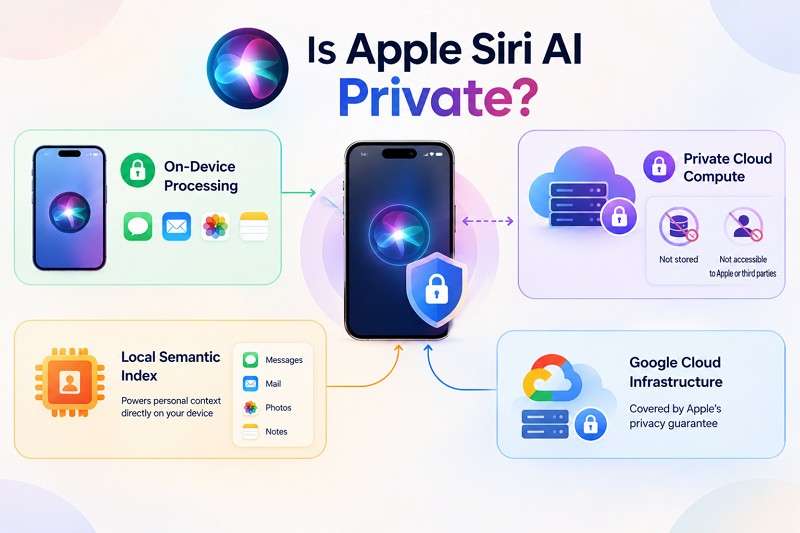
Apple says it processes personal information on-device wherever possible. Anything sent to Private Cloud Compute is neither stored nor made accessible to Apple or third parties. Apple’s privacy guarantee now extends to Google Cloud infrastructure alongside its own servers. Meanwhile, the local semantic index powers personal context directly on the device without transmitting personal messages externally.
Which iPhones Support iOS 27 Siri AI?
According to MacRumors, the following iPhone models will support Siri AI and Apple Intelligence:
| iPhone Model | Runs iOS 27 | Apple Intelligence | Siri AI |
| iPhone 11 to 15, SE 2nd and 3rd Gen | Yes | No | No |
| iPhone 15 Pro | Yes | Yes | Yes |
| iPhone 15 Pro Max | Yes | Yes | Yes |
| iPhone 16 series | Yes | Yes | Yes |
| iPhone 17 Series | Yes | Yes | Yes, plus voice customization on Pro |
| iPhone Air | Yes | Yes | Yes, plus voice customization |
| iPhone 18 Series | Yes | Expected | Yes |
iOS 27 Support vs Siri AI Support
These are separate compatibility lists. iOS 27 supports iPhone 11 and later, plus iPhone SE (2nd generation and later), while apple siri ai has higher hardware requirements. Apple lists Siri AI and Apple Intelligence support for iPhone 15 Pro and iPhone 15 Pro Max, plus all iPhone 16 and later models.
There is also a higher hardware tier within supported devices. Apple's most powerful on-device model, including features such as expressive voices and more advanced dictation, is limited on iPhone to iPhone Air, iPhone 17 Pro, and iPhone 17 Pro Max.
An iPhone can therefore support iOS 27 without qualifying for Siri AI. Models outside the Siri AI hardware list still receive compatible iOS 27 features. However, they do not gain Siri AI capabilities that require Apple Intelligence-supported hardware, including advanced personal context, onscreen awareness, and system-wide app-action features.
When Will Siri AI Be Available?
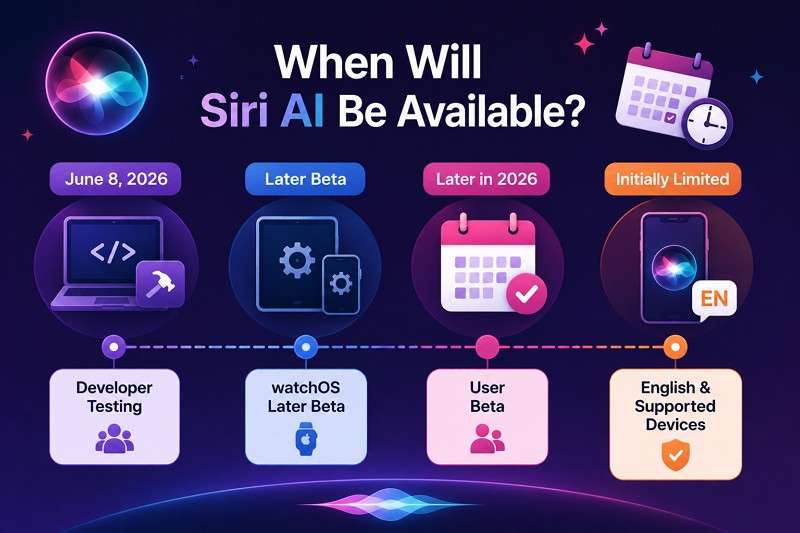
Developer testing opened on June 8, 2026, across iOS, iPadOS, macOS, and visionOS 27, with watchOS following in a later beta. Apple has said the user beta arrives later in 2026, initially limited to supported devices set to English. Public beta testers cannot access Siri AI yet, so the waitlist does not currently apply.
Siri AI Language and Regional Availability
English only at launch, covering Australia, Canada, Ireland, India, New Zealand, South Africa, the UK, and the US. More languages follow later. Apple Siri AI will not ship initially in the EU on iPhone, iPad, or Apple Watch, though Mac and Vision Pro users there do get it. China remains excluded while Apple works to meet local regulatory requirements.
Part 5. Switching to an iOS 27 iPhone? Transfer WhatsApp with MobileTrans AI
Siri AI requires an iPhone 15 Pro or newer, so many readers will be shopping rather than updating. Migrating phone data frequently breaks at WhatsApp because Android backups use Google Drive, which iOS devices cannot read. MobileTrans-WhatsApp Transfer can move chat history directly between handsets over a computer between 6000+ iOS and Android devices.
It can also combine old and new WhatsApp messages on your phone without erasing your current chats. You can even back up your WhatsApp data to a computer to free up phone storage and restore it to any device whenever you need it. Additionally, MobileTrans lets you export WhatsApp chats as PDF or HTML files on your computer so you can view or print them whenever you want.
How AI Data Optimization Helps During WhatsApp Transfer
AI Data Optimization organizes WhatsApp media for review before transfer, helping reduce unnecessary files when moving to an ios 27 siri ai-compatible iPhone.
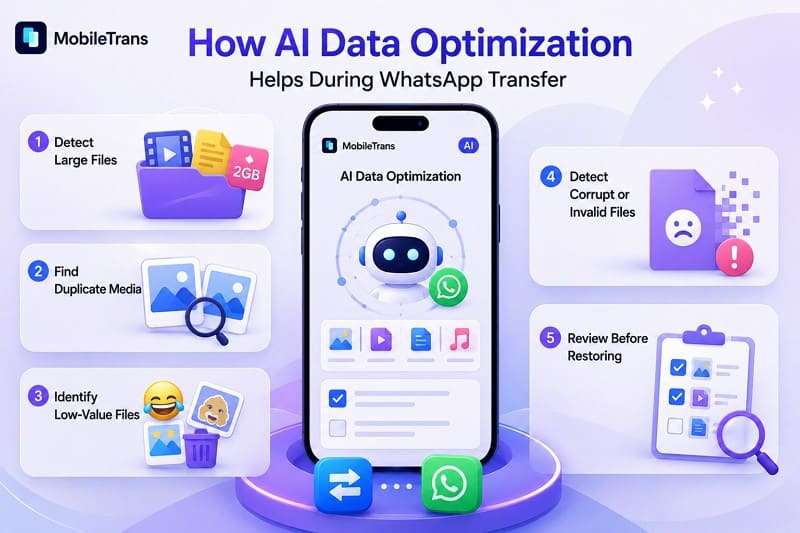
- Detect Large Files: Pinpoints space-heavy videos and attachments so you can remove unnecessary media before transfer.
- Find Duplicate Media: Detects duplicate photos and videos, helping reduce redundant files and transfer size.
- Identify Low-Value Files: Highlights memes, stickers, and other disposable media you may not want to keep.
- Detect Corrupt or Invalid Files: Flags damaged or invalid media that could disrupt the WhatsApp transfer or restore process.
- Review Before Restoring: Lets you review detected files and exclude unwanted media before restoring your WhatsApp data.
Note: The filter only touches media attachments. Your full text conversation history transfers intact regardless of what you exclude.






How to Transfer WhatsApp with MobileTrans AI?
While you seek to upgrade to apple siri artificial intelligence, learn how to move WhatsApp with MobileTrans:
Tip: Choose Transfer to replace existing WhatsApp data, or Transfer and Merge to combine old and new WhatsApp data.
Step 1. Open MobileTrans and pick WhatsApp Transfer, then select your transfer mode.
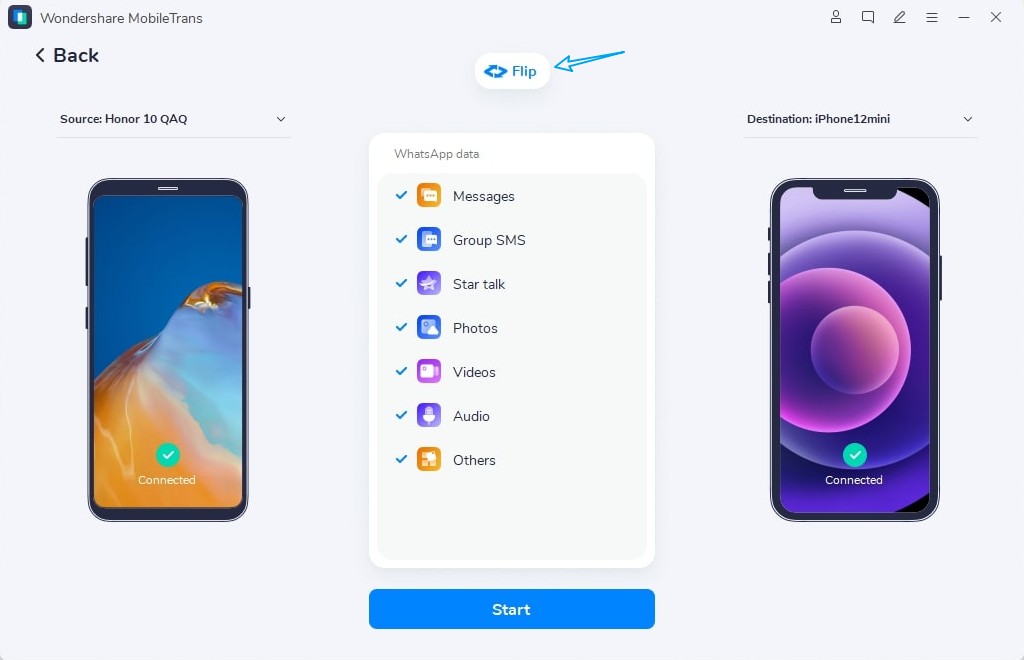
Step 2. Connect both handsets, enable AI-powered transfer, and click Start.
Step 3. Keep both phones connected until done. Check your new phone for the transferred history.
Part 6. Is Siri AI a Major Upgrade Over the Old Siri?
Deciding if the new phone is worth the cost depends on how much the assistant has improved. Compared to older versions, the upgrade is substantial, and users researching apple ai siri can evaluate the changes directly in this table:
| Area | Old Siri | iOS 27 Siri AI | Main Improvement |
| Natural conversations | Limited follow-up requests | Follow-ups and multi-task requests | Maintains conversational context |
| Personal context | Basic app queries | Semantic search across Mail, Messages, Photos | Finds vaguely remembered information |
| On-screen awareness | Limited screen context | Understands relevant on-screen content | Uses visible context directly |
| App actions | Limited actions and shortcuts | Actions inside Apple and supported apps | Completes more tasks across apps |
| World knowledge | Often relied on web search | Direct answers using web knowledge | More useful knowledge-based responses |
| Visual intelligence | Limited visual lookups | Camera and systemwide visual queries | Ask about what you see |
| Writing assistance | Dictation and basic assistance | Draft, rewrite, adjust tone, proofread | More capable writing support |
| Conversation history | Limited conversational continuity | Continued contextual conversations | Easier follow-up interactions |
| Voice and dictation | Standard Siri voices and dictation | Adjustable pace and expressivity on supported models | More natural voice and dictation |
| Privacy | On-device processing where supported | On-device first, then Private Cloud Compute | More advanced privacy-preserving processing |
Where Siri AI Could Be Most Useful
With Siri AI, users can locate deep thread details, connect Mail to Calendar, refine queries without a restart, and analyze on-screen items. Text tools and camera queries are entirely new capabilities, not minor tweaks.
Current Siri AI Limitations
Before you commit to upgrading to apple siri ai, know these drawbacks first:
- Users must wait for the Siri AI beta, which arrives later in 2026.
- Siri AI requires newer Apple Intelligence-compatible iPhones, excluding older iOS 27-supported models.
- Siri AI initially supports devices set to English, with more languages coming later.
- EU availability is limited on certain devices, while China remains unavailable pending regulatory requirements.
- Third-party app capabilities depend on developers implementing supported App Intents and related frameworks.
Conclusion
Siri AI redefines Apple device control through advanced personal context and cross-app actions, though hardware limits and regional gaps require careful planning before upgrading. Its deeper integration with apps, on-screen content, and web knowledge makes Siri more capable for everyday tasks. If you need a new phone, MobileTrans ensures seamless data migration and storage optimization.
FAQ
-
What is the difference between Siri AI and Apple Intelligence?
Apple Intelligence is the broader platform of AI models and services that powers intelligent features across Apple devices. Siri AI is the advanced assistant built on this foundation. Every device supporting Siri AI also supports Apple Intelligence, while Apple Intelligence powers many additional features beyond Siri.
-
Which iPhones support Siri AI in iOS 27?
The iPhone 15 Pro, iPhone 15 Pro Max, and all iPhone 16 and 17 models, including iPhone Air, support Siri AI. Older models, including iPhone 11 through iPhone 15, can run iOS 27 but lack the hardware required for Apple Intelligence and Siri AI.
-
When will Siri AI be available?
Developer testing began in June 2026, while the Siri AI user beta is scheduled for later in the year on supported devices set to English. Apple plans to expand support to additional languages afterward, although it has not announced specific release dates.
-
Does Siri AI work without an internet connection?
Partly. On-device models can handle simpler Siri AI requests locally, while tasks requiring current web information need an internet connection. More complex requests may use Private Cloud Compute when additional processing power is required, which also depends on network connectivity.