
![Top 4 Fixes for WhatsApp “View Once” Not Working [2026 Guide]](https://mobiletrans.wondershare.com/images/images2025/whatsapp-view-once-glitch-1.jpg)
 TL;DR:
To fix WhatsApp View Once media failing to open or disappear, immediately update the application to the latest version, clear the local cache on Android, or perform a clean reinstallation after backing up your messages.
● Clearing the application cache directly resolves temporary file conflicts but is strictly limited to Android devices, whereas iOS users must completely reinstall WhatsApp to eliminate corrupted data.
● Avoid using third-party browser extensions that claim to bypass media restrictions, as WhatsApp actively patches and blocks these unauthorized tools due to severe privacy and security vulnerabilities.
● If you need to retrieve accidentally closed media, the MobileTrans tool can recover restricted View Once content across both operating systems via a QR code login without requiring root or jailbreak access.
Ask AI for a summary
 ChatGPT
 Perplexity
 Gemini
 Claude
 Grok
Grok
Have you ever encountered the WhatsApp View Once glitch and discovered that the image, video, or audio that you sent did not open at all? This problem may arise because of malware or an outdated application. It disrupts the user experience and can even compromise sensitive moments. This article will help you understand the major causes and provide guidance on how to resolve them with ease.
In this article

Part 1. What is the WhatsApp View Once Glitch?
The WhatsApp View Once glitch refers to the issue where photos, videos, and audio don't open and disappear after being opened once. Users might also experience issues where their media does not disappear after being opened once, its content fails to load, and more. It usually occurs due to outdated app versions, temporary bugs, or device-related issues, such as cache conflicts.
Part 2. 5 Causes Behind the WhatsApp View Once Glitch
The main causes behind the WhatsApp "View Once" glitch are linked to specific privacy and storage vulnerabilities in the app, such as:
- App Bugs: If you have an older WhatsApp version installed, it will not support the View Once feature and may carry unresolved bugs that result in glitches.
- Cache/Data Corruption: On the messaging app, when your data becomes corrupted for any reason, it may cause other problems, such as the WhatsApp View Once glitch.
- Outdated App Version: In older versions of WhatsApp, the feature sometimes experiences compatibility issues, resulting in glitches with new features.
- Device-Specific Issues: iOS users reported this issue more, as it doesn't support cache, and users are unable to manage unwanted files.
- Network Connectivity Issues: If the feature is working on an unstable mobile data connection, it can prevent the media from loading.




Part 3. How to Fix or Avoid the WhatsApp View Once Glitch
The WhatsApp View Once glitch compromises functionality, preventing media from being viewed or listened to by the intended recipient. Therefore, to fix or avoid this issue, users should follow these fixes to ensure protection and privacy:
Fix 1. Update WhatsApp Immediately
An important step to fix the glitch is to update your WhatsApp, because this feature is only supported in its latest versions. Without the update, the bugs can prevent the receiver from viewing or listening to View Once media. This way, you can re-access those one-time media files by following the given instructions on how to update WhatsApp on Android or iOS:
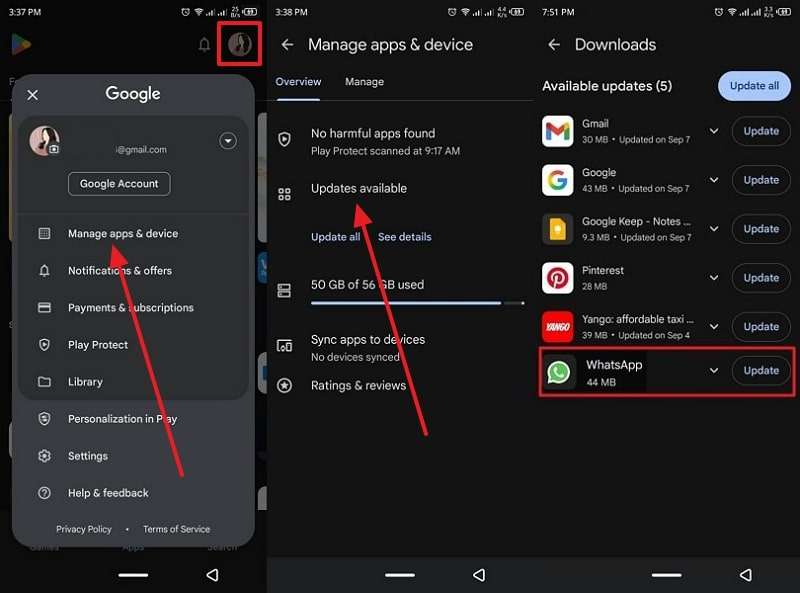
For Android
Instructions. Open Play Store > Open Profile icon > Press Manage Apps & Devices > Access Updates Available > Tap Update.
For iPhone
Instructions. Head to the App Store > Press your Profile picture > Scroll to find WhatsApp > Tap Update.
Fix 2. Check Web and Third-Party Extensions
There are some browser extensions and third-party apps that claim to bypass or unlock the "View Once" media. If you use such extensions, you can open up security risks and violate WhatsApp's privacy goals. Although now, WhatsApp has actively patched these shady web apps and blocked most of these extensions. Therefore, users should always prefer the official app for viewing "View Once" content.
Fix 3. Remove WhatsApp Cache
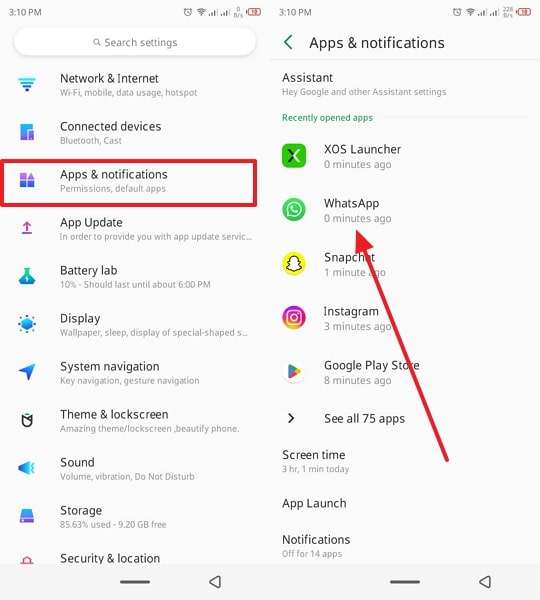
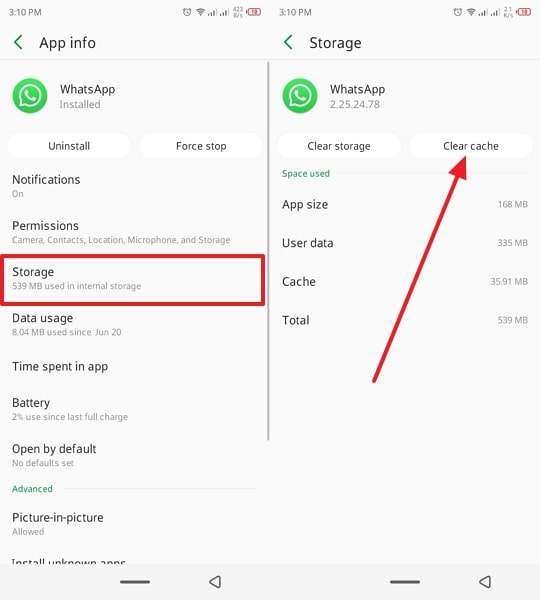
You can also resolve the View Once glitch by clearing the WhatsApp cache on your phone, as it removes all the temporary files. These accumulated files might cause glitches or allow unauthorized media access, and can retain "View Once" media beyond their intended limit. This process can only be performed on an Android mobile, as demonstrated below:
Step 1. Tap Settings > Choose Apps & Notifications > Pick the WhatsApp option.
Step 2. Afterward, press Storage and hit the Clear Cache button to remove unwanted files.
Fix 4. Reinstall the WhatsApp App
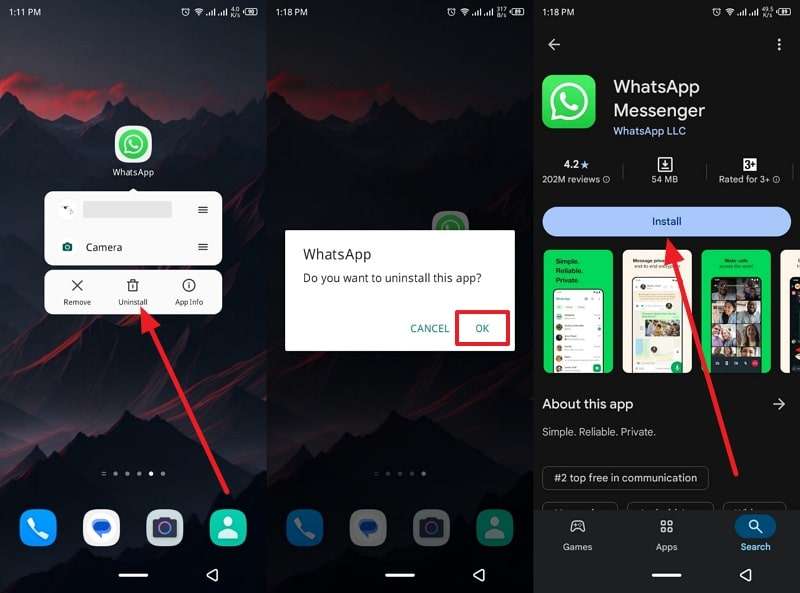
As a last resort, you can reinstall the messaging app itself if the View Once glitch persists. This will erase any corrupted data or cache, which is causing the glitches to occur. Additionally, it is recommended that you back up your important messages before uninstalling the messaging app. Now, reinstall your WhatsApp app on Android and iOS by following these steps:
For Android
Instructions. Press and hold the WhatsApp app > Tap Uninstall > Head to Play Store > Search and press Install.
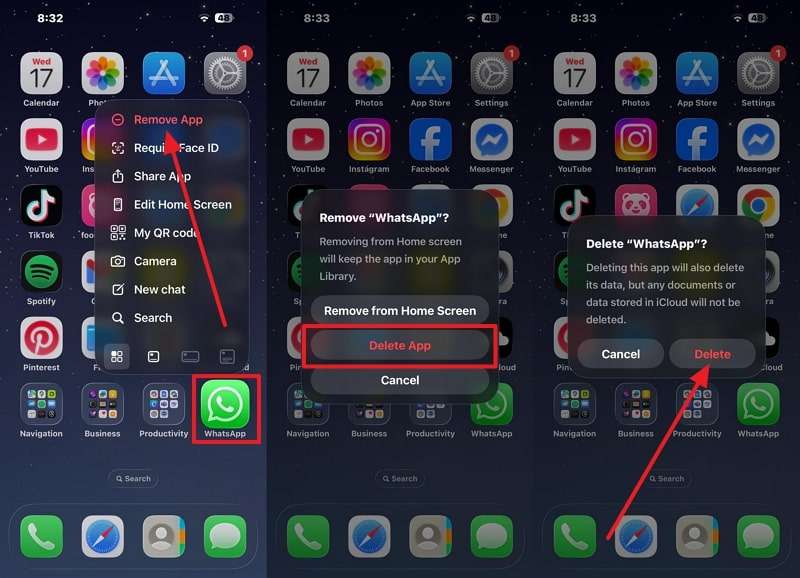
For iPhone
Step 1. Long-press WhatsApp > Tap Remove App > Press Delete App > Hit Delete to confirm the app removal.
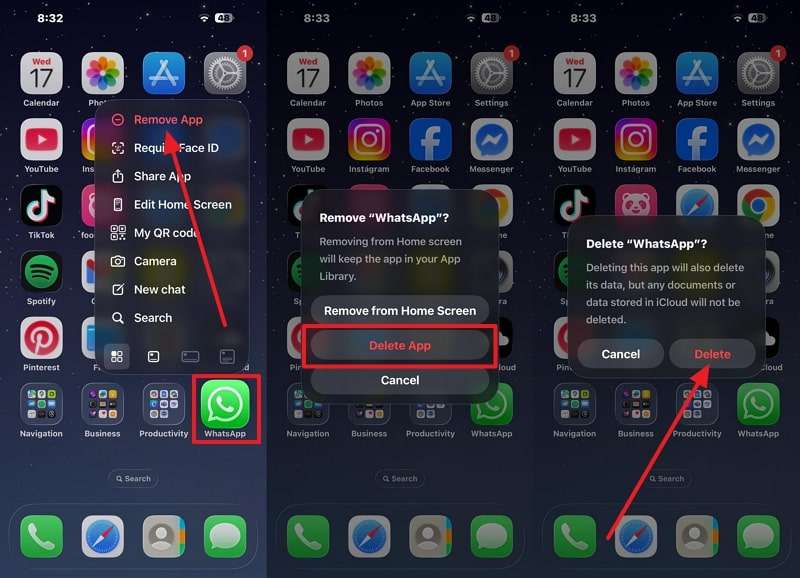
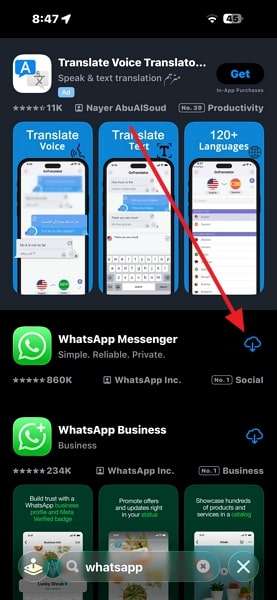
Step 2. Next, open the App Store, search for WhatsApp, and tap the Reinstall icon.
Part 4. Safe Alternatives If WhatsApp View Once Glitch Persists
If the WhatsApp View Once glitch continues even after applying fixes, you don't have to compromise your privacy by using this feature. There are other safer alternatives you can use to send personal and confidential media:
- Instagram Vanish Mode: It is available within this app's DMs, where you can send disappearing photos, videos, or audio, and change their limit from seen once to 7 days.
- Signal Messages: This app enables users to send any personal or professional media that disappears after a set time, making it a more secure alternative.
- Telegram Secret Chats: Users can use its self-destructing feature, where media can be set to disappear after a chosen time frame.
- Snapchat Limited Snaps: In this app, snap a video or image with a 10-second time limit and send it to others, which they can view twice before it disappears permanently.
- Facebook Messenger: With this app's Vanish Mode option, users can send all types of messages, including text, media, or stickers, which the receiver can only view once.
Pro Tip: Recover Accidentally Opened View Once Media with MobileTrans
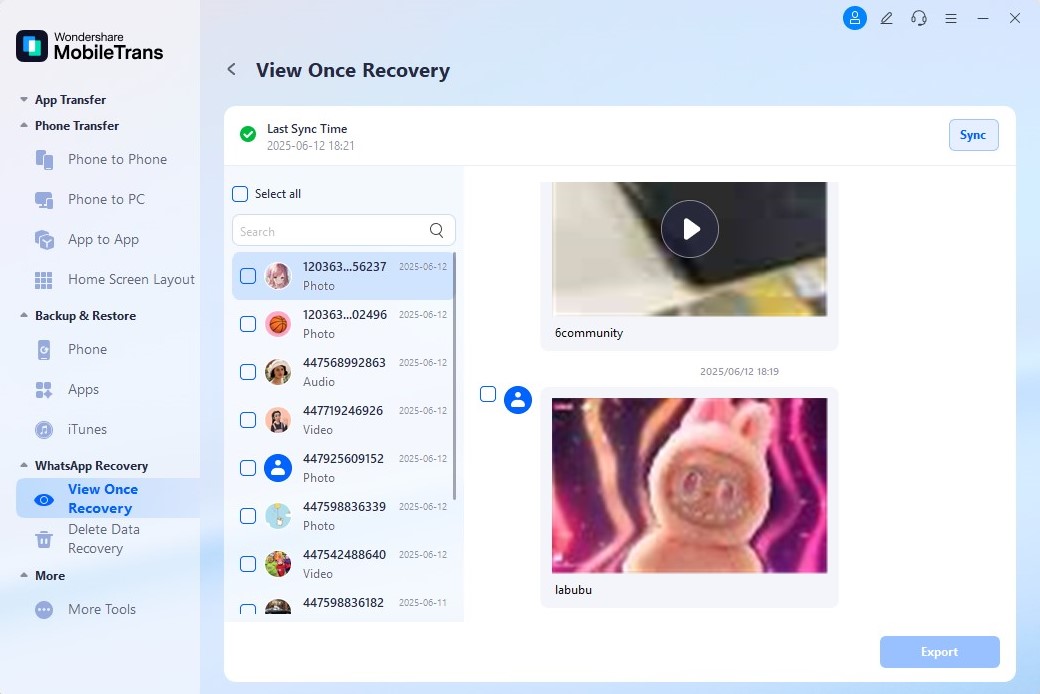
Say you were scrolling through messages in a meeting and accidentally closed an essential View Once media. With MobileTrans, you can easily recover it. The tool detects View Once messages, letting you preview and download them to local storage.
It works with the latest WhatsApp version, covering both private and group chats. MobileTrans also helps recover blocked screenshots or restricted content. Compatible with Android and iOS, it ensures secure login, complete privacy, and safe recovery without jailbreaking.
Key Features
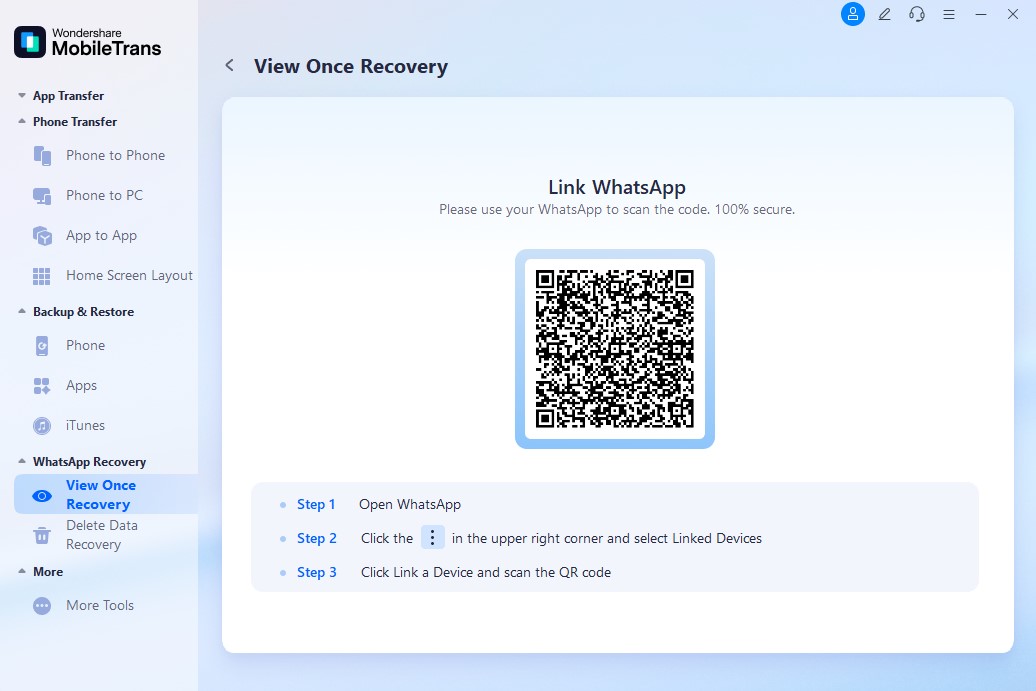
- QR Code Login: Scan the QR code, just like WhatsApp Web, to initiate the View Once recovery process.
- Background Monitoring: This feature continuously monitors and runs the process in the background with zero interruptions.
- All-Chats & Cross-Platform Support: Recover media from both private and group chats, on any device (iOS or Android), with no jailbreak or root required.
Walkthrough on How to Recover Accidentally Opened View Once Media
You can follow these steps to learn how MobileTrans helps you recover and download the once-viewed messages:
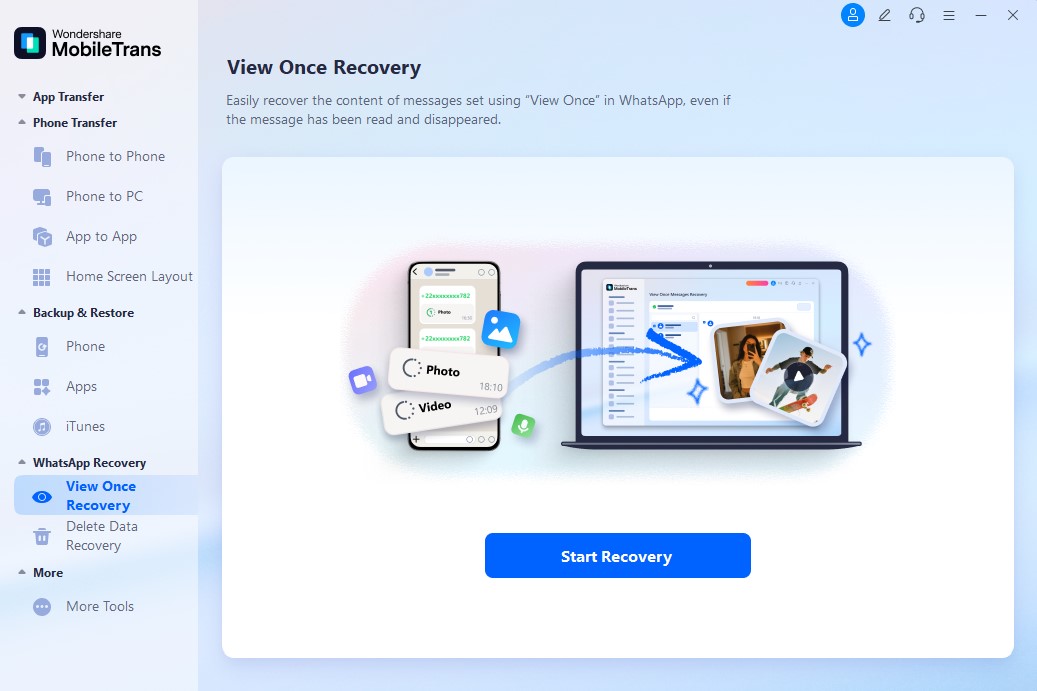
Step 1. Launch the tool > Click WhatsApp Recovery > Press the View Once Recovery tab > Hit Start Recovery.
Step 2. Now, follow the on-screen prompts and scan the QR code to build a connection.
Step 3. After scanning your WhatsApp, select the desired View Once media and click the Export option.
Conclusion
In conclusion, this article provided users with various reasons for the WhatsApp View Once glitch, which disrupts the standard workflow. Therefore, if you want to view the content and avoid such an issue, this article provides four of the best solutions.
Not only that, but users can also turn to safer alternative solutions, like Instagram disappearing messages and more. For users, this article also offered an efficient WhatsApp View Once media recovery tool, MobileTrans.
FAQs
-
How can I quickly resolve the WhatsApp View Once glitch?
You can fix the WhatsApp View Once glitch by updating WhatsApp to its latest version, as it clears bugs and cache. Moreover, by doing so, you can avoid installing any risky third-party apps or extensions that compromise your privacy. -
What if I missed viewing a View Once message during a meeting or a busy time?
Since View Once media disappears after one view, missing it means losing access to the media, regardless of who it was. Therefore, it is best to use MobileTrans, which can help recover View Once photos, videos, and voice messages with ease. -
Can I permanently disable View Once on WhatsApp?
No, you can't permanently turn off the feature on WhatsApp; you must activate it according to your safety needs. However, you can choose not to use the feature and instead rely on disappearing messages or manual "Delete for Everyone" options. -
Is the View Once glitch a security risk?
Yes, it can pose a security risk to your mobile device and the content, including photos, audio, or video, you send to another person. If the media doesn't disappear as intended, it compromises privacy, and that's why you should rely on using a safe alternative.