

 TL;DR:
Switching to a new phone often means moving important data such as contacts, photos, videos, messages, and app data.
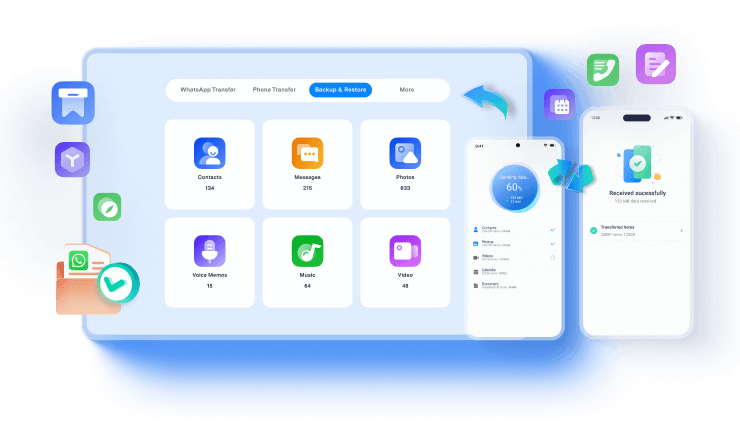
MobileTrans makes phone-to-phone transfer easier by helping users transfer data across iOS and Android devices in just a few steps. It also supports WhatsApp transfer, backup, and restore, making it a convenient solution for users who want a faster and simpler way to manage mobile data.
Ask AI for a summary
 ChatGPT
 Perplexity
 Gemini
 Claude
 Grok
Grok
Switching from an old iPhone to iPhone Duo involves more than moving photos, apps, and contacts. Businesses also need to protect important WhatsApp Business conversations and customer data. Apple's Quick Start handles a full migration during initial setup, while MobileTrans supports selective transfers before and after setup. It also offers dedicated tools for WhatsApp transfer, backup, and restore.
This guide compares iPhone Duo Quick Start and MobileTrans based on setup requirements, supported data, WhatsApp Business transfers, and cost. Both methods still require separate Touch ID enrollment, eSIM activation, and certain app sign-ins on iPhone Duo.
In this article

Part 1. Quick Start vs MobileTrans for iPhone Duo: Key Differences
Choosing between Apple's Quick Start and MobileTrans depends on your transfer needs and whether your iPhone is set up. Quick Start handles complete migration during initial setup, while MobileTrans supports selective transfers before and after setup. It also offers dedicated tools for managing WhatsApp chats. To transfer data to iPhone Duo efficiently, compare the following 10 factors:
|
Comparison Factor |
Apple Quick Start |
MobileTrans |
|
Main Purpose |
Transfers eligible iPhone data during initial setup. |
Transfers selected data and offers dedicated WhatsApp migration tools. |
|
Initial Setup Requirements |
iPhone Duo must be new or erased, with both devices nearby and Wi-Fi and Bluetooth enabled. |
Both iPhones must be unlocked, connected, and authorized to trust the computer. |
|
Works After iPhone Duo Setup |
Requires erasing iPhone Duo to repeat the transfer. |
Works before and after setup without erasing iPhone Duo. |
|
Full Migration vs. Selective Transfer |
Transfers eligible data together without individual category selection. |
Lets you select specific data categories for transfer. |
|
Supported Personal Data |
Apps, settings, messages, photos, and other eligible data. |
Photos, videos, contacts, messages, music, and other supported data types. |
|
Regular WhatsApp Transfer |
May transfer eligible app data, but chats can require separate restoration. |
Offers dedicated WhatsApp transfer, backup, and restore tools. |
|
WhatsApp Business Transfer |
No dedicated option; separate Business chat transfer or restoration may be needed. |
Supports dedicated iPhone-to-iPhone and Android-to-iPhone Business transfers. |
|
Computer Requirement |
No computer required. |
Requires a Windows PC or Mac for desktop transfers. |
|
Transfer Method |
Direct wireless transfer, iCloud download, or wired connection. |
Connects both phones to a computer using USB cables. |
|
Cost |
Free and built into iOS. |
Paid Phone Transfer, WhatsApp Transfer, and Full Features plans; prices vary by platform and license. |
Verdict: Quick Start suits complete iPhone migration during initial setup, transferring eligible apps, settings, and data together. MobileTrans supports selective transfers before and after setup, plus dedicated WhatsApp and WhatsApp Business migration. Quick Start lacks Business-specific controls, so separate chat restoration may be necessary. MobileTrans offers Phone Transfer and WhatsApp Business Transfer as separate plans, while the full suite includes both.






Part 2. How to Transfer Data to iPhone Duo Using Quick Start
Before starting an iPhone Duo Quick Start transfer, check your old iPhone's iOS version, Wi-Fi and Bluetooth settings, and available cables. These requirements help you choose the right transfer method and complete the setup smoothly.
What Can Quick Start Transfer to iPhone Duo?
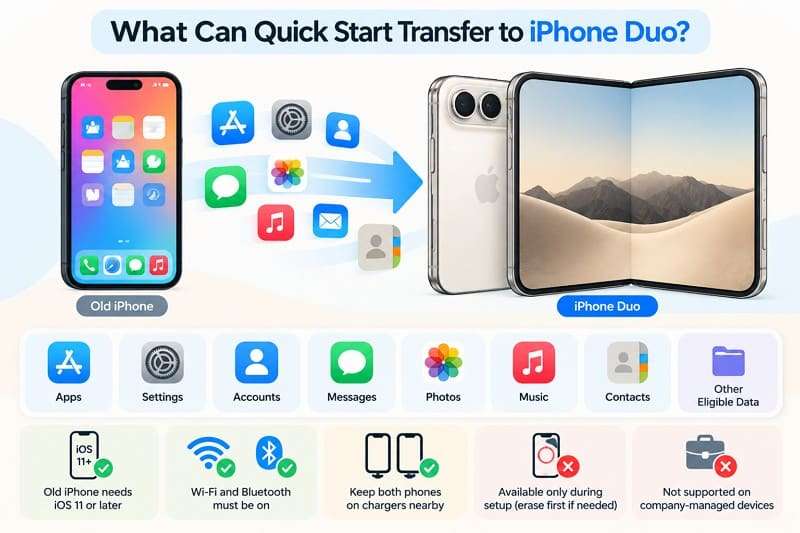
Quick Start transfers apps, settings, accounts, messages, photos, videos, contacts, and other eligible data from your old iPhone. It also supports transferring compatible app data, although some apps require separate sign-ins or restoration. Apple’s Quick Start guide explains that direct transfers keep both phones occupied until completion, while iCloud downloads continue in the background.
To transfer data to iPhone Duo using Quick Start, your old iPhone must run iOS 11 or later, with Wi-Fi and Bluetooth enabled. Keep both devices nearby and connected to power throughout the transfer. Quick Start works only during initial setup, so you must erase an already configured iPhone Duo first. Availability may also depend on organizational restrictions for managed devices.
Transfer Data to iPhone Duo Using a Wired Connection
You can also transfer data using a wired connection. Use a USB-C cable for an iPhone 15 or later, or a USB-C to Lightning cable for an iPhone 14 or earlier. This method transfers eligible data directly between both devices. According to iPhone Duo’s technical specs, it supports only side-button Touch ID and eSIM, requiring separate fingerprint enrollment and eSIM activation.
During setup, eSIM Quick Transfer requires carrier support, compatible software, and the same Apple Account on both iPhones. Your carrier may also offer other activation methods. After migration, verify WhatsApp chats, media, and other third-party app data. Some apps may require phone-number verification, separate restoration, or a fresh sign-in.
How to Use Quick Start to Transfer Data to iPhone Duo
To begin an iPhone Duo Quick Start transfer, place both devices nearby and enable Wi-Fi and Bluetooth on your old iPhone. Keep both phones plugged in throughout the process. Then, follow these steps to transfer data directly between devices or download it from iCloud:
Step 1. Turn on iPhone Duo and place it next to your old iPhone. Select your preferred language and country on the new device.
Step 2. Tap Continue on your old iPhone when the Quick Start prompt appears. An animation will appear on iPhone Duo.
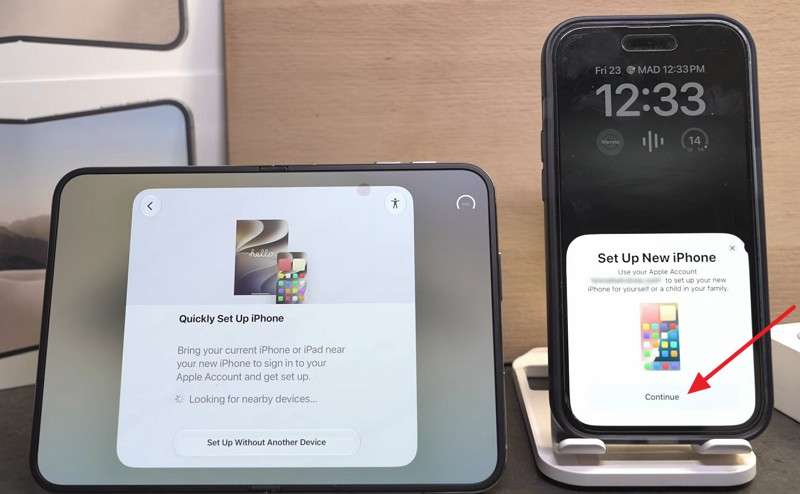
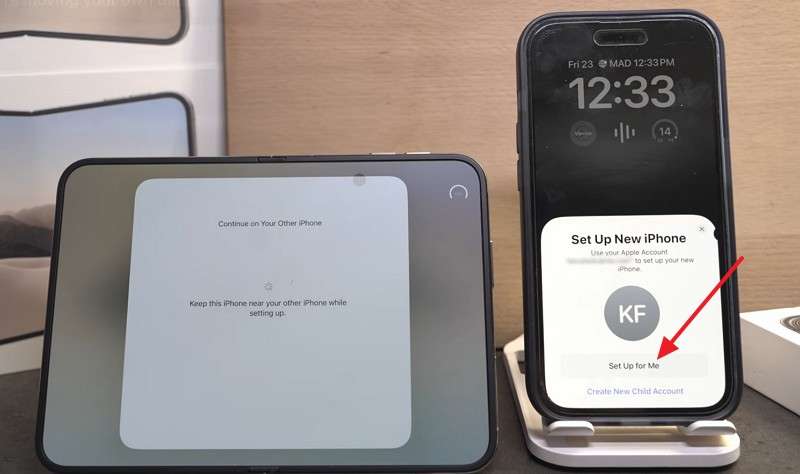
Step 3. Scan the animation using your old iPhone > Select Set Up for Me if prompted > Enter your old iPhone's passcode on iPhone Duo.
Step 4. Select Transfer from iPhone for direct migration or Download from iCloud to restore eligible content from iCloud.
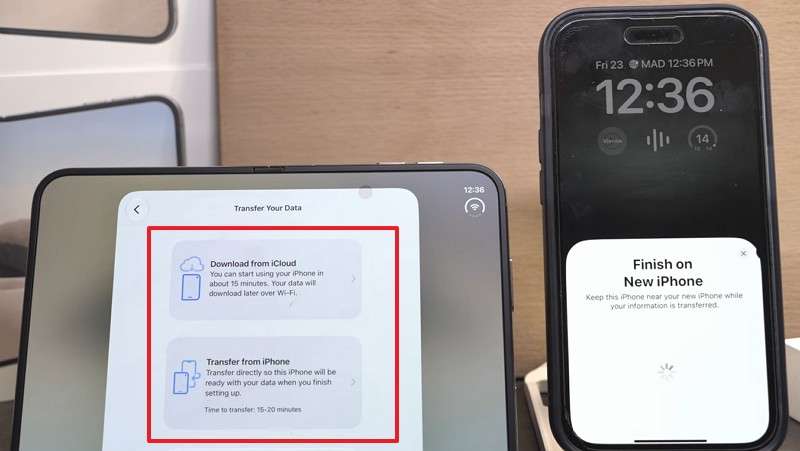
Step 5. For direct migration, follow the remaining setup prompts, accept the terms and conditions, and tap Continue when prompted.
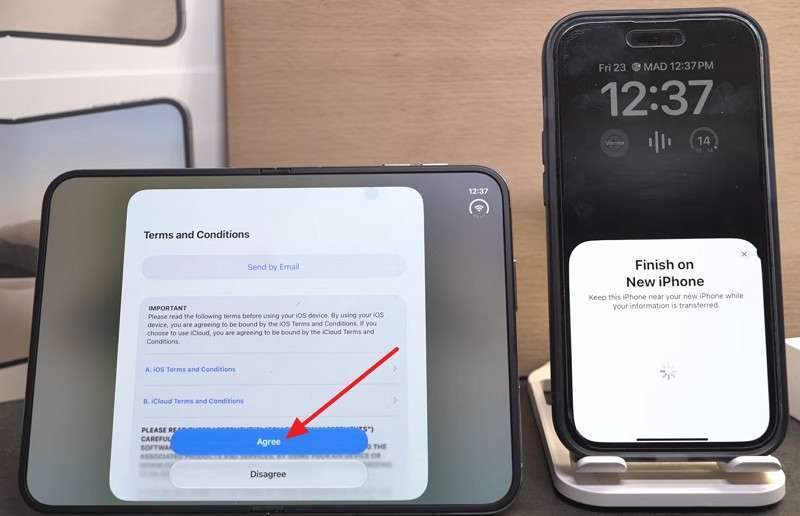
Step 6. Keep both iPhones close together and plugged in until the transfer finishes.
Important Limitations:
- Quick Start Limitations: Quick Start does not support dedicated WhatsApp Business chat transfers.
- Batch Selection: You cannot select individual apps, messages, or data categories for transfer.
- Reset Requirement: Repeating Quick Start requires erasing an already configured iPhone Duo.
- App Authentication: Some third-party apps require fresh sign-ins, verification, or separate data restoration.
Part 3. How to Transfer Data to iPhone Duo Using MobileTrans
Unlike Quick Start, MobileTrans supports transferring selected data both before and after iPhone setup without requiring a reset. For flexible iPhone Duo data transfer, it offers two dedicated options: Phone Transfer to move supported personal data and WhatsApp Transfer to migrate WhatsApp and WhatsApp Business chats.
Transfer Selected Personal Data with MobileTrans
MobileTrans-Phone Transfer lets you transfer data to iPhone Duo without erasing existing content. Instead of migrating everything, you can select from 18+ supported data types, including photos, videos, contacts, messages, and music. It supports 6,000+ Android and iOS devices, allowing transfers before or after setup. The desktop software runs on Windows and Mac and supports direct phone-to-phone transfers.
This Quick Start alternative also offers faster data migration through smart parallel transfer technology. It uses encrypted transfers without requiring cloud uploads, helping protect personal information during migration. The software supports iOS 27, though available data types and transfer capabilities may vary by device and OS version.
Key Features
- Selective Data Transfer: Choose specific data categories, including photos, videos, contacts, messages, and music, without migrating everything.
- Phone and Computer Transfer: Move supported files between iPhones and computers in either direction, making data management and sharing easier.
- App Migration: Transfer compatible apps to your new iPhone through batch installation, reducing the need to download each app manually.
Guide to Transfer Data to iPhone Duo with MobileTrans
As an alternative to Quick Start, MobileTrans lets you transfer data to iPhone Duo without resetting the device, even after setup. Follow these simple steps to select and transfer your old phone data:
Step 1. Select Phone Transfer > Phone to Phone. Connect both iPhones using USB cables. If prompted, tap Trust on each iPhone.
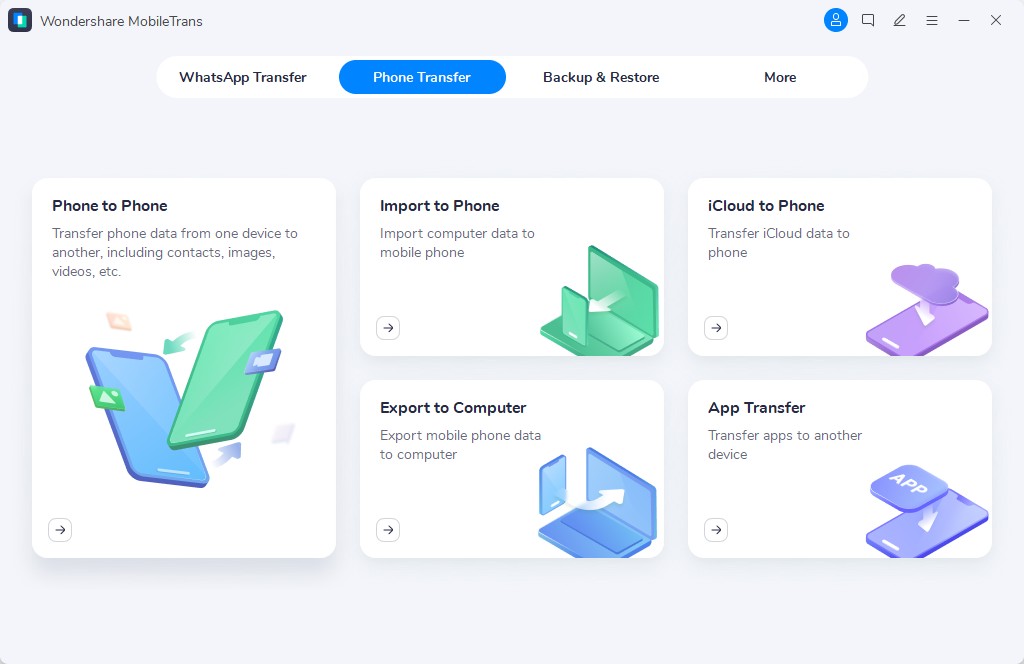
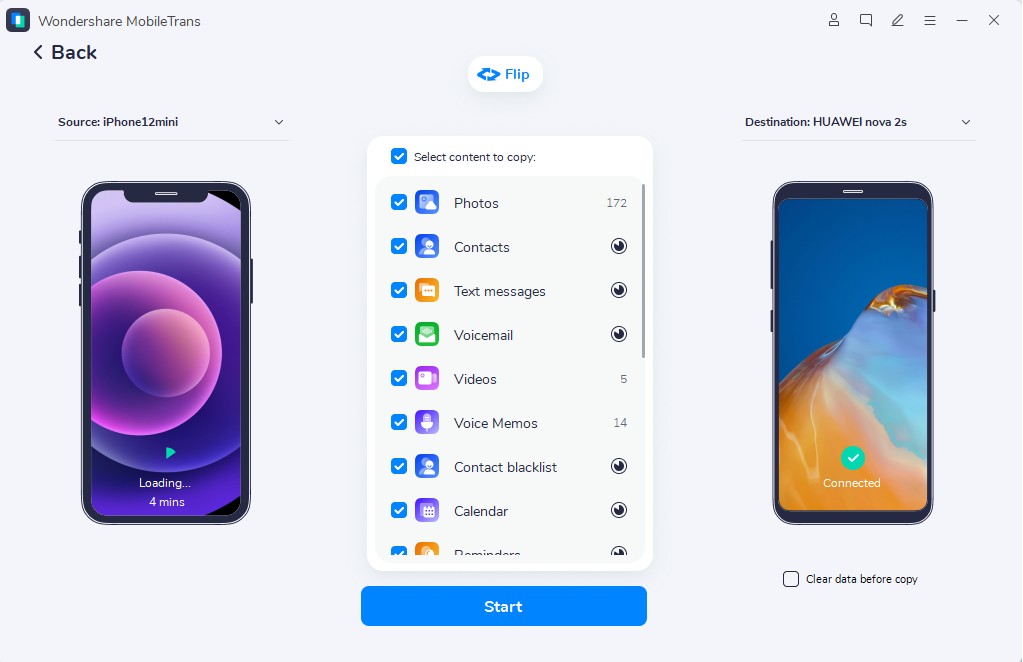
Step 2. Click Flip if the direction is reversed. Select the supported categories you want to copy, such as Photos, Contacts, Messages, or Music.
Step 3. Click Start to begin transferring the selected data. Keep both iPhones connected until MobileTrans confirms the transfer is complete.
Important:
- Unmapped Items: Some apps, system settings, and Apple Account configurations may not transfer.
- Data Option: Enable Clear data before copy only if you want to remove supported existing data on the destination device.
- Module Separation: WhatsApp and WhatsApp Business chats require the separate WhatsApp Transfer module.
- OS Compatibility: Supported data types and transfer options may vary by device and iOS version.
Transfer WhatsApp and WhatsApp Business with MobileTrans
In the Quick Start vs MobileTrans comparison, MobileTrans WhatsApp Transfer offers dedicated tools for transferring WhatsApp and WhatsApp Business data between compatible devices. It supports iPhone-to-iPhone and Android-to-iPhone migration for both apps, including transfers that regular Phone Transfer does not cover. Supported content includes personal, group, and community chats, starred messages, call logs, photos, videos, voice notes, documents, and stickers.
Unlike Quick Start, MobileTrans supports WhatsApp and WhatsApp Business transfers to an already configured iPhone Duo without requiring a factory reset. It also provides backup, restore, and chat-merging features for supported transfers. Both apps require access to their registered phone numbers for verification. However, WhatsApp Business features such as catalogs, labels, and automated replies may need separate setup after migration.


Transfer WhatsApp/WhatsApp Business to iPhone Duo Using MobileTrans
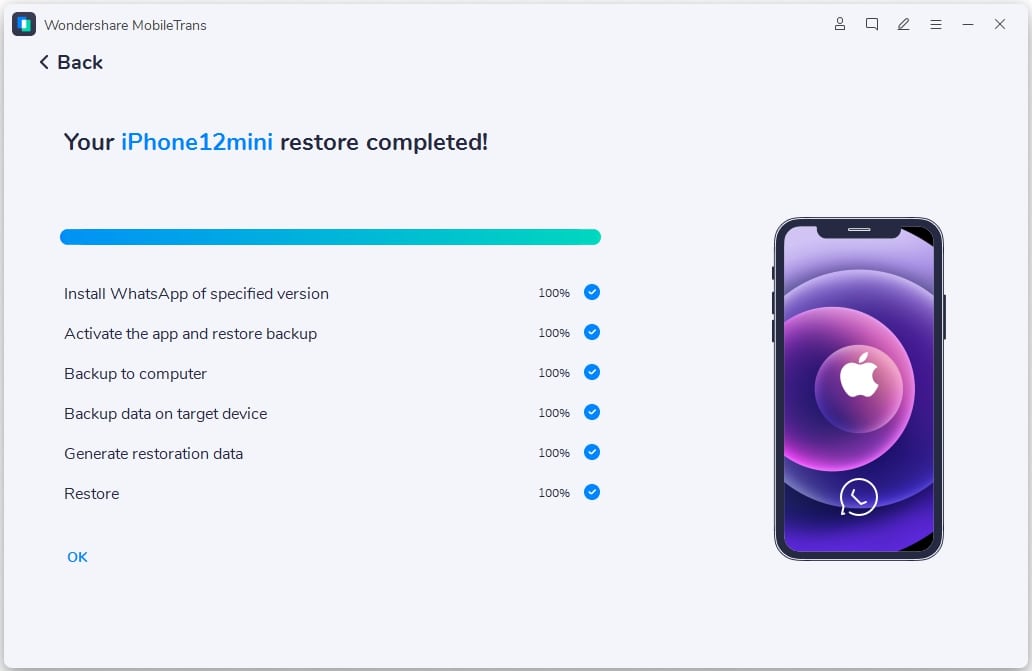
To transfer from an old iPhone to iPhone Duo while preserving WhatsApp and WhatsApp Business chats, connect both devices to your computer with USB cables. Keep them unlocked and follow these steps:
Step 1. Open MobileTrans > App Transfer > Select WhatsApp or WA Business. Then, choose Transfer or Transfer & Merge.
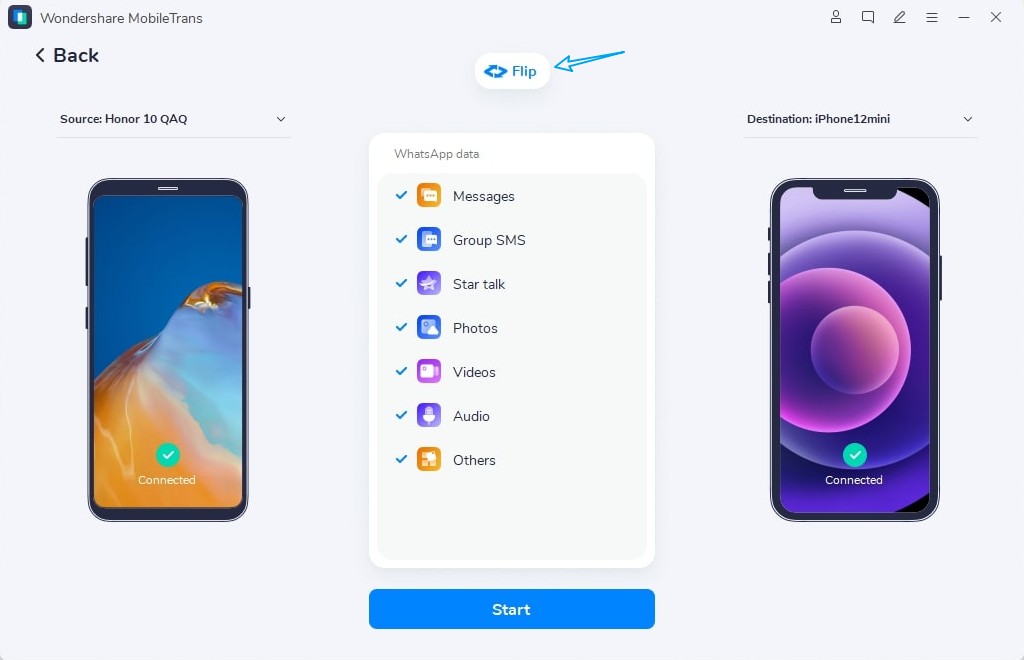
Step 2. Connect both iPhones to the computer using USB cables, unlock them, and follow the on-screen setup instructions.
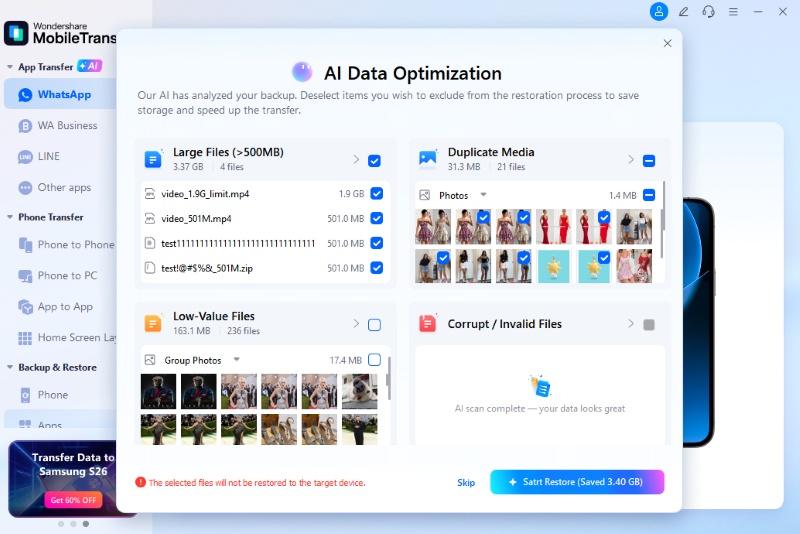
Step 3. Choose AI-assisted Backup for Android-to-iPhone transfers or complete a manual backup for iPhone-to-iPhone transfers.
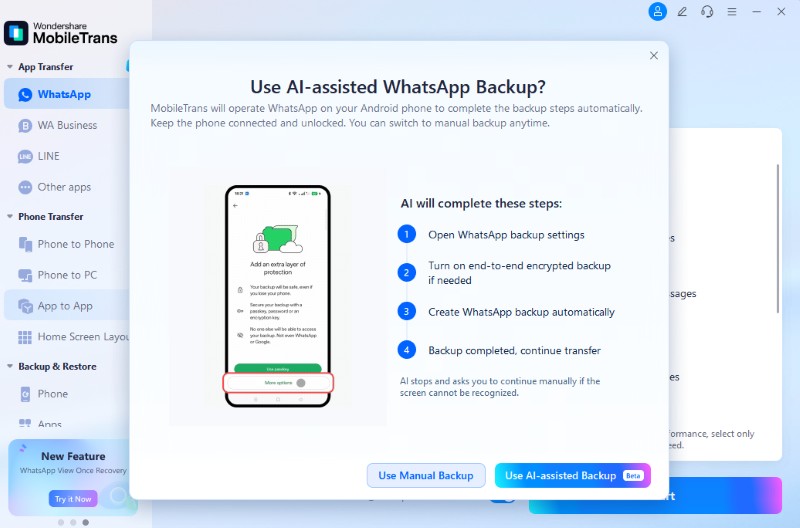
Step 4. Once the data transfer finishes, select Restore Attachments Now or Restore Later if prompted.
Part 4. Quick Start or MobileTrans: Which Should You Choose for iPhone Duo?
The best way to transfer data to iPhone Duo depends on its setup status, the type of data you want to move, and your budget. Here's how to choose the right method for your needs:
Choose Quick Start for Complete iPhone Migration
Quick Start is ideal when your iPhone Duo is new or still being set up. It transfers supported apps, settings, accounts, and personal data without requiring desktop software. The iPhone Duo Quick Start process works wirelessly or through a compatible cable. However, you'll still need to set up Touch ID and verify security-sensitive apps, including mobile banking and WhatsApp Business.
Choose MobileTrans for Selective or After-Setup Transfers
MobileTrans lets you transfer data to iPhone Duo even after initial setup, without resetting the device. It is especially useful in the following situations:
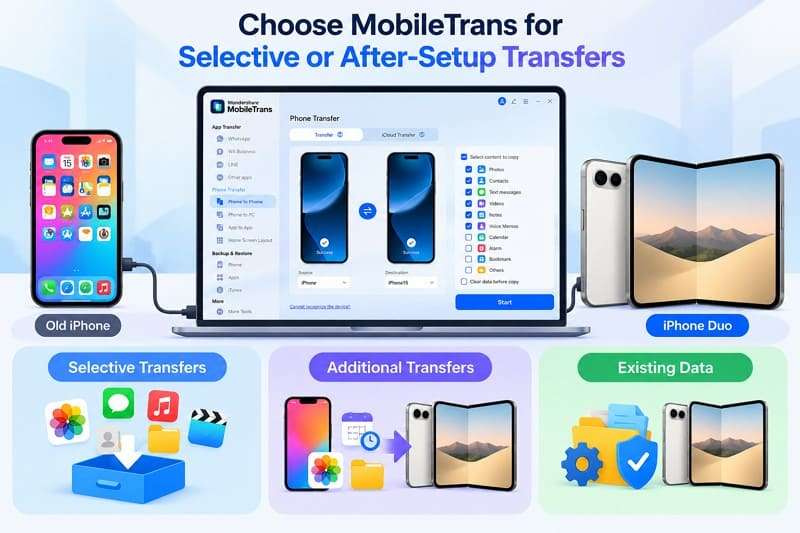
- Selective Transfers: Move supported photos, videos, contacts, messages, and other data without repeating the entire iPhone setup.
- Additional Transfers: Transfer new content from your old iPhone later without erasing iPhone Duo or restarting Quick Start.
- Existing Data: Add supported data from your old iPhone to an already-used iPhone Duo without resetting it or losing existing content.
Which Method Is Better for WhatsApp Business Users?
For WhatsApp Business users, MobileTrans offers a dedicated way to transfer chats and attachments to iPhone Duo. Unlike iPhone Duo Quick Start, which handles general device migration, MobileTrans supports WhatsApp Business transfers between compatible devices. You can also restore Business chats from an existing iCloud backup when moving between iPhones.
MobileTrans is especially useful for transferring WhatsApp Business from Android or moving chats to an already set-up iPhone Duo. After transferring, check customer conversations, shared documents, and product photos. Business settings, catalogs, and labels may require separate verification or setup before you stop using the old phone.
What About Transfer Speed, Cost, and Convenience?
In the Quick Start vs MobileTrans comparison, Quick Start is free and built into iOS, while MobileTrans offers paid plans for different transfer needs. As of October 2026, MobileTrans lists its discounted Windows Full Features plans at $18.89 monthly, $25.19 yearly, and $31.49 for a perpetual license. Each license supports up to 5 mobile devices on 1 PC, although promotional prices may change.
Regarding transfer speed, MobileTrans claims to be 96.32% faster than other transfer methods, appealing to users who want quicker transfers. Quick Start transfers apps, settings, and personal data during setup, while MobileTrans supports selective transfers through a computer. Actual iPhone Duo data transfer times depend on data size, connection quality, and device performance.
Final Recommendation:
- Initial Setup: Choose Quick Start for a free, complete migration when setting up a new or erased iPhone Duo.
- Selective Files: Select MobileTrans Phone Transfer for faster, selective data transfers without resetting an already-set-up iPhone Duo.
- Messaging App Data: Use MobileTrans WhatsApp Transfer to migrate WhatsApp or WhatsApp Business chats and attachments separately.
- Method Summary: Prefer Quick Start for transferring everything during initial setup and MobileTrans for faster, flexible, or after-setup transfers.
Conclusion
iPhone Duo Quick Start offers a free and convenient way to migrate eligible data during initial setup. MobileTrans offers more flexibility with selective transfers before and after setup, plus dedicated WhatsApp and WhatsApp Business migration tools. While Quick Start suits complete phone migration, MobileTrans works better for transferring specific data without resetting your iPhone. Choose the method that best matches your transfer needs.
FAQs
-
Can I transfer WhatsApp Business to iPhone Duo without creating an iCloud backup?
Yes, MobileTrans can transfer supported WhatsApp Business chats and attachments from an old phone to iPhone Duo using a computer and USB cables. Unlike regular WhatsApp, WhatsApp Business does not currently support the built-in QR-code Chat Transfer feature. Without MobileTrans, you can use an iCloud backup for iPhone-to-iPhone migration. -
Can regular WhatsApp and WhatsApp Business use different numbers on iPhone Duo?
Yes, you can use WhatsApp and WhatsApp Business on the same iPhone with different phone numbers. Each account requires a separate number for verification. MobileTrans supports transferring data for both apps, but you still must verify each account with its registered number. -
Can I transfer data from two old iPhones to the same iPhone Duo?
Yes, but Quick Start cannot transfer data from two iPhones simultaneously. You can migrate data from one iPhone during setup, then use MobileTrans Phone Transfer to copy supported data from another iPhone. Check the transfer options beforehand, as overlapping content may create duplicates or overwrite existing files. -
Can I move WhatsApp Business from Android to iPhone Duo after setup?
Yes, MobileTrans supports transferring WhatsApp Business from Android to an already configured iPhone Duo without resetting it. Unlike MobileTrans, Apple’s Move to iOS requires a new or erased iPhone during setup. Its WhatsApp migration feature doesn't support transferring WhatsApp Business chats.