



 TL;DR:
Wondershare MobileTrans is the recommended solution for comprehensive, cross-platform WhatsApp data migration, as Samsung Smart Switch strictly limits WhatsApp transfers to wired iPhone-to-Galaxy connections and lacks support for importing WhatsApp chats from Android devices.
● Samsung Smart Switch requires a physical cable connection, a target Galaxy device that has never used WhatsApp, and specific software versions (Smart Switch v3.7.21.5+, iOS v2.21.160.13+, and Android v2.21.16.16+) to successfully move iPhone WhatsApp data.
● MobileTrans allows unrestricted bidirectional WhatsApp transfers between any iOS and Android devices, enabling users to merge new and old data while retaining specialized content like polls, broadcast messages, and channel updates that Smart Switch ignores.
● Users migrating large accounts or heavy media files should utilize MobileTrans to ensure verified transfers at average speeds up to 30 MB/s, as Smart Switch is prone to silently skipping large files and truncating media without reporting data loss.
Ask AI for a summary
 ChatGPT
 Perplexity
 Gemini
 Claude
 Grok
Grok
In 2026, users encountered problems when moving WhatsApp data from one phone to another. This is because switching from one Android phone to a Samsung Galaxy, or from an older Samsung to a newer one, can sometimes cause missing chats or media. In most cases, tools lack support for large-scale WhatsApp data transfers, limiting users' options.
Right now, MobileTrans vs Samsung Smart Switch are the center of attention and promise to transfer WhatsApp safely. Among these options, choosing the right tool remains important, as it can save time and prevent data loss. This detailed guide will compare the two WhatsApp transfer solutions to help you decide.
In this article

Why WhatsApp Data Transfer Completeness Matters
Between MobileTrans and Smart Switch 2026, you can only decide which is best if you know the true value of WhatsApp migration. Therefore, the 5 points mentioned below will explain why a safe and secure WhatsApp transfer matters now:
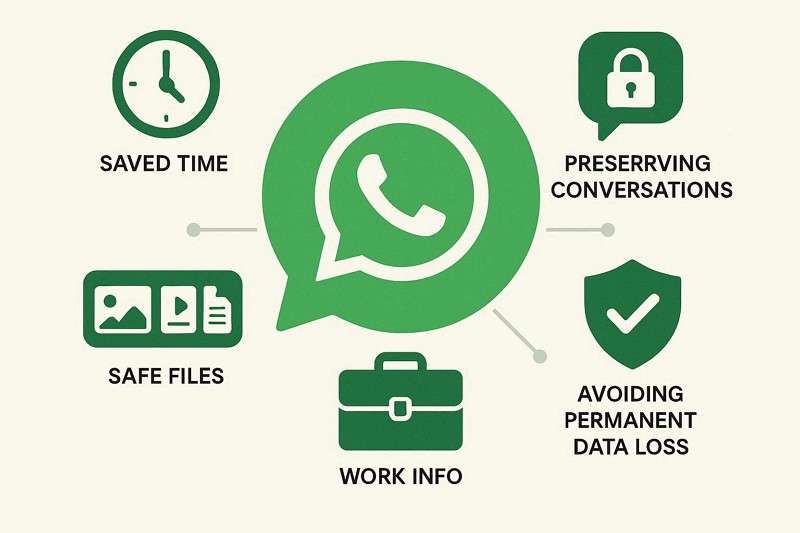
- Save Time and Effort: A full transfer lets you start using the new phone immediately with all your data. Additionally, you avoid searching old chats, manually moving files, or asking contacts to resend anything.
- Keep All Conversations: Complete WhatsApp transfers keep personal, family, and work chats fully intact, without losing any messages. This way, you preserve important addresses, appointments, instructions, and group discussions from earlier chats.
- Protect Photos and Files: All photos, videos, documents, polls, call logs, and other shared media move safely to your new phone. So, if the transfer is incomplete, you may keep the text but lose valuable chat files.
- Preserve Work Information: Invoices, contracts, screenshots, voice notes, and project updates remain safe and accessible. Losing these attachments can slow work, create confusion, or force people to resend files.
- Avoid Permanent Data Loss: Once a device is reset, damaged, or replaced, missing items may not be recoverable. Therefore, understanding what transfers ensures your important data remains safe and complete.
Overview – Samsung Smart Switch and MobileTrans
To decide between Wondershare MobileTrans vs Smart Switch, now let’s see what both tools are and how they function:
What is Samsung Smart Switch?
For Samsung-to-Samsung or Android/iPhone-to-Galaxy migration, Samsung Smart Switch is Samsung’s official transfer tool. Being accessible as a desktop and app-based solution, its app allows Android™ owners to move data between Android 5.0 or higher devices. Talking only about WhatsApp Transfer, the app has certain limits. The app is only useful for migrating WhatsApp chats from iPhone to Galaxy, but it lacks support for importing them from Android devices.
Even for the iPhone to Galaxy, one must use Smart Switch version 3.7.21.5 or higher, iOS version 2.21.160.13 or higher, and Android version 2.21.16.16 or higher. Plus, if the Galaxy device has already used WhatsApp before the Smart Switch restore, the process will not work. Additionally, WhatsApp chat restoration only works over a cable connection.
What is MobileTrans?
Renowned as the fastest WhatsApp transfer solution with a 100% success rate, MobileTrans also supports Phone-to-Phone transfers. As a versatile option, it supports large-scale WhatsApp data transfer, including polls, call logs, broadcast messages, and channel updates. Unlike Smart Switch, its app and PC solution is not limited to a specific version and has no storage limit, making it the best alternative to Samsung Smart Switch.
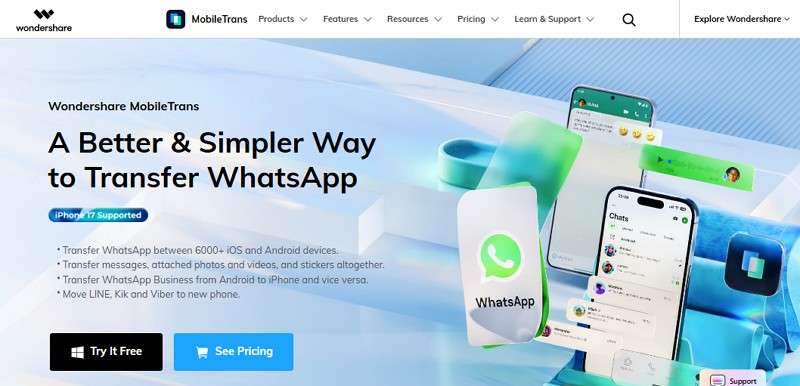
Users can selectively share data in bulk, do not need unnecessary permissions, and transfer WhatsApp data within 5 minutes. With support for 6000+ iOS and Android devices, users can move WhatsApp Business, LINE, Kik, and Viber to a new phone. It can also merge old and new data and let you restore WhatsApp or WhatsApp Business backups from Google Drive or iCloud. Overall, it supports all WhatsApp versions and recovers deleted View-Once media.
Supported Transfer Directions – MobileTrans vs Samsung Smart Switch
For those who want to know, is MobileTrans better than Samsung Smart Switch? The transfer direction is the crucial factor in answering this. So, review the mentioned table and learn which WhatsApp transfer tool meets your needs:
| Transfer Direction | MobileTrans | Samsung Smart Switch |
| Android → Android (Samsung) | Supported | WhatsApp chats are not supported on Android devices through Smart Switch. |
| iOS → iOS | Supported | Not supported (Samsung only) |
| Android → iOS | Supported | Not supported (Samsung only) |
| iOS → Android (Samsung) | Supported | Supported (wired, under specific conditions) |
| iOS → Android (Non-Samsung) | Supported | Not supported |
As for the transfer direction, MobileTrans supports cross-platform WhatsApp transfers without any limits. On the contrary, Samsung Smart Switch is the only suitable option to import WhatsApp data from iOS to Samsung if the conditions are met.
WhatsApp Data Types – MobileTrans vs Samsung Smart Switch
To better understand Smart Switch vs. MobileTrans, let's explore the WhatsApp data types they support.
| WhatsApp Data Type | MobileTrans | Samsung Smart Switch |
| Chat History | Yes | Limited/conditional WhatsApp support |
| Photos | Yes | Yes, as general phone data, not WhatsApp-specific |
| Videos | Yes | Yes, as general phone data, not WhatsApp-specific |
| Voice Notes/Audios | Yes | Yes, only as general media on some transfer paths |
| Stickers | Yes | Not clearly supported for WhatsApp transfer |
| Contacts | Yes | Yes |
| Documents | Yes | Yes |
| Call Logs | Yes | Yes |
| Polls | Yes | No |
| Broadcast Messages | Yes | No |
| Channels Updates | Yes | No |
| WhatsApp Backup Restore | Yes | No |
MobileTrans is a WhatsApp-focused tool that can move almost all types of data. In addition to WhatsApp, it can also share general data types via Phone-to-Phone Transfer. However, Smart Switch transfers general data but clearly lacks WhatsApp chat import support from Android, as one comment says:
Multiple large files failed to transfer correctly via Samsung Smart Switch, resulting in data loss without error reporting. Even small recordings were truncated, and there's no verification for corrupted transfers. This raises doubts about the accuracy of SMS and other data claims. - Takeoded
Media Files and Documents Transfer Comparison
Other than WhatsApp data, know which tool among MobileTrans vs Samsung Smart Switch is a better option for media and documents sharing:
| Data type | MobileTrans | Samsung Smart Switch |
| Photos | Yes, including WhatsApp photos | Yes |
| Videos | Yes, including WhatsApp videos | Yes |
| Audio/Voice Notes | Yes, including WhatsApp audios | Yes, for general media transfer |
| Documents | Yes, including WhatsApp documents | Yes |
| Music Files | Yes | Yes, DRM-free only for some cases |
All in all, Samsung Smart Switch moves media files and documents in a general phone migration. Whereas MobileTrans is WhatsApp-focused and enables one to move data in 2-3 simple steps and under 10 minutes. Even though Smart Switch supports general migration, it's still a headache for some users, as stated:
Samsung Smart Switch caused problems with large video files and did not report errors. It may be safer to try alternative transfer tools. - Oopsiforgotmyoldacc
Real-Life WhatsApp Transfer Test Scenario - MobileTrans vs Samsung Smart Switch
Between Wondershare MobileTrans and Smart Switch, if you are still unsure which tool to use, this section will help you decide. Learn how these tools work efficiently, which is the fastest, and what limitations Smart Switch has.
Step-by-Step WhatsApp Move via Smart Switch (iPhone → Samsung Galaxy Only)
Since you cannot import data from Android, but from iPhone to Samsung Galaxy, here is how the app works:
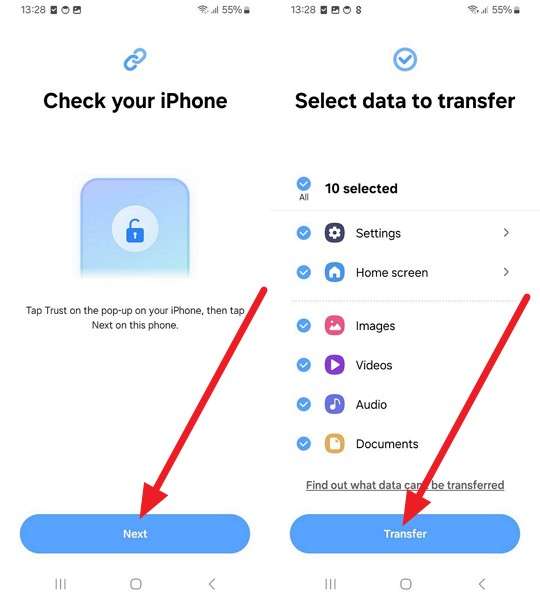
Step 1. Go to Accounts and Backup on Samsung settings. Choose Transfer Data for Device Setup > Receive on This Phone.
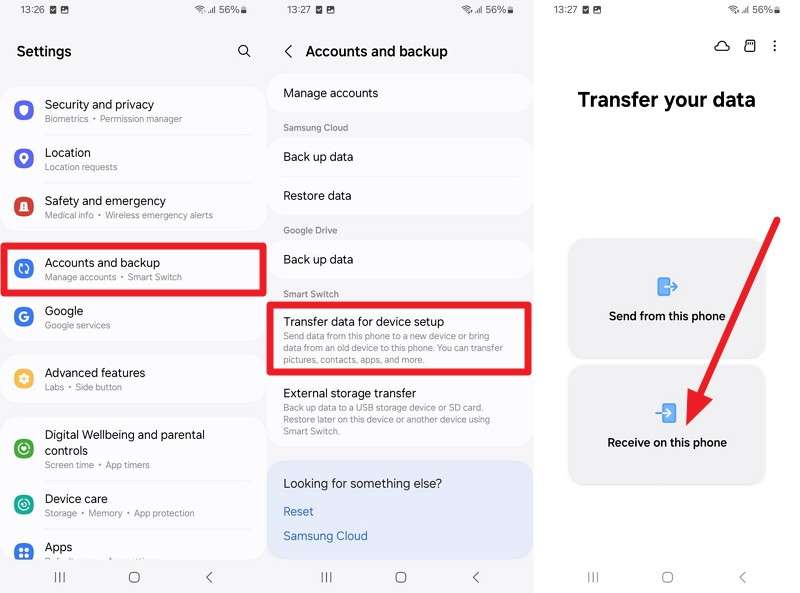
Step 2. Connect the device via a cable, then choose Trust on iPhone. On Samsung, press Next, choose data types, and Transfer.
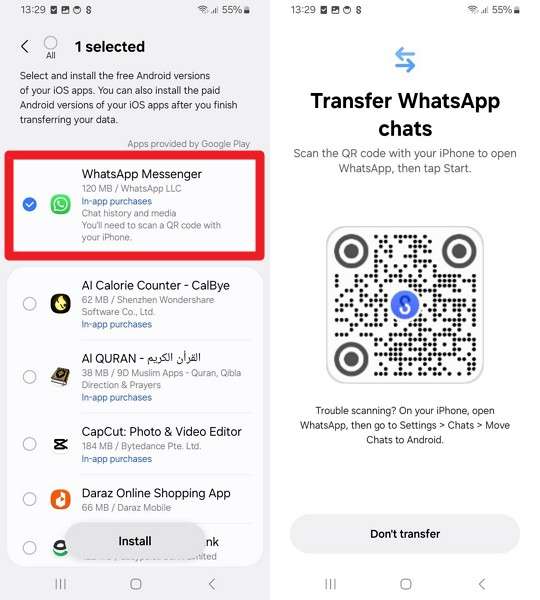
Step 3. Select WhatsApp Messenger and choose Install. Scan the QR code with the camera.
Step 4. Press the Start button when directed to WhatsApp. Open WhatsApp and log in to Samsung using the same number.
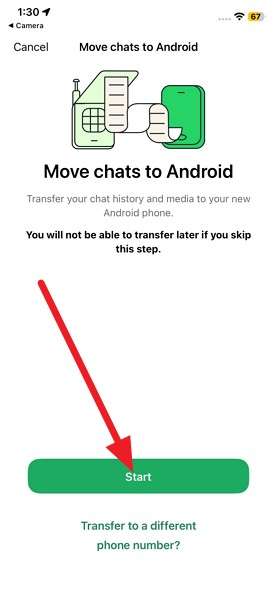
Step 5. Tap on Start to complete the process, and the data will be imported.
Simplified Guide to Transfer WhatsApp with MobileTrans
To know what makes MobileTrans the best alternative to Samsung Smart Switch, review the mentioned steps:
Step 1. Choose WhatsApp in the App Transfer tab. Choose between the Transfer or Transfer & Merge options.

Step 2. Determine the source and target device as you connect. Choose the data types and press Start; wait for it to finish.
Ease of Use and Speed Comparison
Based on the transfer process, if you question “Is MobileTrans better than Samsung Smart Switch?" the answer is yes. Unlike Smart Switch, MobileTrans requires no lengthy steps; instead, it offers a one-click solution to move data across platforms. Whereas Samsung Smart Switch is best suited for moving general data types, but poses strict limits for WhatsApp migration.
Limitations of Samsung Smart Switch
To further highlight why Smart Switch is not the right choice to transfer WhatsApp, here are some of its limitations:
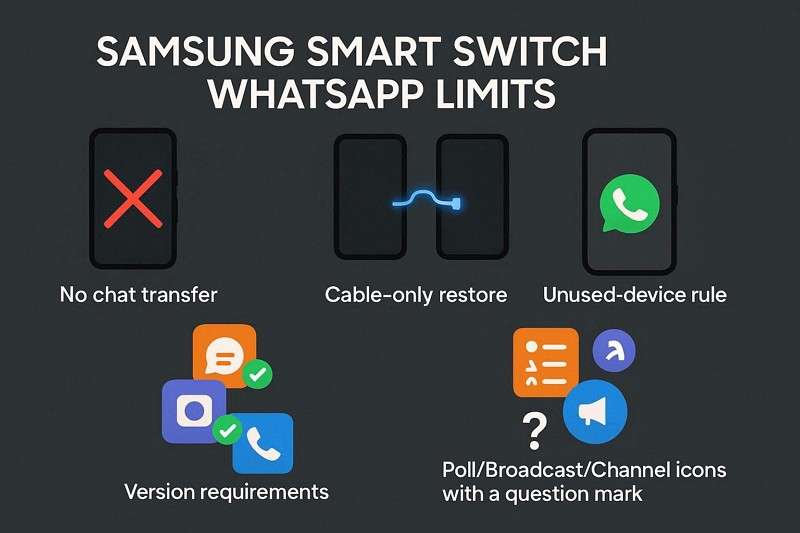
- Smart Switch does not support Android WhatsApp chat transfer on devices.
- WhatsApp restoration works only through cable, not wireless Smart Switch transfer.
- Smart Switch and WhatsApp must be running supported versions for the transfer to work.
- The new Galaxy must not have used WhatsApp before Smart Switch restore.
- Support for polls, broadcasts, and channels in WhatsApp transfer remains unclear.
Why MobileTrans Stands Out as the Most Complete WhatsApp Transfer Tool
Now, you know MobileTrans is the best alternative to Samsung Smart Switch. To justify it further, review the given points for better clarity:
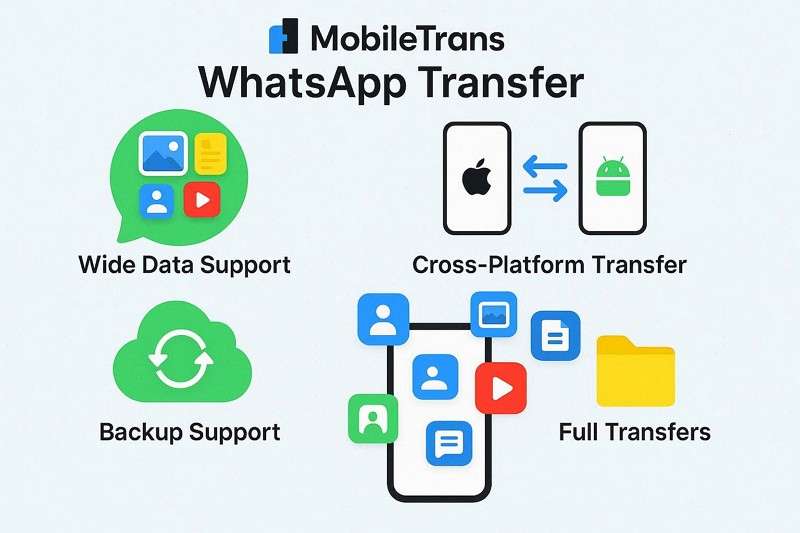
- Wider WhatsApp Data Support: MobileTrans transfers chats, media, voice notes, documents, contacts, locations, and call history. Users can also leverage the facility to move call logs, polls, broadcast messages, and channel updates.
- Works Across Platforms: This tool supports WhatsApp transfer between Android and iPhone in both directions. Users can also use the MobileTrans app for WhatsApp transfer at an average speed of up to 30 MB/s.
- Backup and Restore Support: MobileTrans can back up and restore WhatsApp and WhatsApp Business data. It also supports cloud restores, which are helpful when switching phones or recovering lost information.
- Complete Transfers Only: This innovative WhatsApp transfer tool can move and merge full WhatsApp data, not just a few messages. This ensures nothing is left behind, avoiding partial transfers or missing content.
- Handles More Than Chats: In addition to WhatsApp, it transfers contacts, photos, videos, SMS messages, apps, documents, and calendar items. This makes it a broader phone-migration tool, not just a chat-transfer app.
To sum up, a successful and safe WhatsApp transfer is necessary in 2026, which has sparked the MobileTrans vs Samsung Smart Switch debate online. Therefore, this guide has compared the two tools, including transfer direction, data types, and ease of use.
Since WhatsApp imports from Android are limited to Smart Switch and the requirements pose hurdles for iOS users, using MobileTrans is recommended. The tool lets various general and WhatsApp data types cross-platform, both via desktop and mobile apps.






FAQs
-
Which tool is easier for beginners?
MobileTrans works in steps so that beginners can complete a WhatsApp transfer without confusion or errors. In contrast, Smart Switch requires additional setup, which may lead new users to encounter mistakes or delays.
-
Can I trust the transfer results?
Yes, MobileTrans shows progress and verifies all data, so users can be confident that nothing is lost. However, Smart Switch may silently skip files, so you might not realize if the transfers fail.
-
Does either tool need technical skills?
MobileTrans does not require specialized skills, so that anyone can perform the transfer without extra guidance or knowledge. On the other hand, Smart Switch sometimes requires device adjustments so that beginners may need help or instructions.
-
Is it safe to use on large accounts?
Yes, MobileTrans handles large accounts well, so WhatsApp messages and media are transferred safely without any content being lost. Meanwhile, Smart Switch can fail when handling large amounts of data, leading to incomplete or corrupted transfers.










