
 TL;DR:
iOS users can overcome the lack of native WhatsApp status saving by utilizing third-party App Store applications to download media locally, or by using WeLastseen to track and retain statuses beyond the standard 24-hour expiration limit.
● Free applications like Status Download for WhatsApp + and Status Saver for WA Save Story enable simultaneous multi-account management and feature built-in video splitters for customized social media reposting.
● The WeLastseen web tracker captures photos, videos, and voice notes from standard and Business accounts without app installation, but it can only monitor media uploaded after the target contact details are actively added to the system.
● Operating these saving tools requires no iOS device jailbreaking and functions strictly privately, ensuring the original uploader receives no notification when their status content is viewed or downloaded.
Ask AI for a summary
 ChatGPT
 Perplexity
 Gemini
 Claude
 Grok
Grok
WhatsApp is a go-to messaging app widely used to communicate and share multimedia and documents. One of its standout features is the status feature, which allows users to share and upload videos, images, and other media. However, sometimes you wish to save someone else's status on your iPhone mobile device.
Unfortunately, iOS devices do not offer a built-in status-saving feature that leaves you searching for a free WhatsApp status saver for iPhone. Such status-saver apps provide a convenient way to download and store other people's WhatsApp statuses. This article will give you the best status-saving apps and their key features to help you decide which is best for your needs.
In this article

Part 1.Best Free WhatsApp Status Saver for iPhone
This part of the article will provide you with the best WhatsApp status saver for iPhone free of cost. By going through the given apps, you’ll find which one best suits your needs:
1. Status Saver Video Photo Save
As one of the best free status savers for iPhone, it allows you to view and share other’s WhatsApp statuses. Moreover, you can back up and restore anyone’s status on different devices using iCloud. It also provides a detailed timeline history of previous statuses where you can review the old statuses of anyone and any group. Users can also create their status by utilizing over 100 templates, stickers, and backgrounds.

Key Features
- It lets you import WhatsApp contacts from your iPhone to this app.
- You can get a storyline history of all the statuses you viewed or still have to review.
- The calendrical view neatly organizes every contact and their status so you can save and view them whenever you want.
2. Status Saver for WhatsApp 100%
It is a one-click solution to save someone’s messaging app statuses easily, making it a convenient choice. This user-friendly app allows users to view both the personal and business statuses of people, which they can save to watch them later. With this WhatsApp status saver for iPhone free download app, you can store multiple videos and images locally with security control.

Key Features
- You can play videos and images on its built-in video player and gallery, even offline.
- The video splitter feature allows users to split and post videos on various social media platforms.
- The collection tab automatically stores the saved statuses for you to view later.
3. Status Saver for WA Save Story
Another app includes the status saver for WA save story, where you can scan your iPhone device and view other statuses. Apart from automatically saving other people’s video and image statuses, this app provides other advanced features. Users can connect more than two devices to this app, which is highly compatible with iOS devices.

Key Features
- This free status saver for iPhone offers an image status editor where you can customize the status image with different options.
- With the video splitter, divide a long status into various parts and set the desired time duration of the split.
- You can utilize the status maker to create your version of the story with the saved statuses.
4. Status Download for WhatsApp +
With this WhatsApp status download app for iPhone free, you can seamlessly manage and store various people's statuses. Furthermore, this app can handle two WhatsApp accounts simultaneously and lets you save statues with a single tap. Logging into this app is unnecessary, and you can start saving content and sharing it online.

Key Features
- You can use its integrated video player to play downloaded statuses offline without interruption.
- This app lets you send custom messages or notes to other people without saving their numbers.
- It has a reminder feature where users can set important reminders for messages or statuses.
5. Status Saver for WhatsApp WA
If the users are looking for an all-in-one free WhatsApp status saver for iPhone, this app is a great choice. With this app, Follow your chosen WhatsApp contacts and store their deleted or expired statuses in your local gallery effortlessly.

Key Features
- After using a video splitter, users can share their stories on platforms like Instagram, Facebook, and Snapchat.
- It reposts other people's stories and statuses without worrying about security concerns.
- The incognito mode can let you privately go through stories and edit them however you want.
Enjoy More Control with the New Status Tracker!
Being able to save various statues of people is immensely useful, considering the above-mentioned free WhatsApp status saver for iPhone apps. However, due to the 24-hour status limit of WhatsApp, there are times that you can miss certain statuses. In that case, you need a reliable and effective WhatsApp tracker with advanced tracking features for your iPhone.
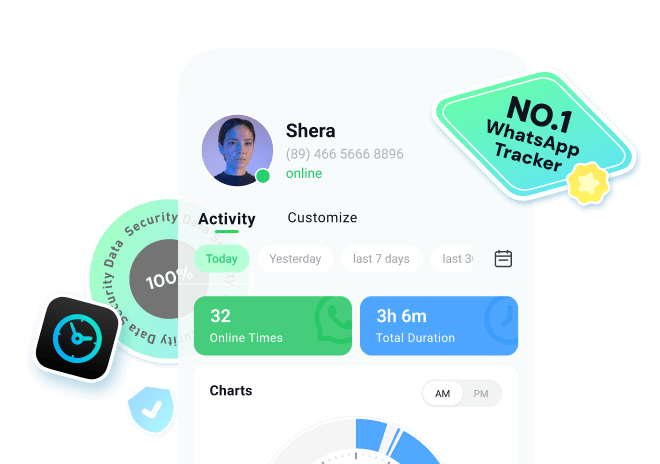
That is why we provide WeLastseen, which can help you discreetly track other’s online activity history. Moreover, you can use various devices, like Android or computers, to log in to this online website and monitor your contracts in real-time. It also keeps your personal information safe and secure and avoids the hassle of installing other apps.







Follow the tutorial to know how to track WhatsApp status:
Step 1. Enter Status Tracker and Add Target Contact
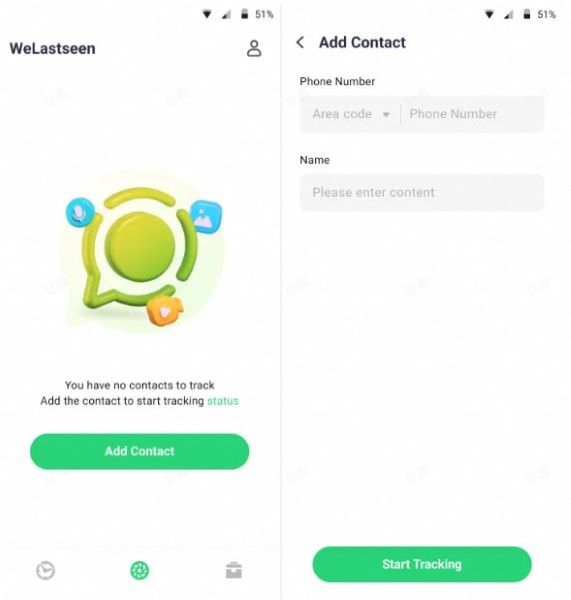
At first, access the "Status Tracker" tab from the bottom and press the "Add Contacts" button to enter further details. Once done, hit the "Start Tracking" button to begin viewing the status for the added contact.
Step 2. Connect Your WhatsApp Account and Monitor Status
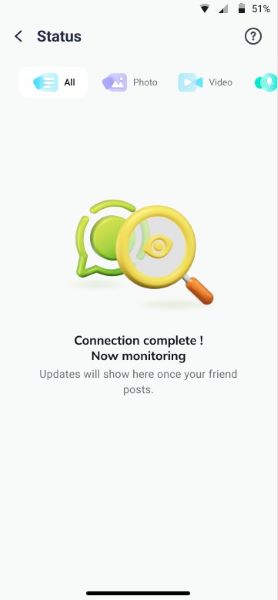
Later, tap the "Link" option to connect your WhatsApp account and access the monitoring dashboard.
Step 3. Review Expired Statuses and Download Them
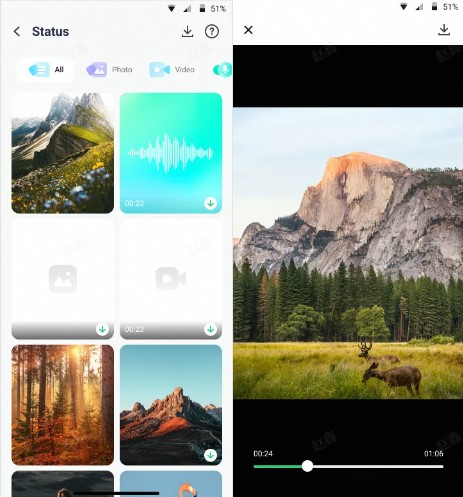
After this, you'll be able to view all the current and expired statuses uploaded by the user after making a connection. Next, press the "Download" icon to select the statuses and export them via the "Save" button.
Conclusion
To conclude, people want to save others' WhatsApp statuses for personal and business purposes. Therefore, we looked at the best five free WhatsApp status savers for iPhones with advanced saving features. Besides that, keeping the 24-hour limit in mind, we provide you with a practical and advanced tracking tool, WaLastseen Online Web, for iPhone.
This online tool lets you track the online and offline activity of your desired contacts without their knowledge. You can easily add various contact numbers and track their activity while maintaining your privacy.
FAQs
-
Q1. Is it safe to use a WhatsApp Status Saver on an iPhone?
Yes, using an effective status-saver app on your phone is safe if it is a trusted app approved by the App Store. We have discussed various free WhatsApp status savers for iPhones, which prioritize user security and ensure no misuse of your information. -
Q2. Should I jailbreak my iPhone to use a status saver?
There is no need for a jailbreak, as many free status-saver apps are designed to work seamlessly on iPhones. Moreover, these apps comply with Apple’s guidelines and offer a secure way to save and share WhatsApp statuses. -
Q3. Will the person know if I save their status?
No, saving someone’s status using a status-saver app doesn’t notify them, but it is recommended that you respect people’s privacy and ask for permission if needed.