

 TL;DR:
Finding hidden WhatsApp conversations depends on the method used to conceal them, with personal chats accessible through native folders, while viewing someone else's locked messages remains technically impossible without their specific device passcode or biometric scan.
● Personal hidden messages are stored in either the unsecured Archived tab located at the top or bottom of the main feed, or within the highly secure Locked Chats folder, which remains completely invisible until you manually swipe down on the chat list and authenticate via PIN, Face ID, or fingerprint.
● Third-party apps claiming to bypass WhatsApp Chat Lock are scams and likely malware; detecting if another user utilizes this feature strictly requires brief, unlocked physical access to their device to swipe down on their chat feed and look for the hidden folder prompt.
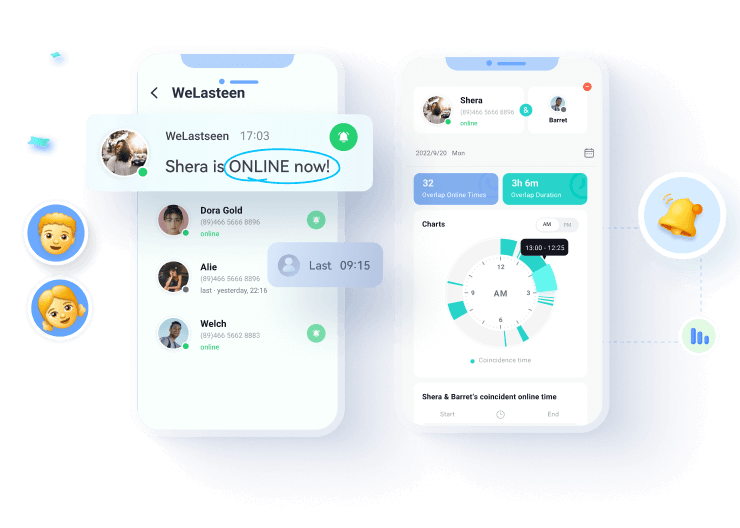
● While reading another user's encrypted messages cannot be done, the WeLastseen tracker tool available on Android and Web can monitor exact online and offline timelines even if a user's Last Seen status is hidden, and analyze the chat probability between two specific contacts.
Ask AI for a summary
 ChatGPT
 Perplexity
 Gemini
 Claude
 Grok
Grok
It’s common to hide sensitive and personal chats on WhatsApp for privacy and security reasons. However, one of the more common questions people ask is how to find hidden chats on WhatsApp.
You might be looking for hidden chats on WhatsApp for different reasons. For instance, you may suspect that your partner is being unfaithful on WhatsApp and hiding chats from you, or maybe you want to unhide a previously hidden chat on WhatsApp, and you can’t find the chat in your hidden folder.
Regardless of your reason, you’ll be glad that this article reveals all you need to know about how to check hidden chats on WhatsApp and WhatsApp Businesses. Keep reading.
In this article


Part 1: How to Find Your *Own* Hidden Chats (Archive & Lock)
If you've hidden your own chats and can't find them, there are two different "hidden" folders. Here’s how to check both:
| Feature | How to Find It | Security |
|---|---|---|
| Archived Chats | At the top (or bottom) of your main chat list. | None (Not secure) |
| Locked Chats | Swipe down on the main chat list. | High (Needs PIN/Face ID) |
1. How to View Hidden Chats on WhatsApp via Archive
If you archived a chat on WhatsApp to hide it, you can find the hidden chat in your archived chats folder.
- Open WhatsApp on your phone and access the main chat feed.
- On the new versions of WhatsApp, you will see the Archive tab at the top of your screen with the number of unread messages displayed next to it. Tap on Archived.

If you are using an old WhatsApp version, the Archived chats will be at the left side of your main chat feed. So swipe to access your Archived chats.
- If you turned off the Keep Chats Archived toggle in WhatsApp settings, the Archived Chats tab should be at the bottom of your main chat feed.

- The archived folder contains a list of all your archived hidden chats. If you can't find the chat you are looking for here, it means the chat was hidden via WhatsApp chat lock.
2. How to View Hidden Chats on WhatsApp via Chat Lock
- Open WhatsApp on your phone and swipe down from the main chat feed to see the Locked Chats icon at the top of the screen. The icon is usually hidden, so you must swipe to see it.

- Tap on Locked Chats and verify your access via PIN code, Face ID, or Fingerprint depending on the security protocol you used to lock the chat.

- Here, you will see all the chats you have hidden on your account via the Locked Chats feature.
Part 2: How to Know if *Someone Else* Has Hidden Chats on WhatsApp
The Hard Truth: You Cannot Read Their Chats
Due to WhatsApp's end-to-end encryption, it is technically impossible to read someone else's locked chats without their password, PIN, or biometric scan. Any app or tool claiming to "hack" or "bypass" WhatsApp's Chat Lock is a scam and likely malware.
So, How Can You *Know*? (The Only Real Clue)
You cannot see the messages, but you *can* often see if the "Locked Chats" feature is being used. This is the only way to "know if someone has locked chats."
- Open WhatsApp on their phone (this requires brief, unlocked access).
- On the main chat list, swipe down slowly from the top.
- If they use the feature, a folder named "Locked Chats" will appear at the top, above "Archived."
- If you do not see this folder, they are not using the feature (or have just unlocked it).
- Tapping this folder will immediately ask for their code or scan, which you cannot bypass.
Other Behavioral Signs
You can also look for behavioral signs that your partner is hiding messages:
- They quickly angle their phone away from you when WhatsApp is open.
- They never leave their phone unlocked.
- They close WhatsApp when you enter the room.
Bonus: How to Track WhatsApp Online Activity
As we explained in Part 2, it is impossible to read someone else's locked chats. However, if your concern is that your partner is online late at night but not talking to you, you *can* track their online activity.
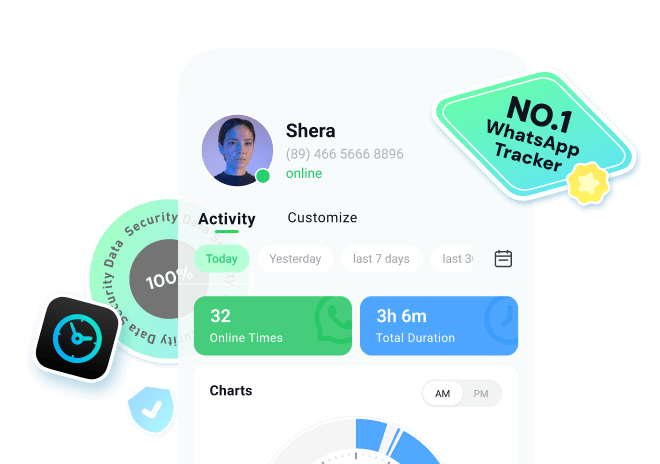
A tool like WeLastseen helps you monitor when a contact is online or offline, even if their "Last Seen" is hidden.







How to Catch a Cheating Partner on WhatsApp via WeLastseen?
Follow the steps below to see if your boyfriend or girlfriend is cheating and hiding chats on WhatsApp:
Step 1: Download the WeLastseen Mobile App
The first step is downloading the WeLastseen WhatsApp tracker app from the Google Play Store. Open the Google Play Store on your Android phone and search for the WeLastseen app. Then tap Install next to the app to download it on your phone.

If you are using an iPhone or can’t download the app from the Google Play Store for any reason, you can access the WeLastseen app online.
Step 2: Add Your Partner’s Contact to WeLastseen
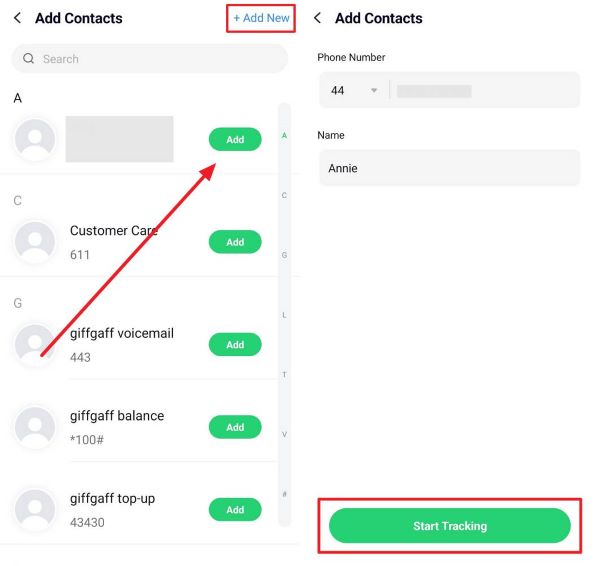
Once the app is downloaded, click Allow for WeLastseen to access your WhatsApp contacts. Then click on Add Contact next to your partner’s name to add him/her to WeLastseen.
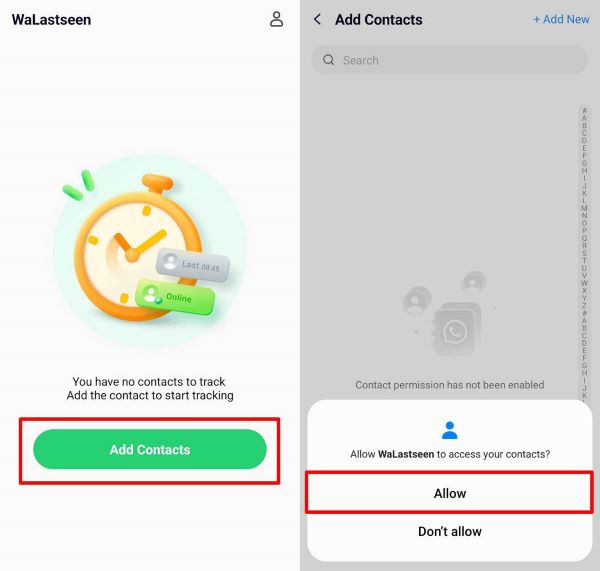
The WeLastseen app allows you to add multiple contacts. For instance, if you want to track your partner and a suspected person, you can add them to WeLastseen.
Step 3: Track Your Partner’s WhatsApp Activity Online
Click on Start Tracking at the bottom of your screen.
Within seconds, the WeLastseen app will display an in-depth analysis of your partner’s WhatsApp online activity, including his or her last seen information on WhatsApp, current online status, and usage timeline for the current day.
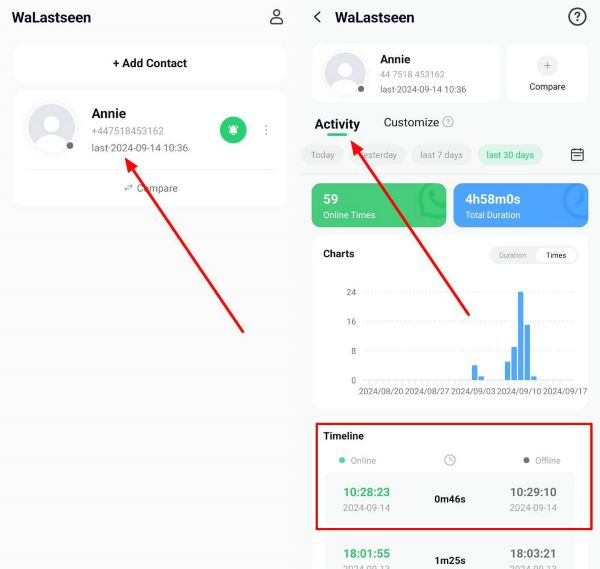
You can tap the Calendar icon on the screen to check your partner’s WhatsApp online activity for any day of the month.
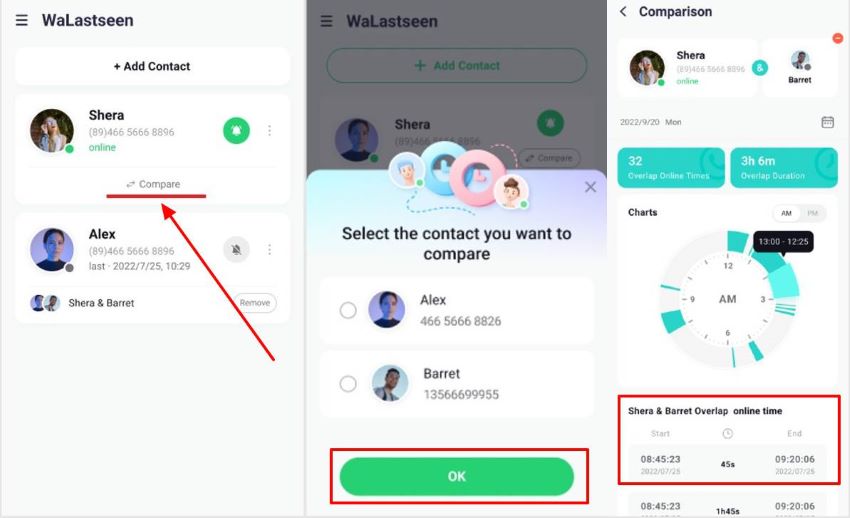
You can also use WeLastseen's chat probability feature to compare your partner's WhatsApp usage timeline and another person's online patterns and determine the likelihood of a chat connection between them.
Step 4: Set Custom Notifications
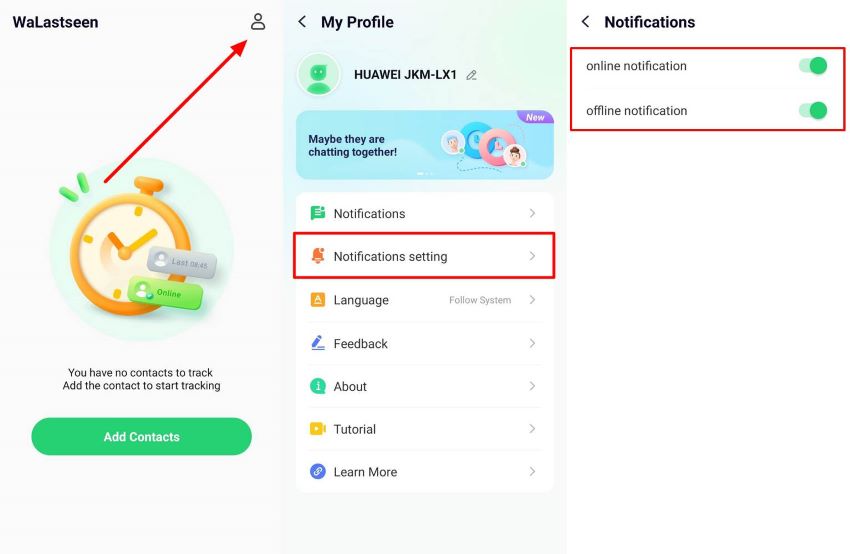
After tracking your partner and getting the information you need, you can also set custom notifications for your target contacts via WeLastseen. Go to Profile > Notification Settings and select if you want to receive notifications when your partner is online and offline.
FAQs
Do you still have questions about how to find hidden WhatsApp chats? Here are answers to common questions you may find helpful:
-
Will someone know if I hide their chats on WhatsApp?
No, WhatsApp doesn’t notify your contacts when you hide their chats and you won’t get a notification too if someone hides your chats on WhatsApp. The only way to know if someone hides your chat on WhatsApp is to check the person’s WhatsApp feed. -
Where can I find my hidden chats on WhatsApp?
If you hide chats via WhatsApp Chat lock, you can find the hidden chats by swiping down the main chat feed on WhatsApp. The chat lock icon is usually displayed at the top of the WhatsApp main chat feed but hidden from prying eyes. So, you have to swipe to access the locked chats. If you hide chats via Archive, you can find the hidden chats under the Archived folder. -
I can’t remember my WhatsApp chat lock code; what do I do?
Without the code, you can’t see your locked chats. If you forget your code, you can search for the contact’s name via the WhatsApp search bar or contact WhatsApp customer support for help. That said, it’s better to use your Face ID or fingerprint to lock your chats on WhatsApp because you don’t have to worry about forgetting a passcode.
Conclusion
So, what’s the bottom line? How you find hidden chats on WhatsApp depends on how the chats were hidden in the first place. You can find hidden chats on WhatsApp via the Archived folder or the Chat lock feature. Follow the steps highlighted above to learn how to do this.
If you suspect signs of infidelity in your relationship, download and use the WeLastseen WhatsApp tracker to track your partner and find the proof you need. The app is easy to use, private, secure, and doesn’t negatively affect other WhatsApp users.