
 TL;DR:
WhatsApp's Private Message Summary feature utilizes Meta AI and private processing technology to securely condense unread messages within individual chats without exposing the contents to Meta or other chat participants.
● To activate the tool, you must manually enable Private Processing in your chat settings and accumulate a sufficient number of unread messages within a single conversation before the Summary option becomes available.
● The capability is currently restricted to English-language users in select regions and must be executed chat by chat rather than summarizing all unread conversations across your account simultaneously.
● As an independent capability for monitoring contact activity, the third-party WeLastseen mobile app provides real-time online status tracking and instant notifications, but it requires users to create a separate account.
Ask AI for a summary
 ChatGPT
 Perplexity
 Gemini
 Claude
 Grok
Grok
WhatsApp recently announced a new AI-powered feature called “Private Message Summary”. The purpose of this feature is to provide a quick summary of your unread messages in a chat, so you can get an idea of what is happening before reading the texts.
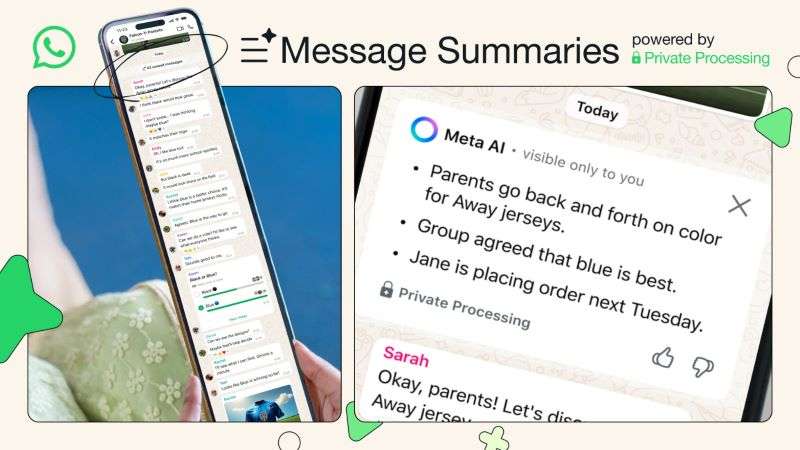
While this feature helps to save time and catch up on unread conversations, many WhatsApp users are still unfamiliar with how to use WhatsApp Private Message Summary.
Common questions include: What is a WhatsApp private message summary? Where to find the message summary on WhatsApp? And how can you get WhatsApp private message summaries?
In this guide, you'll discover:
- All you should know about message summaries on WhatsApp
- The difference between a personal message and a private message
- How to use WhatsApp private message summary
Get ready to discover WhatsApp's new AI feature – let's dive in!
In this article

Part 1: What is AI Private Message Summary on WhatsApp?
It is often difficult to keep track of all your unread WhatsApp messages and conversations due to different reasons, such as a poor network, a low battery, or a busy schedule.
WhatsApp private message summary helps you catch up on your online discussions by getting a quick overview of your unread messages. The feature uses Meta AI to privately and quickly summarize unread messages in a chat, so you don't miss out on meaningful conversations.
One common concern that users have is whether WhatsApp message summaries allow Meta to access private chats online.

WhatsApp private message summary uses private processing technology via Meta AI to generate a response without Meta or WhatsApp ever seeing your messages or the summaries. No one else in the chat can see that you summarized unread messages either, so your privacy is protected.
Next, let's check out how to get a message summary on WhatsApp.
Part 2: Hot! Safe Methods to Get Message Summary on WhatsApp – Android & iOS
Are you missing out on important messages online? Here is a step-by-step guide on how to get private message summaries on WhatsApp:
How to Use Private Message Summary on WhatsApp – Android & iOS
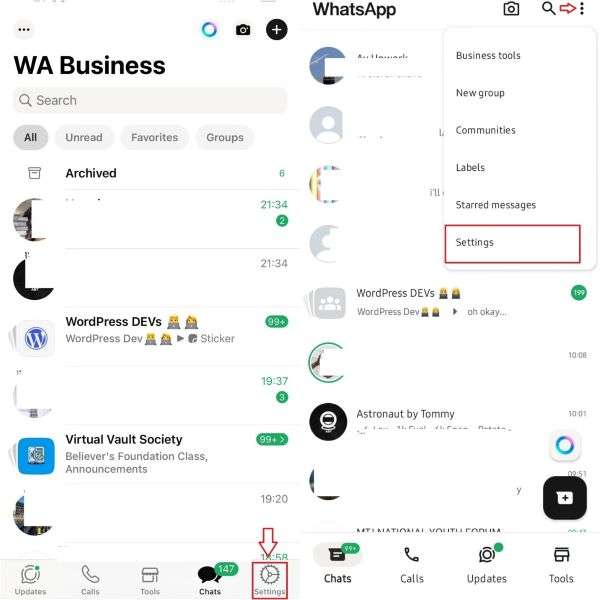
To get a message summary online, you first have to enable the WhatsApp Private Processing feature.
- Open WhatsApp and go to
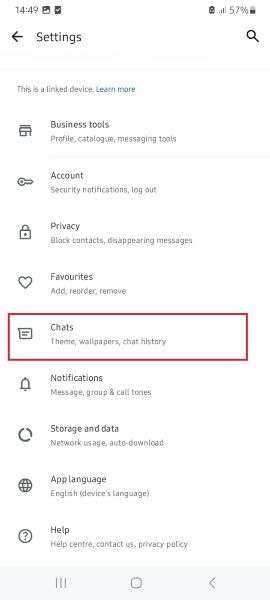
- Tap on Chats > Private Processing and turn on the feature.
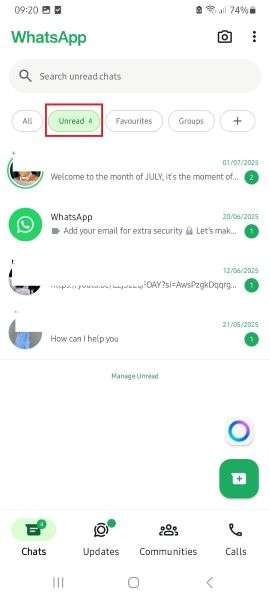
- Once you've enabled private processing, you'll see the option to summarize your messages when you have enough unread messages.
- Tap Unread Messages to see awaiting messages. Then tap on the individual or group chat you want to summarize, and select Summary.

Bonus: How to Track Online Status in Seconds - WeLastseen Mobile App
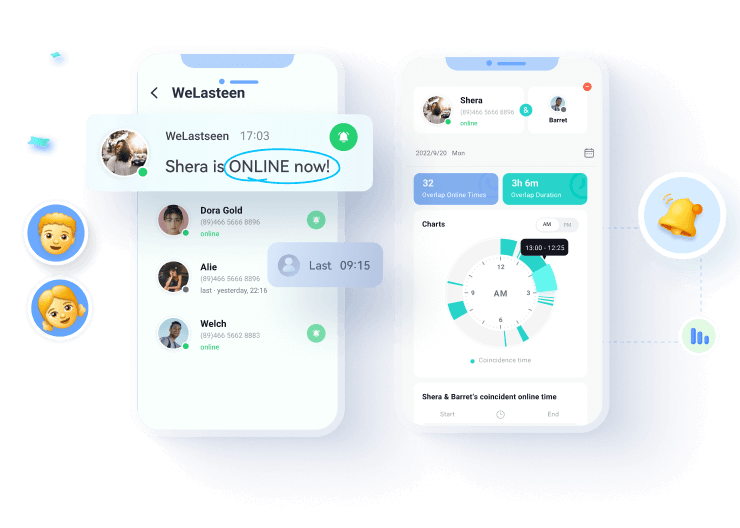
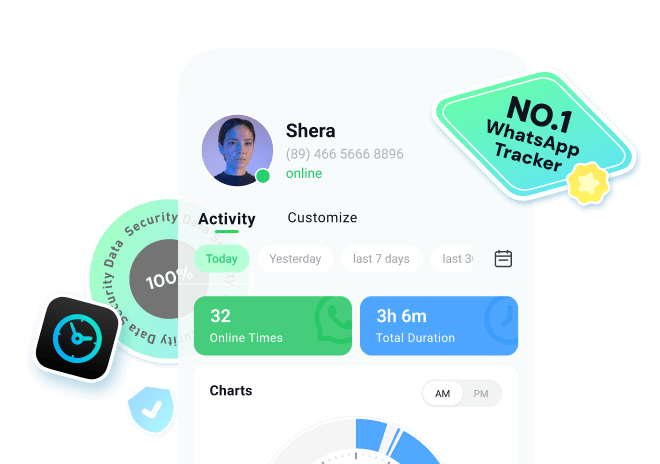
Did you know that you can now track online status on WhatsApp in seconds? The WeLastseen mobile app is a secure tool that is designed for WhatsApp users who want to know when someone is online or wish to track their friend's online status privately.
The WeLastseen Online Status Tracker app improves communication efficiency and convenience by keeping users connected via advanced tracking features. The app is secure, user-friendly, and reliable.





How to Track WhatsApp Online Status via WeLastseen
Step 1: Install the WeLastseen App
Open the Google Play Store on your Android phone and search for the "WeLastseen: Chat App Tracker." Tap on Install to download the app.
Step 2: Choose Who to Track
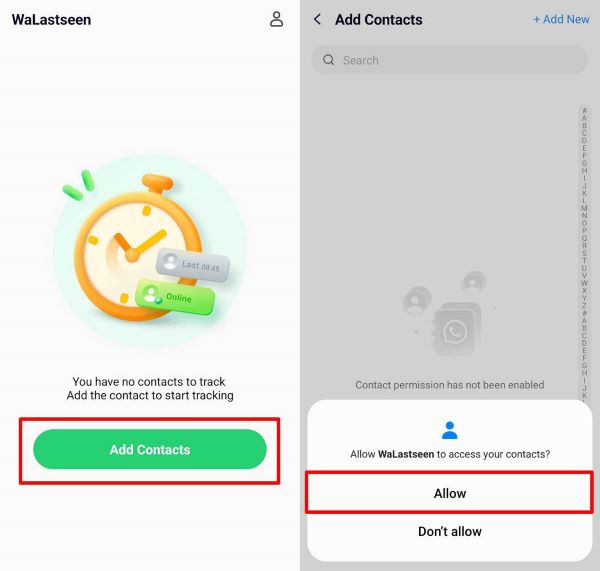
Tap "Add Contacts," then select "Allow." Choose your target contact from your WhatsApp contact list.
Step 3: Start Tracking
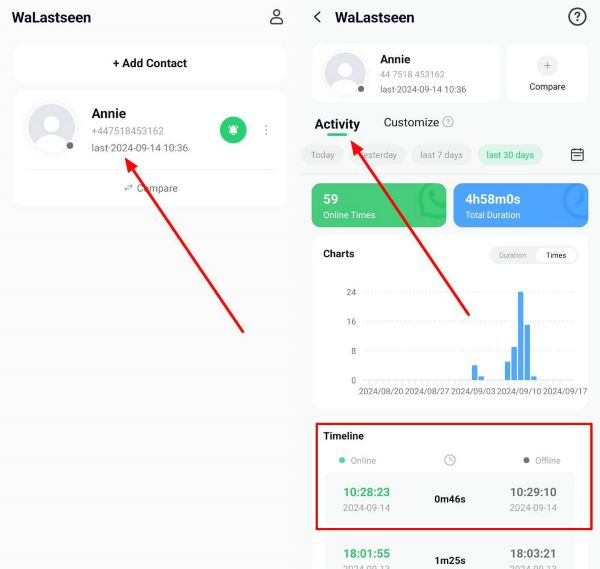
Tap on the Start Tracking button. Then click on the Activity Tab to see the chart data of your target contact.
Step 4: Set Online Status Notifications
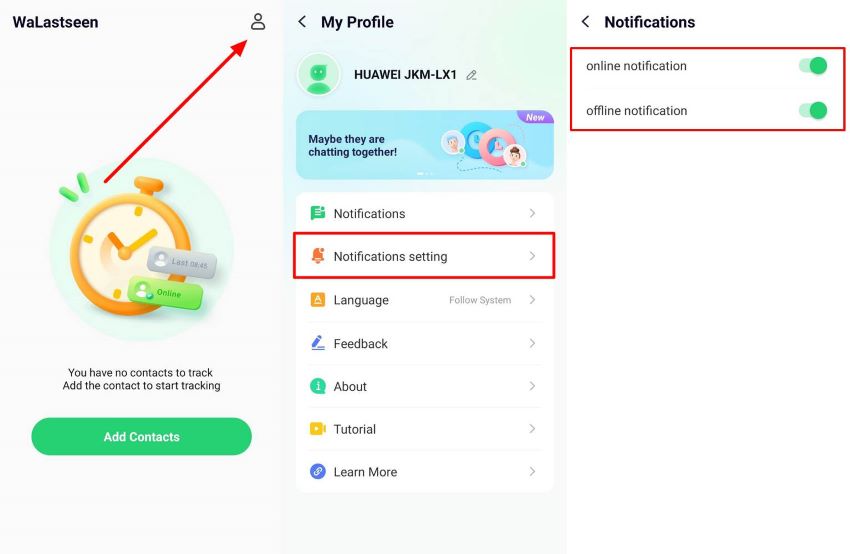
Go to Profile Icon > Notification Settings. Turn on notifications for online status tracking.


Thanks to the intuitive design and convenient user interface of the WeLastseen mobile app, you can now track online status freely on WhatsApp. So, download the app now and start tracking.
Part 4: Benefits of Private Message Summary on WhatsApp
Here are some benefits to enjoy when using private chat summary on WhatsApp:
- AI-Integration: Since message summaries work via Meta AI, users get to enjoy an integrated AI user experience for message summary and analysis.
- Saves Time: By showing a brief recap of recent messages, message summaries save time and help users decide whether or not to respond immediately.
- Improved Communication Efficiency: You can now join the conversation and catch up on missed chats without reading everything.
- Easy Accessibility: For older and visually-impaired users who have to deal with long texts, the message summary provides an easily accessible option.
- Privacy Guaranteed: No one but you can read or access your message summaries.
Final Words – Is Private Message Summary Needed?
In summary, WhatsApp's private message summary is a groundbreaking feature that will change the way we chat online and improve communication efficiency.
Currently, several users are concerned about the need for and privacy of WhatsApp private message summaries. Some people believe the feature isn't necessary, while others worry about the involvement of AI in private messages.
You don't have to worry about any of this because WhatsApp uses heavy encryption and private processing technology to ensure the privacy and security of its users. Finally, remember to track online status via WeLastseen and respect the privacy of other users on the app.
FAQs
-
Can WhatsApp read my private message summaries?
No, WhatsApp can't read your private message summaries because the texts and summaries are protected by private processing technology. Also, no other user can read your private message summaries online thanks to WhatsApp's end-to-end encryption for all messages sent and received on the app. -
Why can't I find the WhatsApp private message summary?
There are different possible reasons for this, such as an outdated WhatsApp version, a poor network connection, or device incompatibility. Also, the WhatsApp message summary feature hasn't been released in all countries yet. So, if you can't find it, you need to wait until WhatsApp launches the feature in your country. Currently, the feature is only available in the English language to a few countries. -
Can you see all your unread WhatsApp messages at once?
With the new AI-powered WhatsApp summary feature, you can now see all your unread messages in a chat at once. Just tap on Message Summary, and you're all set. You should know that you can't see all your unread messages in every chat at the same time. Instead, you have to use the summary feature to view unread messages in each chat one after the other.