


 TL;DR:
To restore lost game progress on Android, retrieve your data through Google Play Games cloud saves, in-game account syncs, native device backups, or third-party data recovery software if no backup exists.
● Cloud and in-game sync recovery methods require you to have previously enabled the automatic sign-in toggle within Google Play Games or linked your profile to a Google or Facebook account prior to the data loss.
● If no local or cloud backups are available, your remaining recovery options are scanning your device storage with data recovery software or contacting the specific game developer's support team using your account ID for a server-side restoration.
● For users switching phones where standard cross-platform syncs fail, the MobileTrans App-to-App transfer tool bypasses backup requirements by directly migrating the game application and its associated in-app data via a USB connection.
Ask AI for a summary
 ChatGPT
 Perplexity
 Gemini
 Claude
 Grok
Grok
Many gamers feel frustrated when they lose saved levels or rewards after reinstalling or switching phones. Progress loss can happen due to deleted apps or faulty updates. In such cases, knowing how to restore game progress on Android becomes very important. With simple steps, you can bring back your hard-earned progress without stress. So, this guide explains different methods that work easily, even if you are not technical.
In this article
Part 1. Common Reasons for Losing Game Progress
Before learning solutions, it is important to know why game progress gets lost. Below, you will explore a few common reasons that explain what usually causes this frustrating issue:
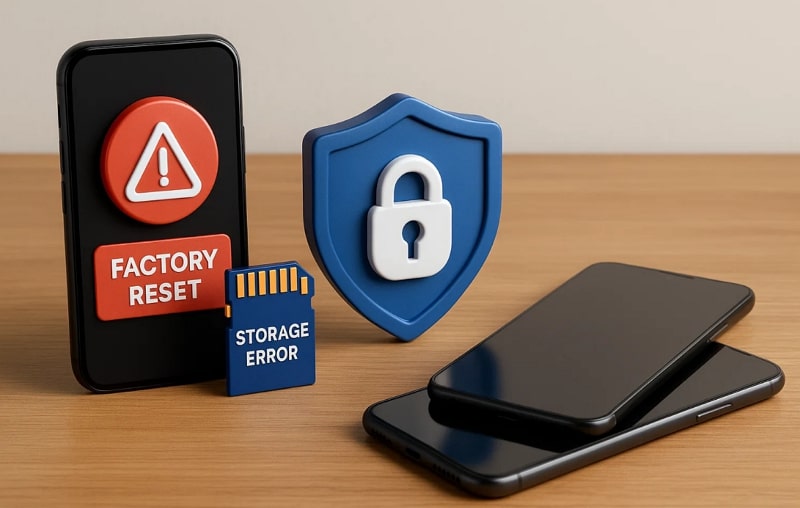
- Phone Reset: A factory reset deletes all files, like your game progress and other data. Without a backup, restoring those lost files can become very difficult for most users.
- Storage Error: Corrupted storage or bad memory cards can erase files, leaving games without saved progress. This problem often happens when files fail to save correctly on your device.
- Account Issues: Using the wrong account means your saved game progress may not appear correctly. Many games store progress with accounts, so mismatched details often cause serious loss.
- Uninstall Game: Deleting a game without syncing data will remove your stored progress completely. Once reinstalled, your game restarts fresh, and previous achievements cannot be retrieved easily.
- Device Change: Switching phones without proper transfer methods may cause loss of your game progress. To avoid this, learn how to recover game progress on Android using the correct tools.
Part 2. How to Restore Game Progress on Android - 5 Ways
After exploring some reasons, multiple ways also exist to bring back your game progress. So, this section covers the top 5 solutions to help you understand how to restore game progress on Android safely:
Method 1. Google Play Games Cloud Save
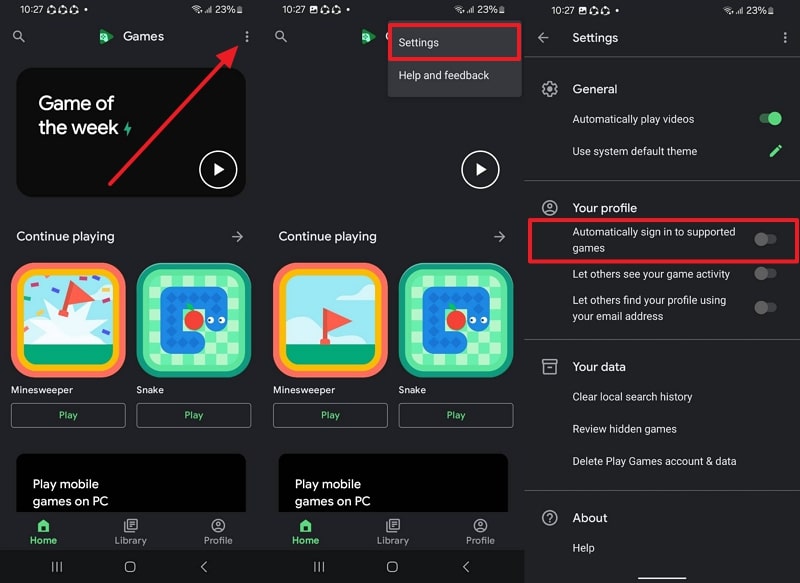
Google Play Games Cloud Save is the first and easiest way to restore progress. It stores your achievements, levels, and rewards across different devices without extra effort. This feature ensures you never lose data when reinstalling or changing your phone. The service also keeps your gameplay synchronized, providing a consistent gaming experience anywhere. So, follow the steps below to find out how to recover game progress on Android:
Instructions. Access the Google Play Games app and tap Three Dots > Settings > Toggle Automatically Sign In to Supported Games.
Method 2. In-Game Account Sync
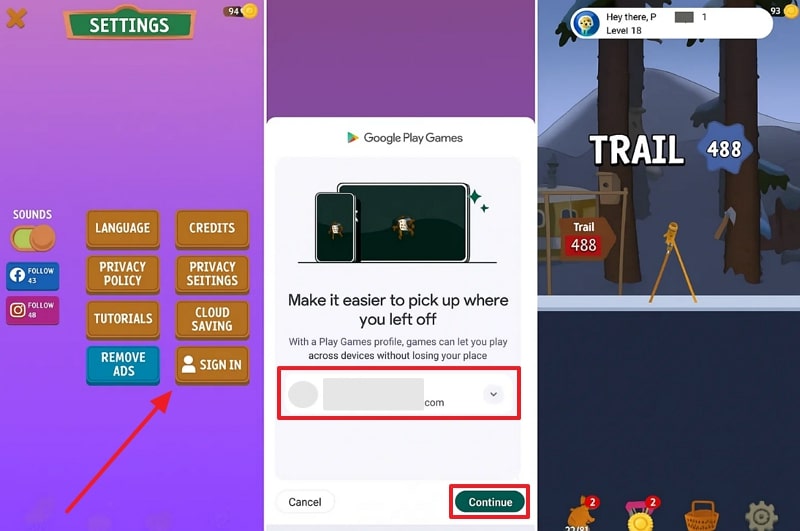
This solution helps players secure progress directly by linking the game with personal accounts. It supports platforms like Facebook or Google to ensure smooth cross-device access. Once connected, your progress automatically updates whenever you log in again. It also prevents losing achievements or levels when reinstalling games or switching devices. Anyway, go through the given guide to understand how to restore game progress on Android:
Instructions. As you access the game settings, tap Sign In to choose your previously used Google Account and press Continue.
Method 3. Device or Cloud Backup
Device or cloud backup allows players to restore saved progress if a backup exists beforehand. This method uses native phone backup or services like Samsung Cloud for storing important data. Once restored, your games return with levels, achievements, and rewards safely intact. It ensures smooth recovery whenever unexpected data loss happens. Review the following instructions to learn how to recover game progress on Android:
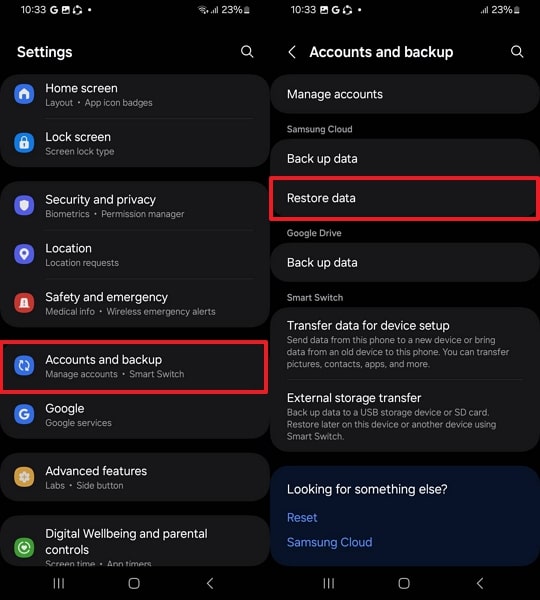
Step 1. Navigate to the Accounts and Backup section and tap the Restore Data option.
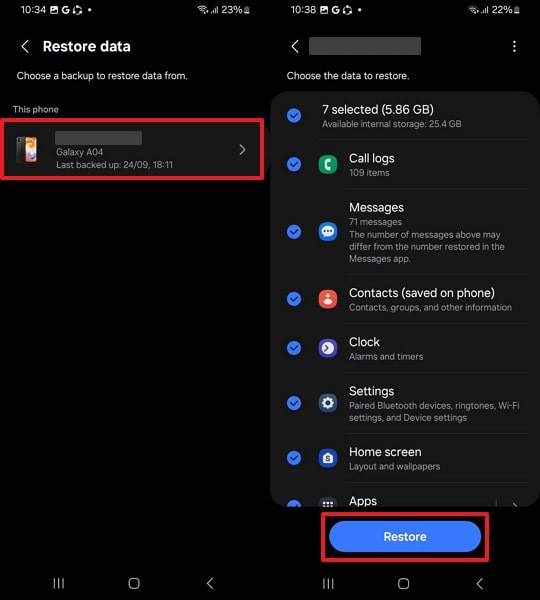
Step 2. Select your Backed Up file, including Game's App Data, and press the Restore button.
Method 4. Use a Data Recovery Software
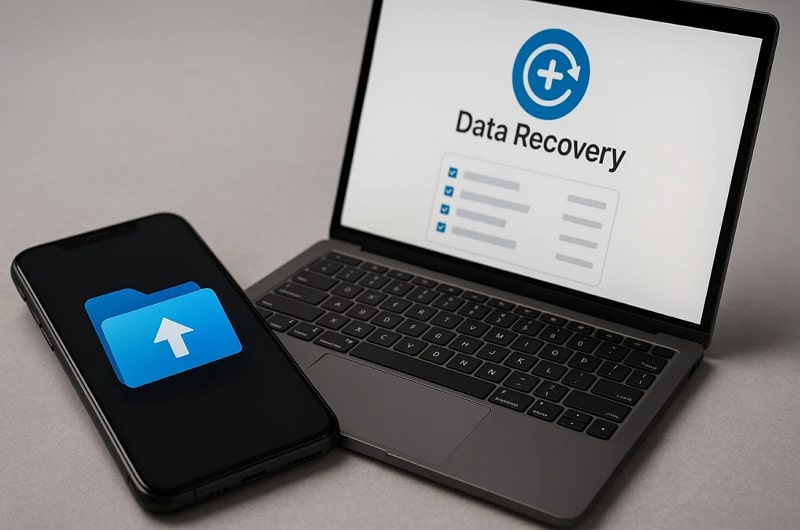
Apart from the above, you can use data recovery software to bring back lost progress. These tools scan storage deeply to locate deleted or hidden files safely and quickly. Many recovery apps support different game formats, making them useful for various titles.
Besides, you can preview files before restoring, which ensures you recover only what's needed. This method works well when no backup is available, offering another chance to regain lost progress.
Method 5. Game Developer Support
When the above methods can't help, you can contact Game Developer Support for assistance. Developers store progress details on their servers, making account-based recovery possible for players. By sharing details like account ID or username, support teams can verify identity and restore progress.
This approach is useful when data is inaccessible through normal backup methods. Thus, it ensures complete solutions to learn how to recover game progress on Android.
Part 3. Hassle-Free Game Progress Migration: MobileTrans App-to-App Transfer
After learning how to recover game progress on Android, these methods sometimes fail because backups are incomplete, or game data isn't supported. Some games also don't sync across platforms, leaving progress stuck on your old device. In such cases, using MobileTrans ensures hassle-free migration without worrying about missing progress.
It's App-to-App transfer lets you move apps to your new phone without reinstalling them individually. The tool matches apps and installs available versions from the Google Play Store onto Android. Moreover, MobileTrans supports batch installation, saving time while setting up apps on your new phone.
Key Features
- Wide Support: Supports 6000+ Android and iOS devices to ensure universal compatibility.
- Secure Process: Ensures safe transfers without erasing your phone's existing data.
- Phone Transfer: Transfer photos, videos, contacts, messages, and more data between phones.
- App Transfer: Transfer Apps with in-app data seamlessly.
- iCloud Restore: Helps Android users restore synced iCloud data, including pictures and messages.




After exploring a few features, adhere to the given detailed steps to use this tool for app migration:
Step 1. Once you connect both phones to the computer via USB cable, click the App to App > Game App > Start button.
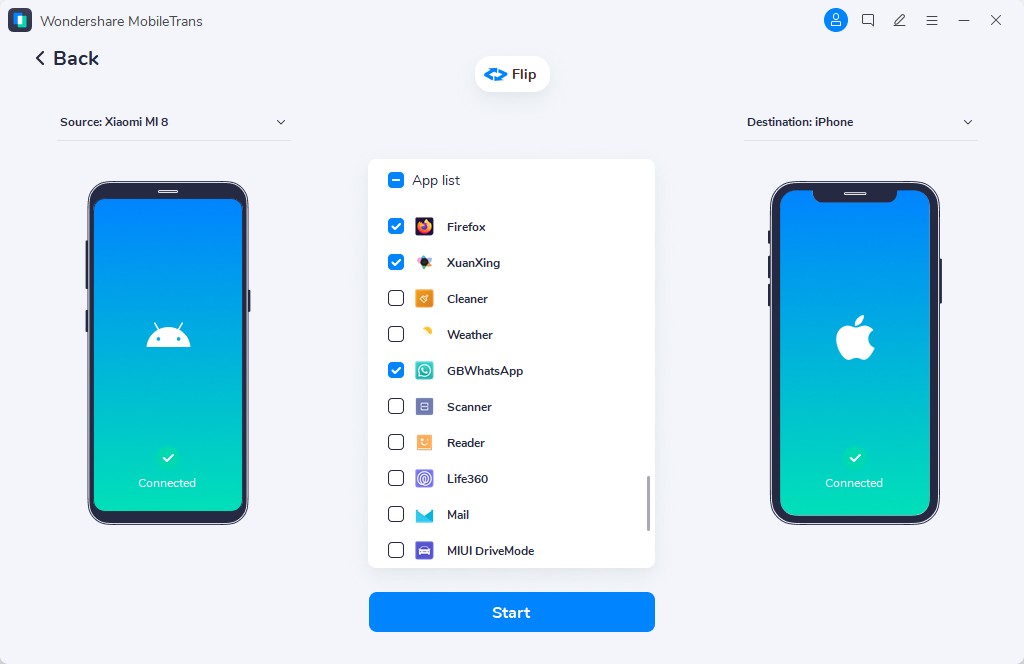
Step 2. As you receive a pop-up on your destination phone, press the Install button.

Step 3. After a while, your game apps and their data will be transferred, and you will see a confirmation screen.

Conclusion
To conclude, losing game progress can feel discouraging, but the right methods make recovery simple. This article has already explored several methods to restore game progress on Android. For players still struggling, developer support also provides another chance to regain progress. Besides, when switching devices, using MobileTrans is the easiest way to move everything.










