



 TL;DR:
Instagram Vanish Mode is a temporary privacy setting for one-on-one direct messages that automatically deletes all sent texts and media the moment you close the chat session.
● Instagram Vanish Mode is best for conducting entirely temporary, screenshot-monitored conversations in one-on-one chats, whereas WhatsApp View Once is better suited for sharing highly sensitive media across both individual and group chats because it completely blocks screen capturing.
● The mode cannot be enabled permanently and must be manually activated per session by swiping up inside an existing chat; if you become stuck in Vanish Mode, you must update the Instagram app, reboot your device, or clear the application cache to resolve the glitch.
● While Vanished Instagram messages cannot be restored or backed up under any circumstances, unopened WhatsApp View Once media remains active for 14 days and can be exported by connecting your account to the MobileTrans tool via a QR code login.
Ask AI for a summary
 ChatGPT
 Perplexity
 Gemini
 Claude
 Grok
Grok
Have you ever sent a message on Instagram and wished it could disappear after being read? That is where Instagram Vanish Mode comes in. Its use in private chats has gained popularity among many users; teenagers often depend on it to conduct their conversations privately. In this guide, you will be presented with the appropriate steps to handle it without any complications, ensuring that your messages are not lost.
In this article

Part 1. What is Instagram Vanish Mode
Vanish Mode on Instagram is a communication feature that allows users to send disappearing messages, images, videos, or GIFs during direct messages. When the receiver receives the message and leaves the chat, the message is automatically cleared, and no history is lost. It is designed to be fast, informal, and a one-on-one chat where the user doesn't want to leave a digital footprint.
Vanish mode works when you swipe up in an already existing chat. Notifications are sent if someone takes a screenshot, adding a layer of privacy. This balance of fun and security makes it especially popular among younger users who want more control over their conversations.
Key Features of Instagram Vanish Mode
Having known what Vanishing Mode Instagram is, it is time to discuss its most important functions that allow making the process of private chatting more regulated:
- Auto-Disappearing Messages: Messages, photos, and videos in Vanish Mode will automatically vanish when the chat is closed. This is to ensure that intimate talks do not leave an indelible mark.
- One-on-One Chat Only: Vanish Mode is only available for one-to-one communication and is not applicable in group chats, making it more manageable. Instagram allows people to share sensitive or temporary information with more confidence, as it restricts it to a one-on-one conversation.
- No Forwarding or Copying: The contents of Vanish Mode cannot be saved, forwarded, or copied, which limits the probability of information leakage. This protection comes in handy for users who value privacy and do not want to be exposed to shared content.
- Screenshot Notifications: When a recipient uses a screenshot of a disappearing message, Instagram will send an immediate notification to the sender. Transparency serves as an inhibitive, preventing it and making both parties more conscious of what they post.
- Activation Visual Cues: When Vanish Mode is activated, the chat screen transforms to display special visual effects, including a darker background and small animations. With these clues, it is evident to both users that they are in a temporary, fading away chat space.
Part 2. Why Do People Use Vanish Mode on Instagram?
When understanding what Instagram Vanish Mode is and how it functions, it's essential to consider the reasons why people use it in the first place. Below, you will get the rationale of using Instagram Vanish Mode, which includes both privacy issues and trying to make a chat light and clutter-free:
- Improved Security on Sensitive Data: When you post personal information, such as passwords, addresses, or other sensitive data, you may not want it to be visible anywhere after reading, or there will be no record of it. Vanish Mode guarantees that such messages disappear automatically only when both users have left the chat, and it is non-threatening.
- Less Chat Clutter: Old messages, pictures, or posts can quickly accumulate and become a mess, making it difficult to scroll through. Vanish Mode allows better organization in your message list and is helpful for casual or temporary conversations.
- Spontaneous, Casual Interactions: Sometimes, you want to send a meme, joke, or reaction, without it staying persistent. Vanish Mode makes such fleeting, momentary conversations more natural and entertaining.
- Avoid Forwarding or Sharing: It is possible to forward, save, or even copy regular messages even when the sender is unaware of the process. Vanish Mode is a good way to avoid sharing something that is not desired to share because when the media has vanished, it cannot be shared or forwarded after being saved.
- Notifications on Screenshots on More Security: When a person takes a screenshot while you are in a chat via Vanish Mode, Instagram notifies both the sender and the recipient. The feature of alerts provides accountability and informs you when your privacy could be compromised.
Instagram Vanish Mode vs Regular Chat
| Feature | Vanish Mode | Regular Chat |
| Message Retention | Messages disappear when chat is closed | Messages stay until manually deleted |
| Privacy Level | High (Disappearing messaging, auto delete) | Standard (messages stored indefinitely) |
| Screenshot Notification | Notifies the sender of screenshots | No notification on screenshots |
| Activation | Swiping up in a chat activates the mode | Always on, no special activation |
| Participants | Only available for two-person chats | Available for direct, group, or broadcast chats |
| Message Accessibility | Contents vanish after viewing and exit | Can view messages anytime, unless deleted |
| Chat Appearance | Dark theme, special notifications | Default Instagram look |
| Saving or forwarding | Messages cannot be saved or forwarded | Messages can be saved, copied, or forwarded |
| Manual Deletion | Erased automatically | Users must manually delete unwanted messages |
Part 3. Can't Turn off Vanish Mode on Instagram | Try Expert Fixes
While many users enjoy the benefits of Vanish Mode on Instagram, some encounter issues when attempting to turn it off. If you find yourself stuck in this situation, here are some expert fixes to help you regain control of your chats:
Fix 1. Update the Instagram App
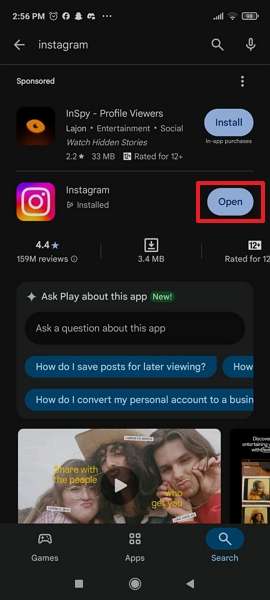
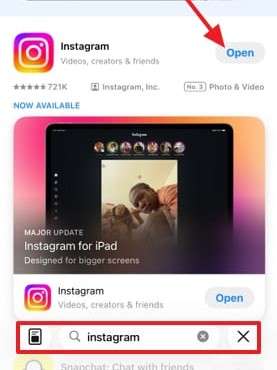
When you cannot turn off Vanish Mode on Instagram, the initial solution is to update the app via the Play Store or App Store. This is effective since old versions tend to create glitches, such that some functions may not work effectively. By updating your app, you'll enjoy improved performance, bug fixes, and enhanced privacy settings. Here, we will discuss how to do it with these guides:
For Android
Instructions. Access the Google Play Store > Search for the Instagram app and tap the "Update" button if it is available.
For iPhone
Instructions. Open App Store > type Instagram in the search bar > Choose the Update button if available to update the app.
Fix 2. Reboot Your Device
Rebooting the phone can also be considered another easy but efficient solution to the issue of vanishing mode on Instagram. Restart removes glitches, refreshes background processes, and ensures the app runs smoothly without any hiccups. The benefit here is that it also resets minor system conflicts, which might be the reason Vanish Mode is stuck. Now that you know why rebooting can help, let’s move into instructions to try this fix:
For Android
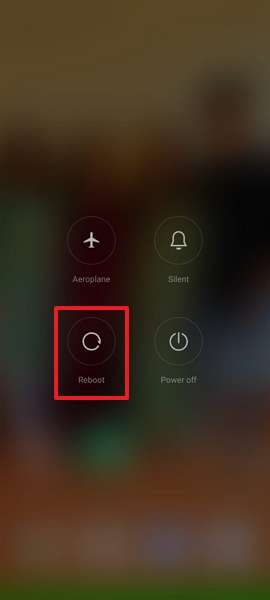
Instructions. Press and hold the Power button, then tap the Reboot option on the screen.
For iPhone
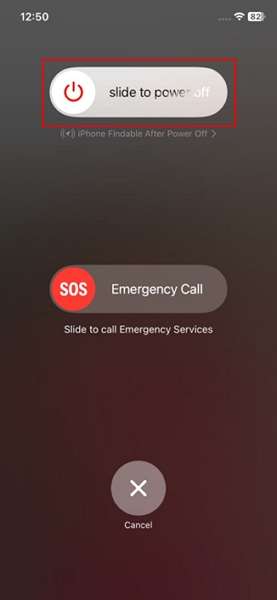
Instructions. Hold your phone’s Power and Volume Up buttons, then swipe the Slide Power Off slider on the screen.
Fix 3. Clear App Cache
Cached information can also become corrupted over time, leading to glitches that disrupt features such as Instagram Vanish Mode. Clearing the cache helps delete unwanted files, release available storage space, and provide the app with a clean start, which can help in most cases. With this advantage, we will take you through the guide to clear up your Instagram cache and get the functionality of the system running again:
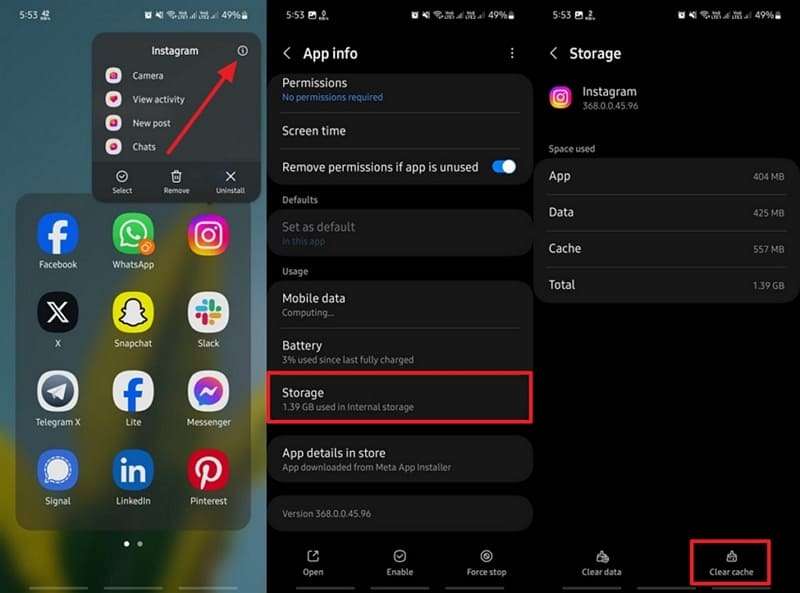
Instructions. Press and hold the app from the home screen > Tap the i icon. Select the Storage option, then tap the Clear Cache option on the next screen.
Part 4. Instagram Vanish Mode vs WhatsApp View Once Feature | Tabular Comparison
At first glance, the two features may appear similar, but they are used differently and operate in distinct ways. A more detailed comparison between the features of Vanish Mode in Instagram and those of View Once in WhatsApp can be made using the following clear side-by-side table:
| Feature | Instagram Vanish Mode | WhatsApp View Once Feature |
| Content Type | Text, images, videos, emojis, voice messages (chat-based) | Photos, videos, voice messages (media-based) |
| Disappearance Trigger | Content vanishes after the chat is closed or exited | Media vanishes immediately after being viewed once |
| Recipient Notification | Sender is notified if the recipient takes a screenshot | Screenshots are impossible since the screen turns black; notification depends on the device and app version |
| Replay/Reuse | Messages can’t be forwarded, copied, or saved | Media can’t be saved, forwarded, or starred |
| Groups/Participants | Only one-on-one chats, both users must activate | For individual and group chats, the sender controls View Once |
| Expiry Policy | Disappears instantly upon chat closure | Unopened media expires after 14 days; opened media is gone instantly |
| Activation Process | Swiping up within a DM/chat activates Vanish Mode | Sender selects “View Once” before sending media |
| Platform Availability | Instagram Direct Messages (mobile app) | WhatsApp (iOS, Android, and web, updated versions) |
| Privacy Goal | Temporary, private conversations and content | One-time viewing for highly sensitive media |
| Backup & restore | Not included in backups or restored after vanishing | Unopened media may be included in the backup until opened |
Pro Tip. How to Restore WhatsApp View Once Media of Your Friends or Family Members
To recover disappearing content on WhatsApp, you can rely on MobileTrans. It works on both Android and iOS, offering smooth media saving without compatibility issues. With a login system similar to WhatsApp Web, safety is ensured.
MobileTrans supports recovery from private and group chats on the latest versions, offering local recovery that gives users complete control. Its beginner-friendly interface makes saving View Once photos, videos, and voice messages simple, ensuring important media is never lost.
Key Features
- Real-Time Sync and Access: It instantly detects new View Once messages, enabling users to preview or download them before they are deleted.
- Smooth Operation: The app runs quietly in the background, with no interruption, providing users with a seamless experience.
- QR Code-Based Login: With a secure login process, users can connect safely without worrying about their devices.




A Detailed Guide on How to Save View One Media via MobileTrans
Now that you know how MobileTrans helps recover disappearing WhatsApp media, it’s time to see how it works in practice. Just like Vanishing Mode, Instagram requires quick action to keep chats secure. MobileTrans offers the following steps to save your View Once media safely:
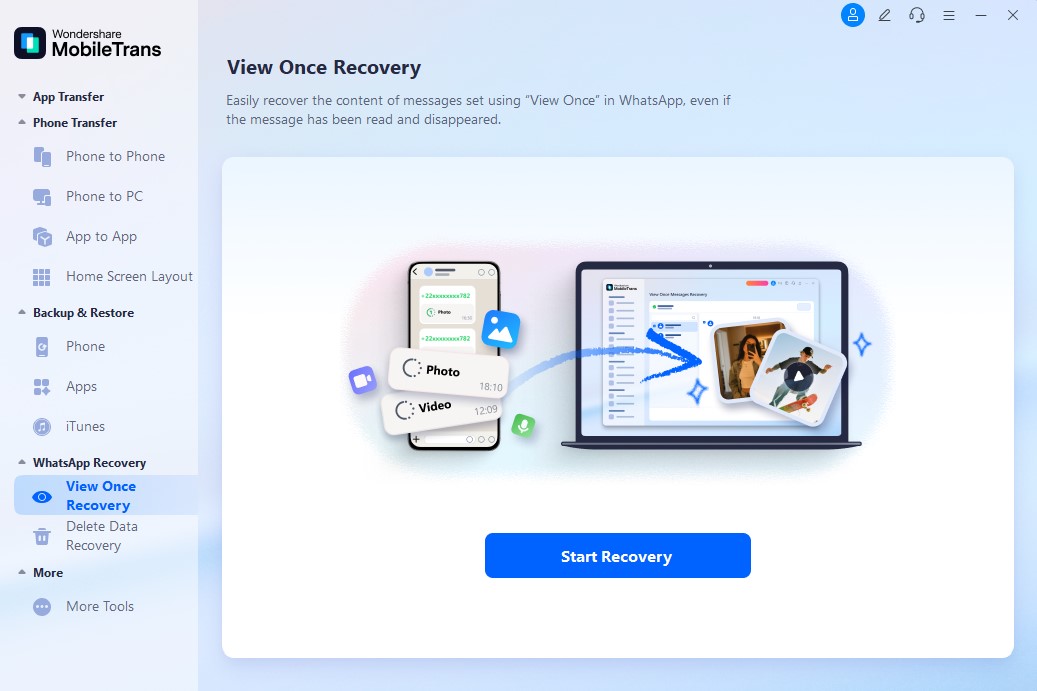
Step 1. Access the tool, then choose the View Once Recovery tab and press the Start Recovery button.
Step 2. Now, link WhatsApp using the QR method.
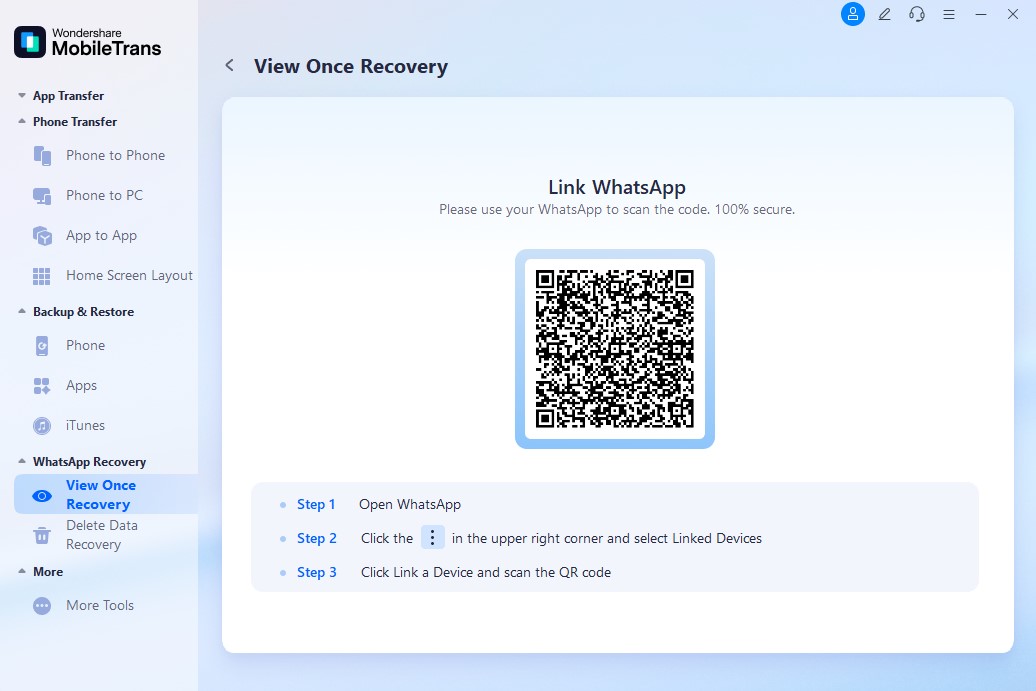
Step 3. Afterward, open the desired chat, select the target media, and press the Export button to save.
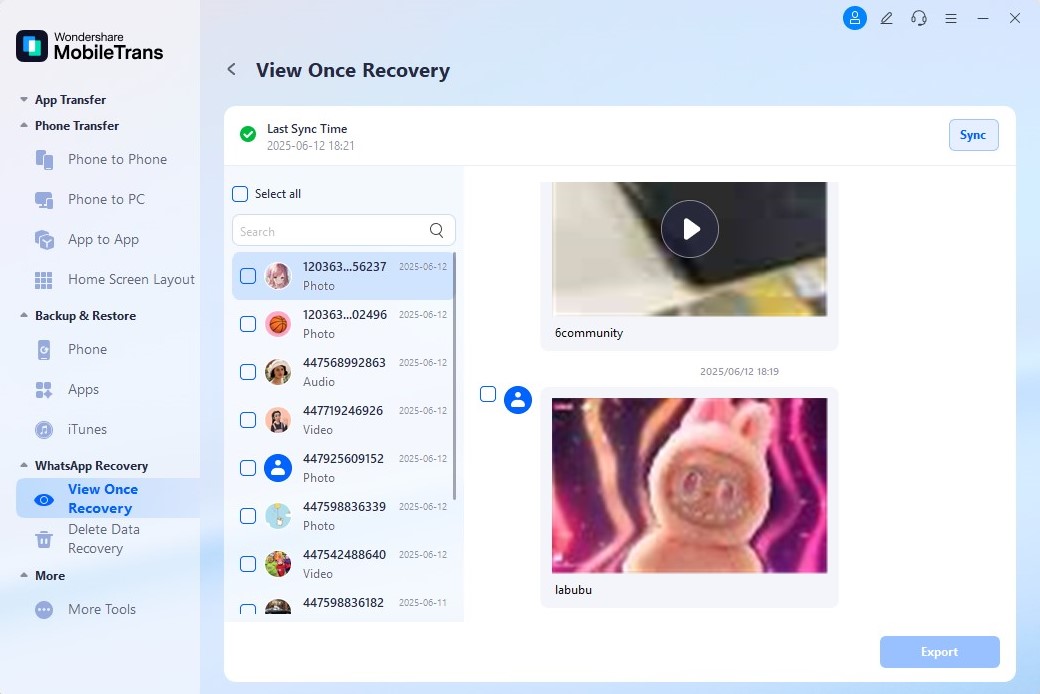
Conclusion
Finally, this guide has introduced you to Instagram Vanish Mode and provided practical fixes if it doesn't work as expected. While Instagram's vanish mode helps maintain privacy, it works a bit differently from WhatsApp's View Once feature, which deletes media immediately after being viewed.
If your priority is to save WhatsApp View Once photos or videos securely, MobileTrans is the ideal solution, providing you with lasting access to important media without compromising your privacy.
FAQs
-
Is Instagram Vanish Mode the same as WhatsApp View Once?
No, Vanish Mode in Instagram is designed for disappearing text messages in chats, while WhatsApp View Once applies to media. Both offer privacy, but their purpose and behavior differ since Vanish Mode clears entire conversations after exiting, whereas WhatsApp only deletes the single media item. -
Can I recover deleted View Once media without third-party tools?
Unfortunately, WhatsApp lacks an inbuilt feature for recovering media after it has vanished from the chat. However, view access can be maintained by using a trustworthy tool, such as MobileTrans, in contrast to Instagram, where messages cannot be retrieved after the session. -
Can I enable Vanish Mode on Instagram and View Once on WhatsApp simultaneously?
Yes, it works on both features simultaneously, as they are independent of each other and operate on their respective platforms without interference. This implies that you can enable the Vanish Mode in Instagram to send messages privately and add sensitive content to WhatsApp to view simultaneously. -
Can I enable Vanish Mode in Instagram permanently?
No, there is no permanent Vanish Mode in Instagram, as the option is created as a temporary feature that works in a session. You will have to switch it on every time you want to use it and get privacy only when you are specifically ready to activate it.










