
 TL;DR:
To track WhatsApp online activity, use the WeLastseen app to securely monitor multiple contacts on Android, or utilize the built-in Screen Time settings on iOS and Android to track and restrict your personal usage without third-party tools.
● WeLastseen provides instant notifications, bypasses hidden last-seen statuses, and calculates chat probabilities between two users, but the application is currently limited to Android devices, requiring iOS and PC users to rely on the web platform.
● Built-in Screen Time settings offer a secure, installation-free method for iOS and Android users to view their daily or weekly WhatsApp averages and set personal time limits, though this method completely lacks the ability to monitor other users' accounts.
● The Rodwa app allows Android users to log their personal online timelines and recover data from old accounts even when the device is turned off, but it comes with identified security risks and restricts tracking to one person at a time.
Ask AI for a summary
 ChatGPT
 Perplexity
 Gemini
 Claude
 Grok
Grok
Knowing your WhatsApp daily timeline is very important because it helps you monitor your routine and manage your daily schedule. Many spend countless hours daily staring at their phone screens and swiping through dozens of chats. However, knowing how much time you, your child, or your spouse spend online on WhatsApp can help you determine what they are doing online and place restrictions if necessary.
So, does WhatsApp show you how much time you spend online? Or is there a WhatsApp online time tracker app that you can use to check your daily online timeline? Also, how many hours should you spend on WhatsApp daily?
This article reveals the answers to all these questions to show you how to track time spent online on WhatsApp for any of your contacts or yourself.
In this article

Part 1: WeLastseen WhatsApp Online Time Checker App – Best Online Time Tracker
WeLastseen will be the best WhatsApp online time tracker app in 2025, thanks to its user-friendly design and advanced time-tracking functions.

The WeLastseen WhatsApp online time checker app is an efficient and reliable WhatsApp tracking tool that gives you detailed insights into the online activity of any of your WhatsApp contacts. The app allows you to check how much time someone spends online daily, see their last seen information, and monitor profile views.
Advanced Features of the WeLastseen WhatsApp Time Checker App
- Instant Notifications: Get instant notifications within seconds of your target contact coming online on WhatsApp.
- Hidden Last Seen Reveal: With the WeLastseen app, you can find the last time someone was online, even if they hide their last seen information from you.
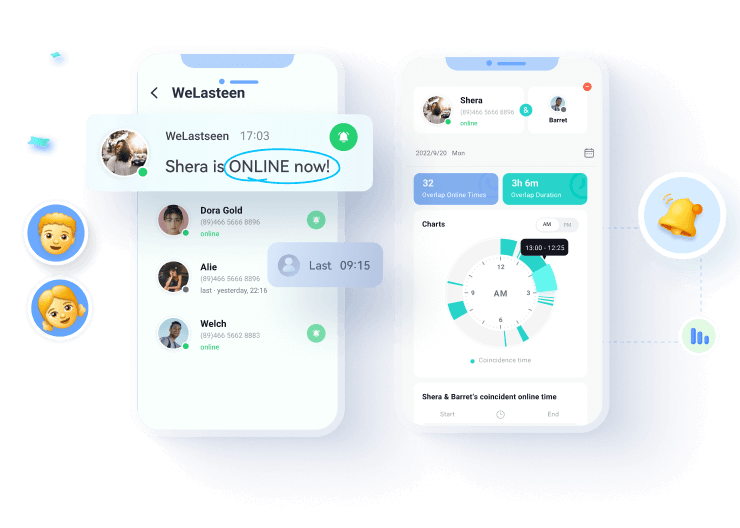
- Multiple Forms of Data Representation: The WeLastseen app displays data in various forms, such as bar charts, clocks, and graphs, so it's easier to interpret information.
- Chat Probability: The WeLastseen app can compare the online timeline of two WhatsApp contacts to determine the likelihood of a connection between them.
- Online Timeline Analysis: The WeLastseen app can analyze the online timeline of any WhatsApp contact to find speaking opportunities, see when the user is most active, and check which days of the week the person comes online.
How to See How Much Time Spent on WhatsApp via the WeLastseen WhatsApp Online Time Tracker App
Follow this guide to track how much time you use on WhatsApp or see how much time any of your WhatsApp contacts spend online daily:
Step 1: Download and Install the WeLastseen App
The first step is downloading the WeLastseen Time Tracker app on your Android phone. Go to the Google Play Store and search "WeLastseen: Chat App Tracker." Then tap on Install to download the app directly on your phone.


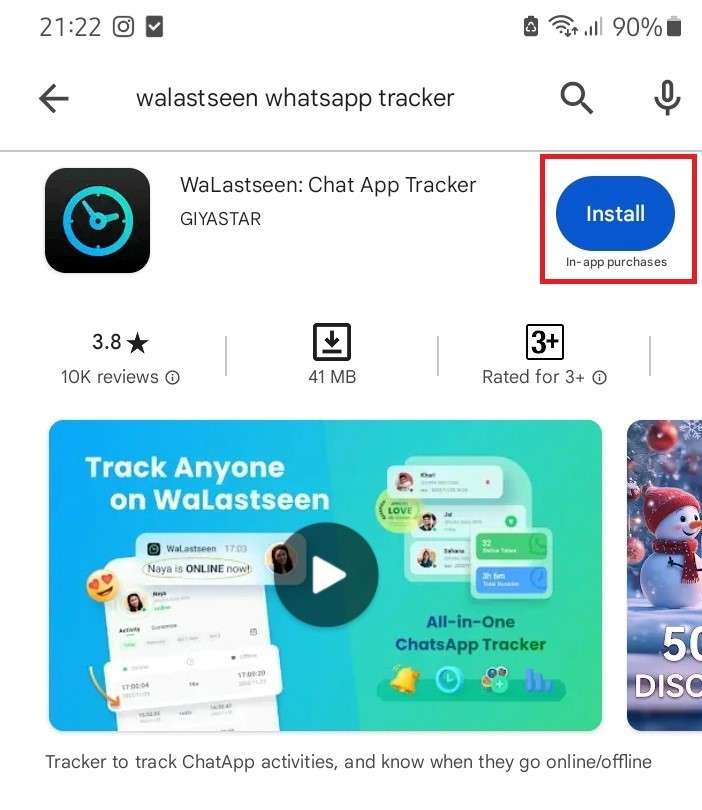
If you are using an iPhone or WhatsApp for a PC, you have to track WhatsApp time via WeLastseen online because the PC and iPhone versions of the WeLastseen app haven’t been released yet.
Step 2: Add Your Target Contact
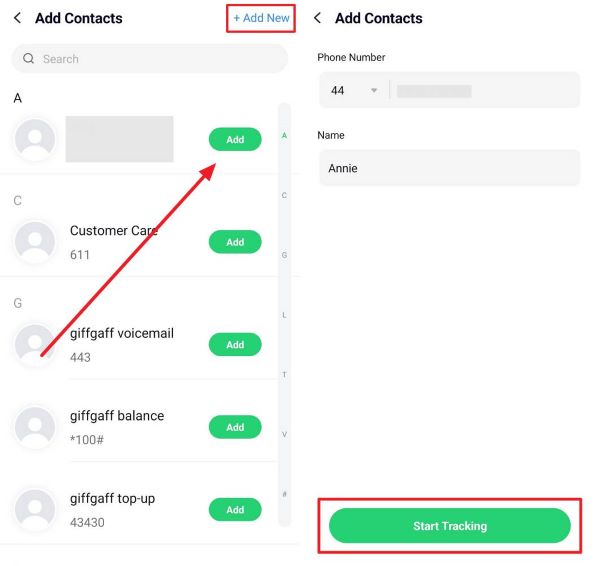
Next, add your target contact to WeLastseen. The target contact is the person you want to track WhatsApp time with. Tap on Add Contact from the WeLastseen main interface and tap on Allow to grant permission to the WeLastseen app to access your WhatsApp contacts.
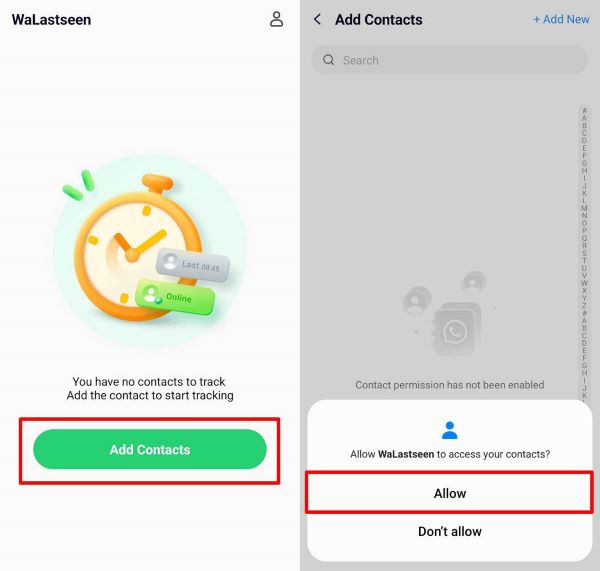
Next, choose the contact you want to add to WeLastseen by tapping the "Add+ icon" next to the person's name. The WeLastseen app allows you to add more than one person. So, if you want to add a new contact, tap "Add New" and choose the following contact to add to your list.
If you want to track your WhatsApp online usage via the WeLastseen app, add your number as a new contact. You can save your number with a different username if you want.
Step 3: Check How Much Time Spent on WhatsApp
Now, it's time to track the WhatsApp timeline. Tap on a contact name and tap the "Start Tracking” icon at the bottom of your screen.
Within seconds, the WeLastseen app will display a detailed page of your target contact's WhatsApp online timeline. You can see the accurate last seen information below the contact's name. Below is a chart that displays your target contact's online activity.
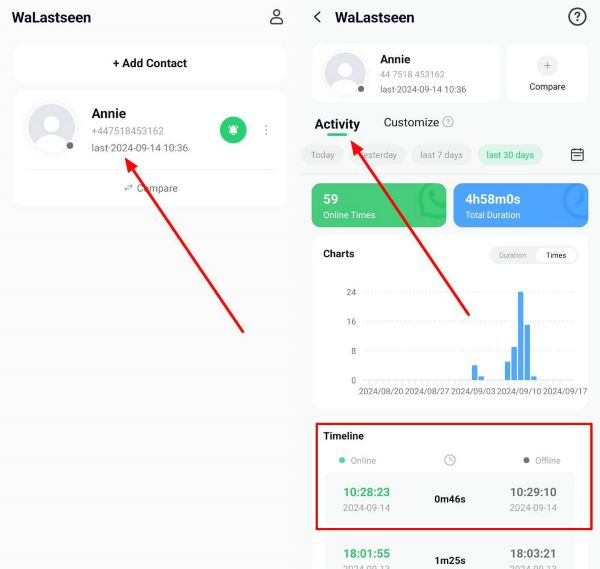
You can see how much time the person spends online each day and check when the person comes online and goes offline.
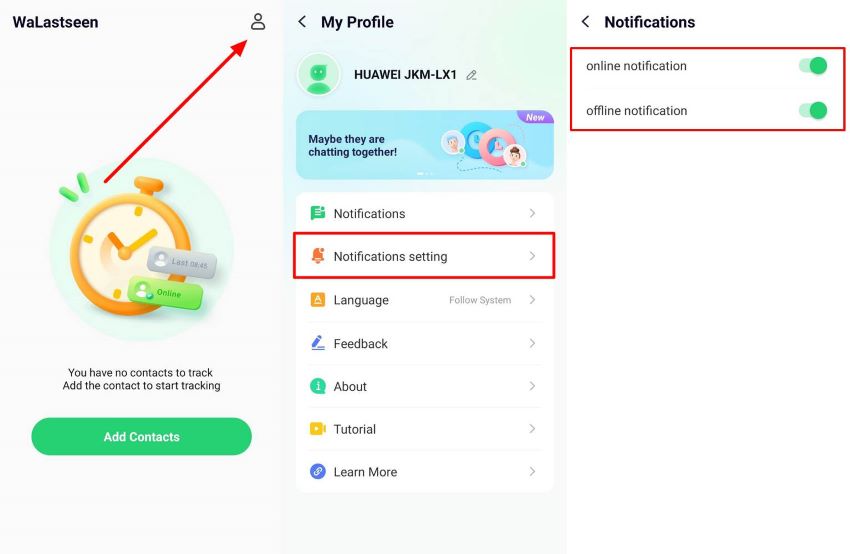
You can customize your notification settings to be notified whenever someone comes online or goes offline. From the main page, tap your Profile icon, go to Settings > Notifications, and choose your preferred notification setting.
Step 4: Set Routines
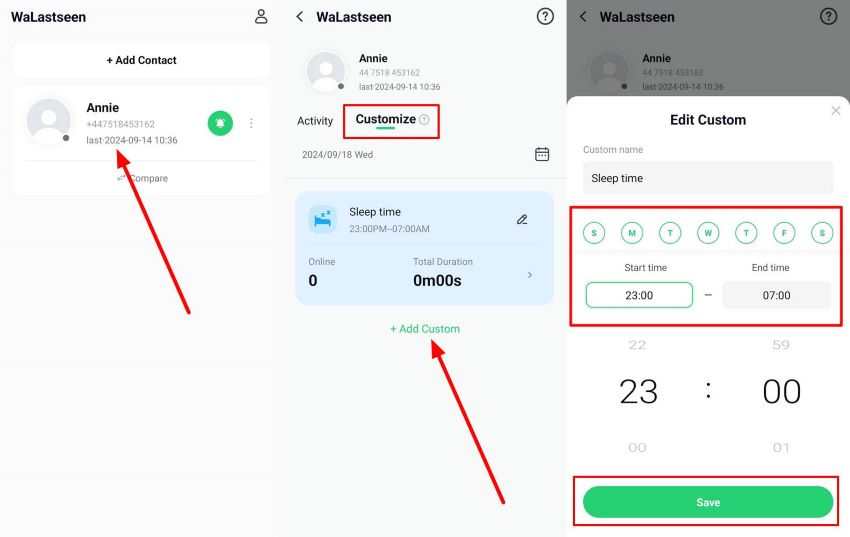
The WeLastseen app allows you to set monitoring routines to manage the number of hours someone spends online on WhatsApp every day. Tap the +Add Custom button and choose the days and times you want to track your WhatsApp timeline.
Part 2: Rodwa WhatsApp Online Time Tracker
The Rodwa WhatsApp online time tracker was designed to show you how long you have been online when using WhatsApp. Thanks to a new Account Recovery update, you can also check your daily average and recover data from old accounts.
How to Use Rodwa WhatsApp Online Time Tracker App
- Search the Rodwa Online Time Tracker app in the Google Play Store. Then tap on Install.
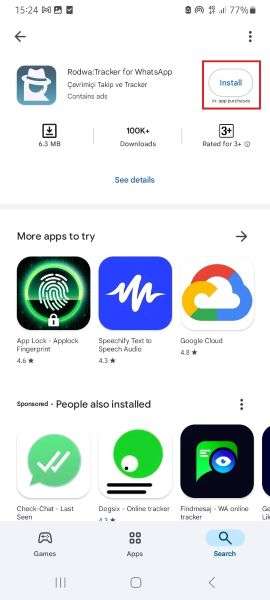
- Create and verify an account with your WhatsApp phone number.
- Open the app and start tracking time immediately after you open WhatsApp. You can see your timeline usage under the Daily Activity tab.
Part 3. Track Time Spent on WhatsApp Manually
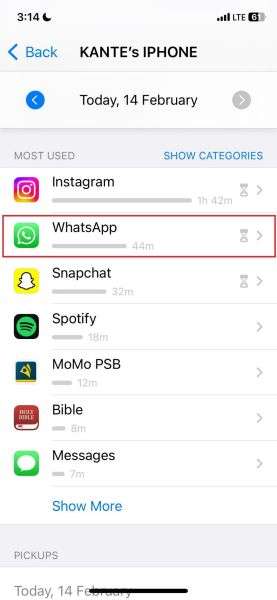
Another way to use a WhatsApp online time tracker app is to manually track WhatsApp time using your phone's Screen Time settings. By default, many mobile devices are designed with a Screen Timer feature that monitors how much time you spend on each app on your phone. You can use this setting to check your WhatsApp daily time average.
1. For iPhone
- Open the Settings app on your iPhone and tap on Screen Time.
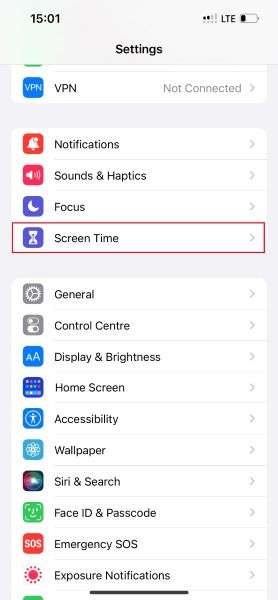
- Under the Daily Average chart, tap on See All Activity.
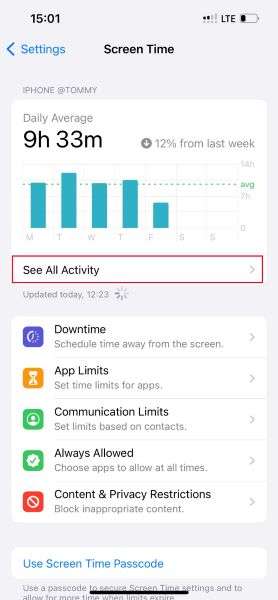
- If you want to check the time spent on WhatsApp for the current day, tap the Day option at the top of your screen. If you're going to check WhatsApp's timeline for the week, tap on Week.
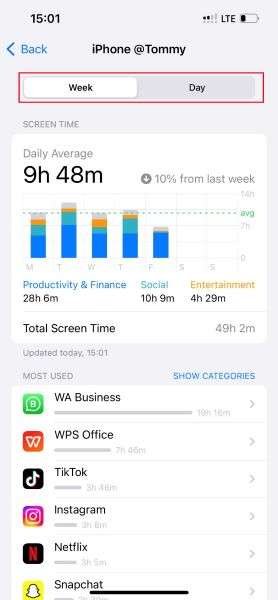
- Scroll down to the Most Used tab and search for WhatsApp. You will see your usage data on the screen, and you can browse according to category and even set usage limits for WhatsApp.
2. For Android
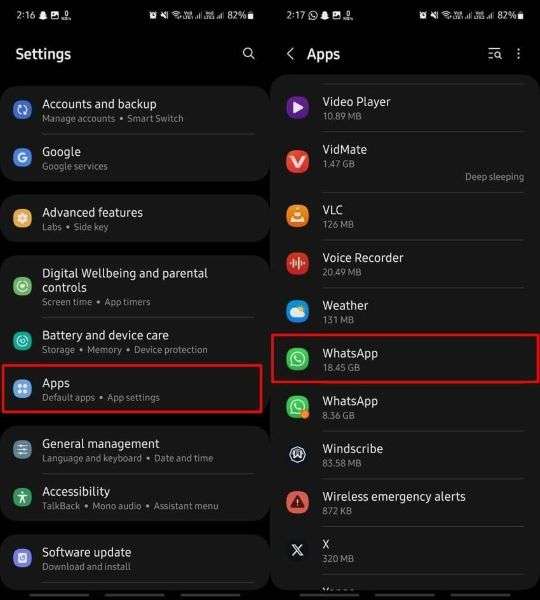
- Open the Settings app on your phone and tap on Apps. Then, choose WhatsApp.
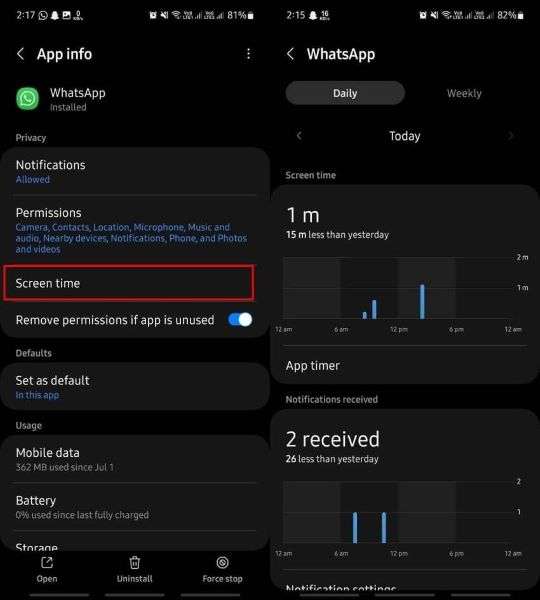
- Tap the Screen Time option on the next page to see your WhatsApp usage data. You can check daily or weekly time usage and even see how many notifications you receive each day.
Which of these apps is the best WhatsApp online time checker free app? Check out this chart that compares the top 3 choices:
| WeLastseen WhatsApp Tracker | Rodwa WhatsApp Time Checker | Screen Time Tracker | |
| Number of Contacts to Track | Track multiple contacts at once | Track one person at once | Track yourself |
| Device Compatibility | Android | Android | iPhone & Android |
| Security | High security | Low security | Average security |
| Accuracy | Displays accurate results within seconds | Medium-level accuracy | Displays accurate results based on screen time usage. |
Conclusion
In summary, whether you are an entrepreneur, parent, or concerned spouse, knowing how much time you or your kids spend on WhatsApp daily can help you manage schedules and monitor your social media usage. You can track time manually via the screen time setting on your phone or use a third-party WhatsApp time tracker app.
Thanks to its user-friendly interface and impressive tracking features, the best app to track time spent online on WhatsApp is the WeLastseen WhatsApp tracker app. With WeLastseen, you can track WhatsApp usage, check timeline overlap, and set routines if necessary.

- Track WhatsApp contacts' last seen status.
- Get instant online and offline notifications of them.
- Analyze their WhatsApp daily usage.
- Compare chat probabilities of two contacts.

FAQ
-
What is the best WhatsApp online time tracker app in 2025?
The WeLastseen WhatsApp online time tracker is the best app for tracking WhatsApp timeline usage. It is efficient, user-friendly, and free to download. You can also choose from multiple data representation options, such as bar charts and line graphs. You can also set custom notifications to inform when someone is online. -
What is the difference between WhatsApp last seen and WhatsApp timeline?
WhatsApp last seen is the time you were last active and online on WhatsApp. If you go offline by 3:30 am, WhatsApp will display your last seen data as 3:30 am, so your contacts can see you are offline. On the other hand, your WhatsApp timeline is how much time you spend on WhatsApp for some time, usually a day or a week.