



 TL;DR:
Access your WhatsApp starred messages by navigating to the Three Dots menu and selecting Starred on Android, or by tapping Settings followed by Starred on an iPhone.
● Native recovery of deleted starred messages strictly requires a pre-existing backup and mandates uninstalling and reinstalling the WhatsApp application to trigger the restoration prompt.
● Retrieving deleted starred items without a backup or app reinstallation requires the third-party MobileTrans PC software via its Deleted Data Recovery feature, supporting firmware up to Android 16 and iOS 26.
● Bookmarked messages remain completely private to the user who saved them without notifying other chat participants, and there is no official limit on the number of texts or media files you can star.
Ask AI for a summary
 ChatGPT
 Perplexity
 Gemini
 Claude
 Grok
Grok
As WhatsApp chats grow daily, important texts often get lost among endless conversations. This is why the starred message option helps users quickly save and revisit key points. Many people still struggle to find starred messages in WhatsApp easily. Whether it's a work detail, address, or family note, starred messages bring convenience. So, this article will explain practical ways to access, recover, and manage them.
In this article

Part 1. What are "Starred Messages" in WhatsApp?
Starred Messages in WhatsApp is a native feature that helps users save important content. It allows bookmarking of specific texts or multimedia for quick reference at any time. These saved messages make it easier to organize details like reminders or essential work updates. They are stored within a separate section called "Starred Messages," accessible from chat settings or the main menu.
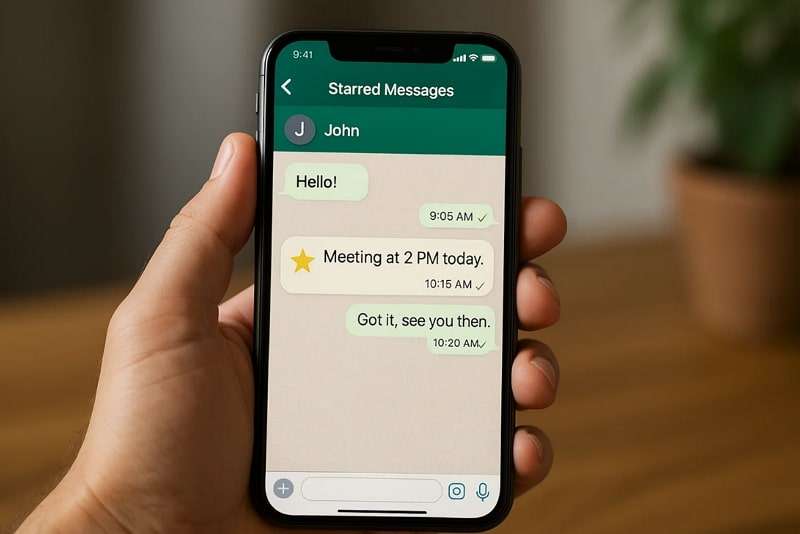
No one else can view starred items except the person who saved them. Besides, understanding their purpose makes it much easier to learn how to find starred messages on WhatsApp. They do not affect the original conversation and remain completely private for personal use. This makes it a convenient tool for managing vital information within conversations.
Part 2. Why Users Need to Find Starred Messages in WhatsApp?
Many times, people make messages starred but later forget where to find them quickly. Below, we will explore a few reasons why knowing how to get starred messages in WhatsApp is very useful:
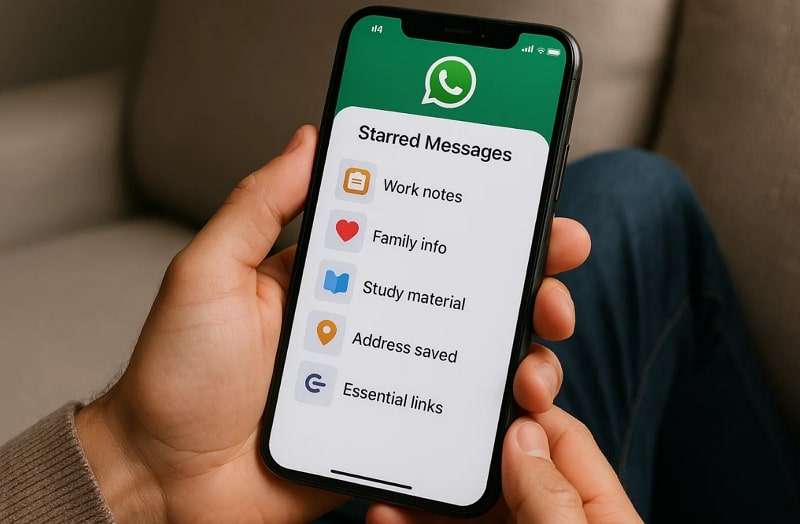
- Work Notes: Starred messages help employees save work updates for quick review. This feature prevents miscommunication by storing official details in a single, secure location.
- Family Info: Users save essential family details, such as birthdays and scheduling plans. It ensures that critical conversations are instantly accessible without the need to search through old chats.
- Study Material: Students can save notes, shared links, or research content shared within groups. Doing this helps prepare better for exams without wasting search time.
- Addresses Saved: Starred chats allow easy saving of home deliveries, office addresses, or driving routes. It eliminates stress by eliminating the need for repeated requests for addresses from contacts or groups.
- Essential Links: Individuals save training pages or news articles directly using message starring. Accessing them quickly helps avoid losing valuable information in large or busy conversations.




Part 3. How to Find Starred Messages in WhatsApp (iPhone & Android)
Finding your saved chats is simple once you know the proper steps to follow. Both iPhone and Android users can easily check their starred messages inside the app. The process looks similar across devices, though menu options may appear slightly different.
Whether it's work updates or personal notes, locating starred messages ensures convenience. So, take guidance from the given steps to learn how to retrieve starred messages in WhatsApp:
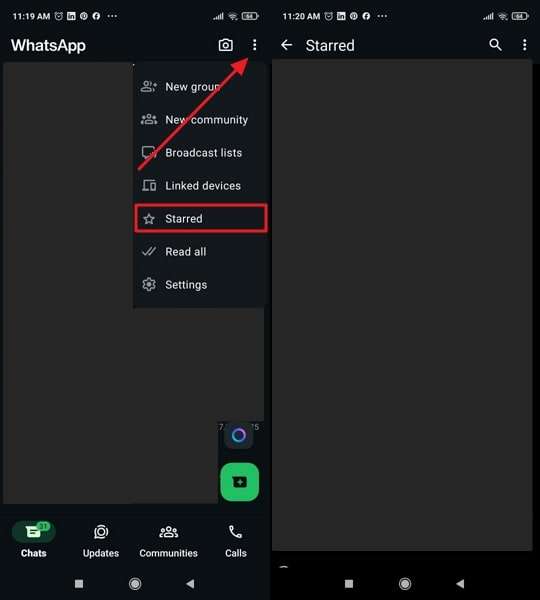
For Android: Tap the Three Dots > Starred to get all the Starred messages.
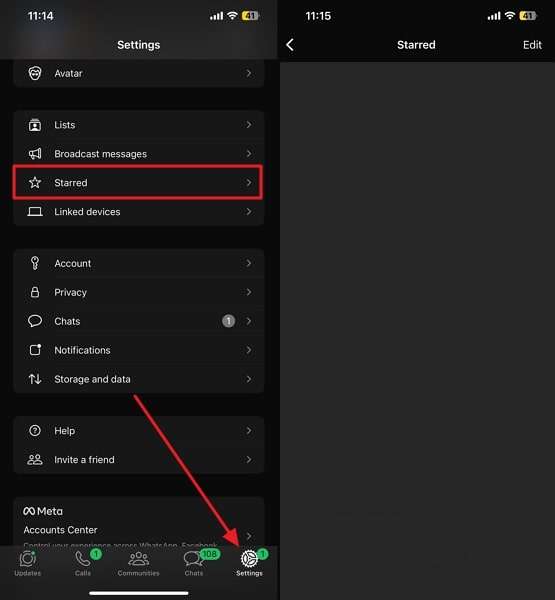
For iPhone: Head to Settings > Starred to retrieve all of your starred messages.
Part 4. How to Recover Deleted Starred Messages on WhatsApp (iPhone & Android)
When starred messages are deleted, users often believe they are losing valuable data forever. Still, the app offers a native recovery option, but it only works if you previously backed up your WhatsApp data. Plus, both iPhone and Android devices allow restoring messages from available backups effortlessly.
Without a backup, deleted starred messages cannot be brought back using native methods. So, review the given guide to find out how to recover starred messages on WhatsApp:
For Android
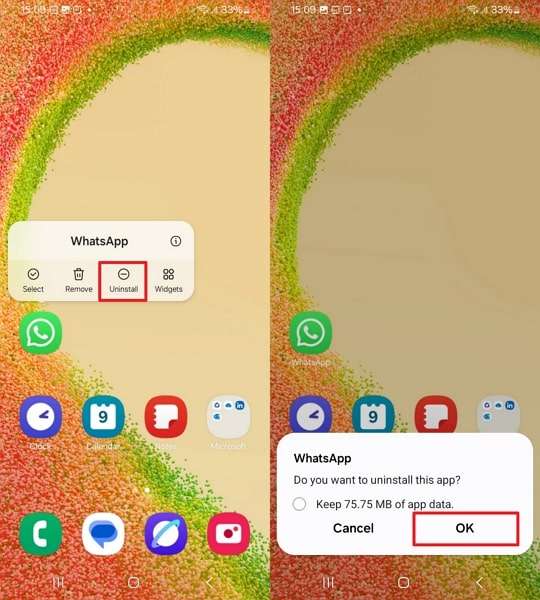
Step 1. Press the WhatsApp app icon, then select Uninstall, and finally OK.
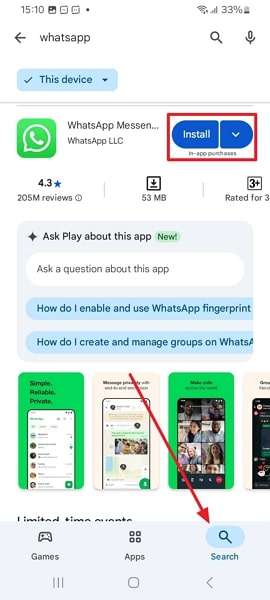
Step 2. Head to the Play Store and tap the Install button on the WhatsApp app.
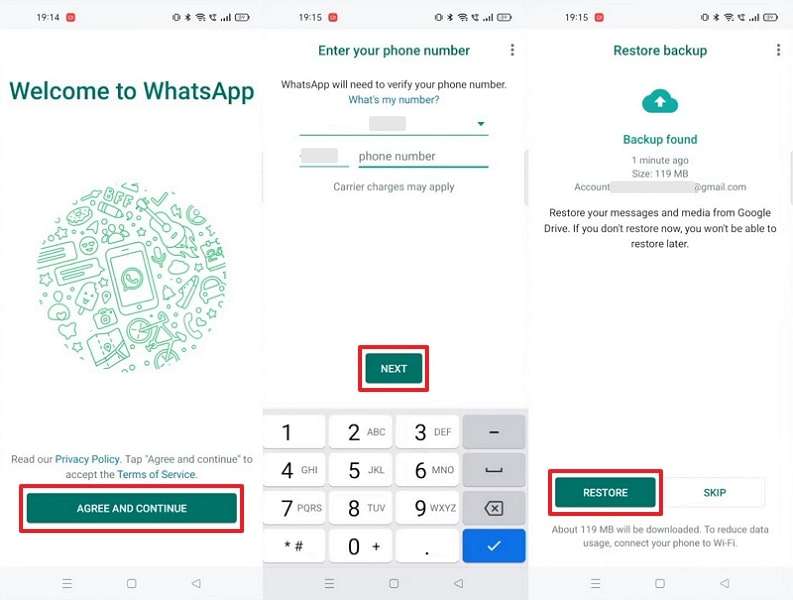
Step 3. Click Agree and Continue> Add Details > Next > Restore.
For iPhone
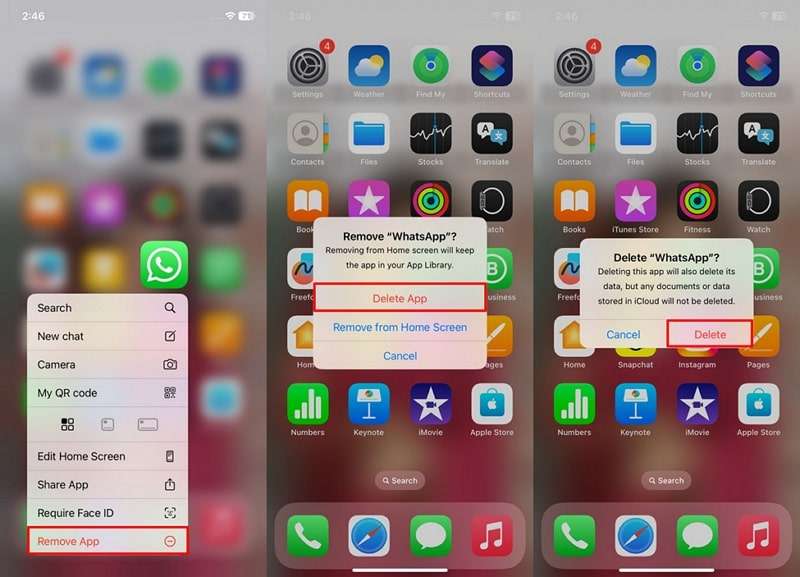
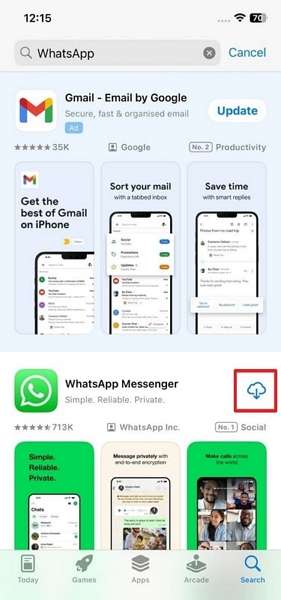
Step 1. Long-tap the WhatsApp icon > Remove App > Delete App > Delete.
Step 2. Search for WhatsApp on the App Store and tap the Install icon.
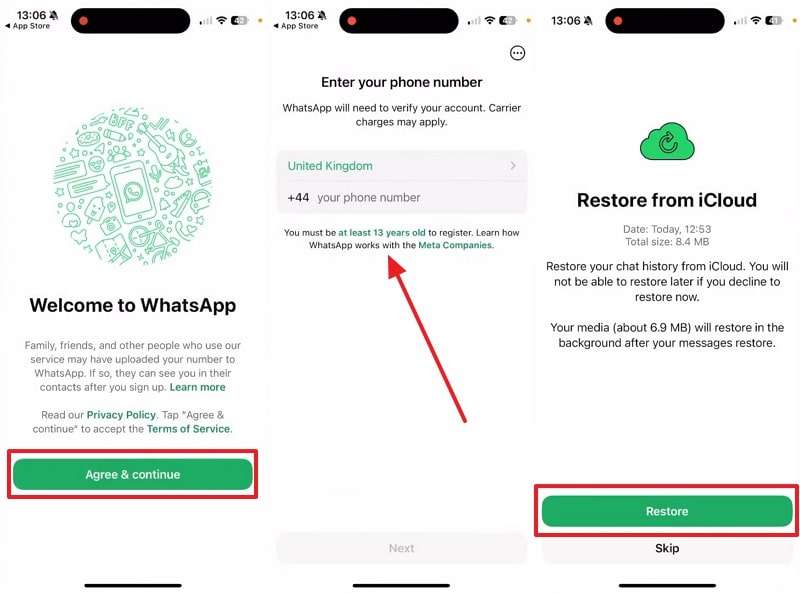
Step 3. Opt for Agree & Continue > Enter Number > Restore.
Part 5. How to Get Back Starred Messages in WhatsApp Without Backup (Third-Party Tools)
If you don't have a backup, you can still restore your deleted starred messages using MobileTrans. It supports restoring WhatsApp messages or data safely across both Android and iOS devices. In addition to starred messages, you can even recover 18+ other types of data, including multimedia and call history. While learning how to get back starred messages in WhatsApp, it lets users choose specific data instead of everything.
Key Features
- Business Support: Restore WhatsApp Business data securely, preserving all existing essential chats.
- Latest Compatibility: Supports Android 16 and iOS 27, including iPhone 18, to ensure seamless device compatibility.
- No Overwrites: Ensure old phone data remains safe without being erased during restore.
- Backup Creation: Easily create backups of WhatsApp chats and attachments anytime needed.
- Data Safety: The tool ensures the privacy and encryption of all recovered data.
Tutorial to Get Back Starred Messages in WhatsApp Without Backup via MobileTrans
Adhere to the steps given below to understand how to recover deleted starred messages on WhatsApp even without a backup:
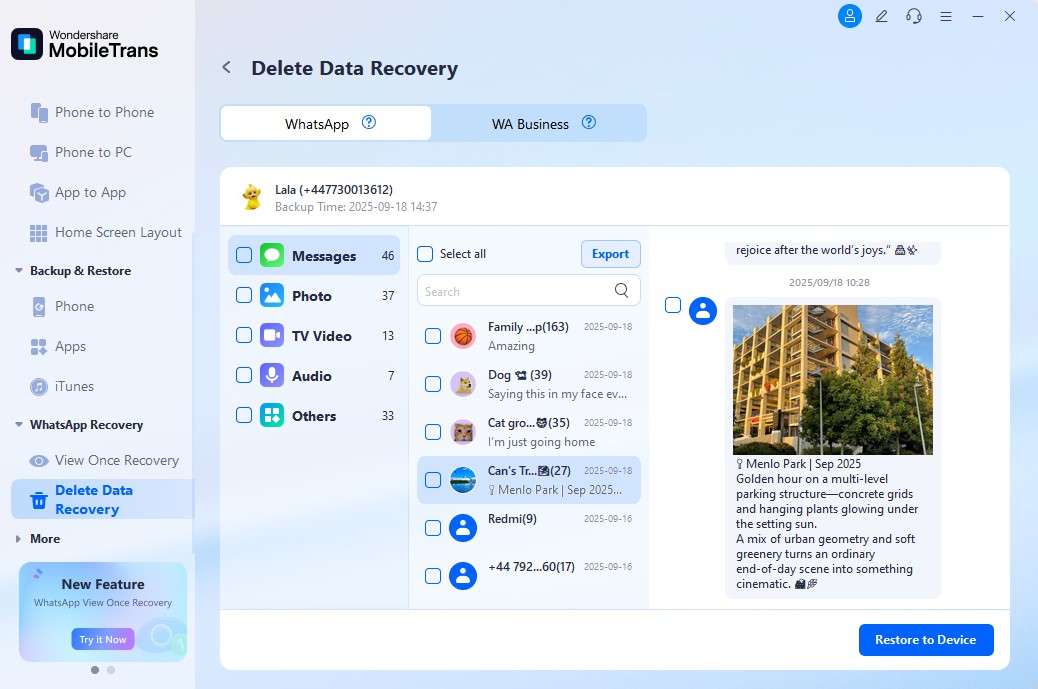
Step 1. Navigate to the Deleted Data Recovery feature from WhatsApp Recovery and connect your phone to the PC.
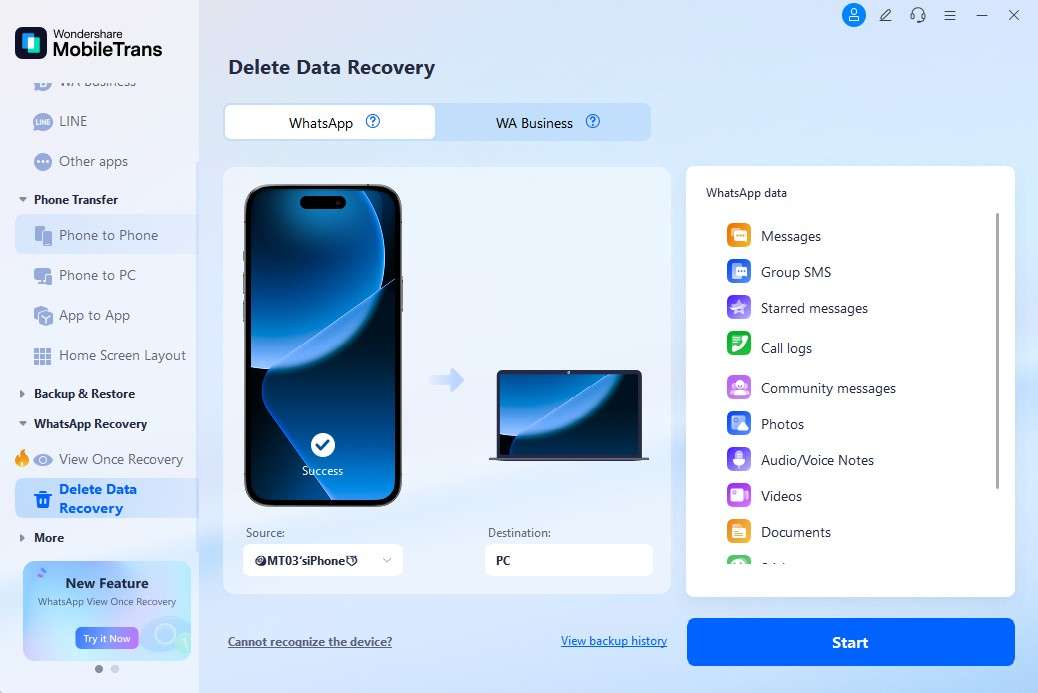
Step 2. Upon connecting, tap Trust on your iPhone and let the tool detect it.
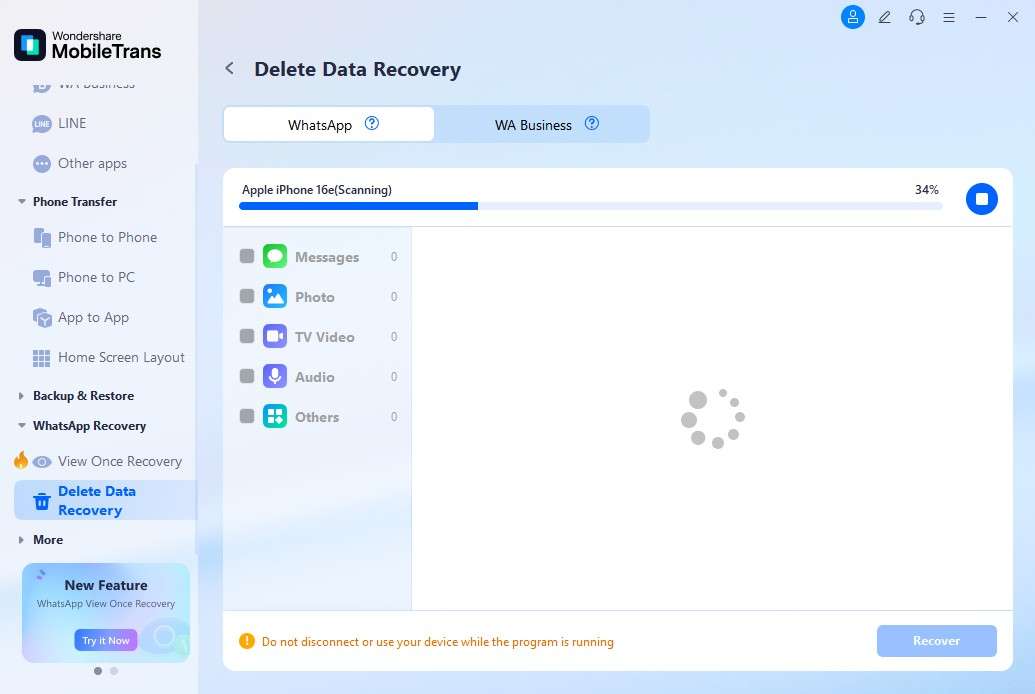
Step 3. Once detected, choose the data or starred messages and press Restore to Device.
Why Choose MobileTrans to Get Back Starred Messages in WhatsApp
MobileTrans is trusted for its simple recovery of WhatsApp data. So, this section covers why you need to use this software to retrieve deleted starred messages in WhatsApp:
- Data Security: MobileTrans uses advanced encryption to keep your recovered WhatsApp data safe. It ensures total privacy by preventing unauthorized access or leaks during the recovery process.
- High Accuracy: The tool scans deeply to locate every deleted message with precise detection. This step minimizes data corruption and ensures complete restoration of starred messages each time.
- Fast Recovery: Restore deleted starred chats within minutes, saving you valuable time effortlessly. Its optimized performance guarantees smooth operation without unnecessary lags or repeated recovery attempts.
- Wide Firmware Compatibility: The dedicated program supports both Android and iPhone devices, regardless of system version. This flexibility allows users to recover data efficiently across multiple platforms without complications.
- User-Friendly: Its simple interface guides users step by step through every recovery process. So, even beginners will be able to retrieve data confidently without expert assistance.
Conclusion
In summary, learning how to find starred messages in WhatsApp helps save time and effort. Starred chats ensure that essential work notes or personal reminders never get lost. With both iPhone and Android, you can easily locate or restore starred content. However, if messages are deleted without backup, recovery becomes difficult. This is where MobileTrans offers effortless recovery of your important WhatsApp starred messages.
FAQs
-
Can others see my starred messages on WhatsApp?
No, starred messages are private and visible only to the person who saved them. They are not shared with chat participants or contacts under any circumstances. This ensures your saved notes or personal details remain secure and accessible privately. -
How many messages can I star in WhatsApp?
There is no official limit to the number of messages you can star. Users can bookmark as many messages as needed for better organization. It ensures that long chats stay manageable by letting you bookmark essential points. -
Can deleted starred messages be recovered without reinstalling WhatsApp?
Native methods require reinstalling WhatsApp, but some external tools provide simpler solutions. Tools like MobileTrans enable the restoration of deleted starred chats without requiring a complete reinstall on devices. This is ideal for users who want recovery without hassle and a quick turnaround.










