



 TL;DR:
You can recover deleted WhatsApp group messages on an iPhone by reinstalling the app to restore a prior iCloud backup, asking a group member to export the chat history, or using MobileTrans for selective retrieval.
● Restoring from iCloud requires an active backup created prior to the deletion and will permanently overwrite your entire current chat history with older data.
● Having a group member export the missing conversation provides a read-only text or zip file sent via email, but this data cannot be integrated back into the WhatsApp application.
● MobileTrans bypasses native overwriting limitations by allowing selective recovery of over 18 WhatsApp data types, explicitly supporting devices up to iPhone 18, iOS 27, and Android 16.
Ask AI for a summary
 ChatGPT
 Perplexity
 Gemini
 Claude
 Grok
Grok
Many iPhone users panic when important group chats are deleted by mistake. These chats typically cover work updates, family discussions, or other crucial shared information. Plus, losing them suddenly can be particularly disturbing when you need them for later reference.
Fortunately, there are several straightforward methods to safely recover deleted messages from a WhatsApp group on an iPhone. This guide will explain both native recovery options and external tools that can be used effortlessly.
In this article

Part 1. Can You Recover Deleted Messages from WhatsApp Group iPhone Natively?
When group messages are deleted, the first thought is whether the platform itself allows recovery. By default, it does not keep deleted chats on its servers for users. Instead, it relies on iCloud backup to restore lost data. In case no backup is created before deletion, the messages cannot be retrieved directly. This makes recovery dependent on proper backup settings and recent saves.
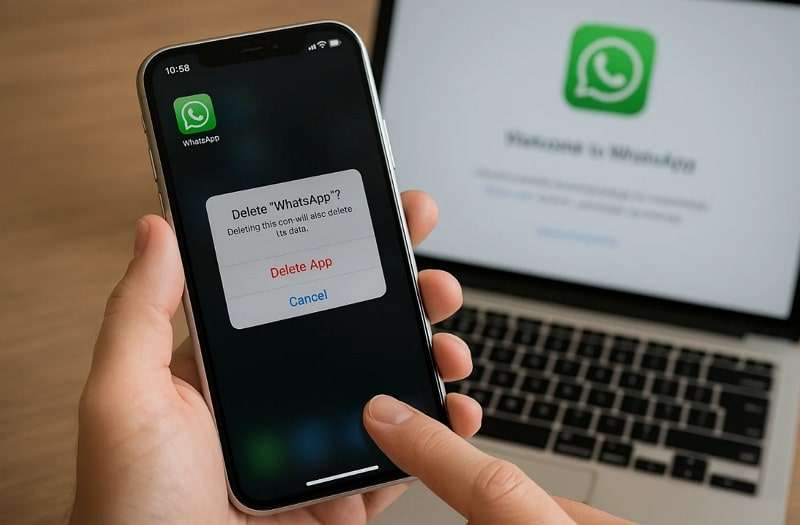
Without a backup, WhatsApp cannot help recover deleted messages from a WhatsApp group on an iPhone. That is why understanding backup options is crucial for users. Native recovery works only in limited cases where backups are regularly maintained and do not overwrite. Otherwise, alternative tools or manual options are the only way forward.




Part 2. 2 Native Ways to Recover Deleted Messages from WhatsApp Group iPhone
When seeking native solutions to recover deleted messages, WhatsApp offers limited choices. Still, the following section provides two ways to help you retrieve your deleted group messages:
1. Restore from iCloud Backup (Native Method)
The effortless native solution is to restore your WhatsApp chats from cloud storage like iCloud. It works if you enabled iCloud backup before the messages were deleted from your device. This method allows you to recover all WhatsApp media and group conversations.
However, it restores everything from the backup date, not just selected chats. Anyhow, go through the steps to recover deleted messages from the WhatsApp group on iPhone:
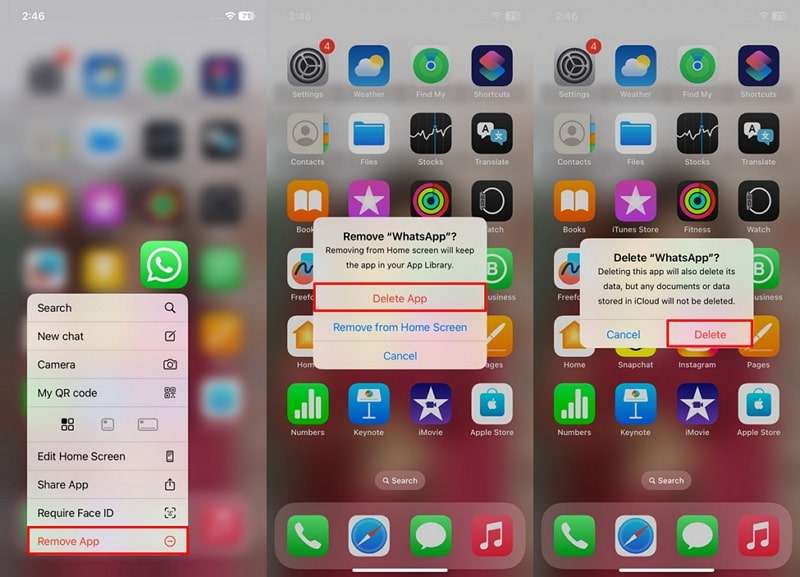
Step 1. Press the WhatsApp app icon for a few seconds and tap Remove App > Delete App > Delete.
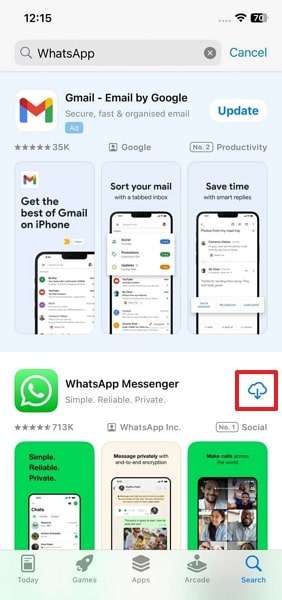
Step 2. Search for the WhatsApp app on the App Store and tap the Install icon.
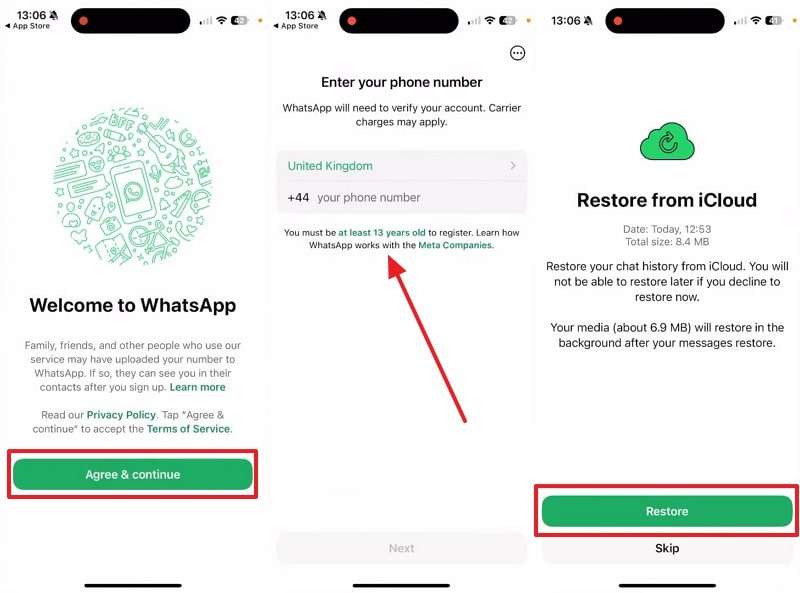
Step 3. Upon launching, press Agree & Continue > Enter Number > Next > Restore.
2. Ask a Group Member to Export Chat
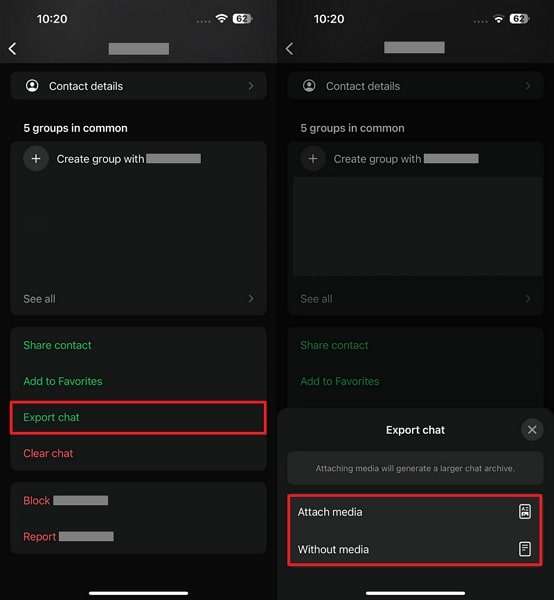
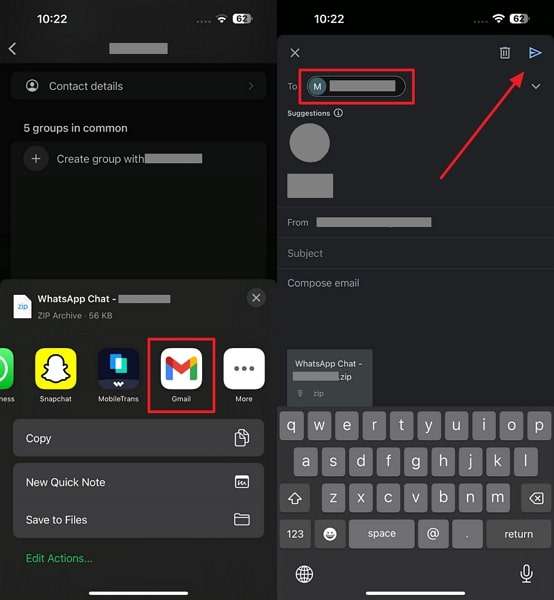
Another simple way is to ask a group member to export the chat and share it. This method works when others in the group still have the missing messages saved. They can export the conversation with or without media and send it directly.
However, it depends on someone else's chat history and cannot be restored within your WhatsApp app. So, adhere to the given guide to recover deleted messages from the WhatsApp group on iPhone:
Step 1. Tap on the Group Name and choose Export Chat > Attach Media/Without Media.
Step 2. Select the Gmail platform, enter your email address, and click Send.
Part 3. Why Native WhatsApp Recovery Methods May Fail?
Native recovery techniques are also helpful, although they are not always successful. A common issue for iPhone users is forgetting to enable iCloud backup. If the backup was never turned on, messages cannot be restored using native methods. Another problem is that restoring a backup replaces all recent chats with older data. Even when backups are available, restoring them resets all chats to the backup date.
This means any new conversations or changes after that date will be lost. Additionally, the dependency on other group members is unreliable because they may not export chats. Due to these restrictions, many users find it challenging to recover deleted messages from WhatsApp groups on their iPhones. That is why external recovery tools are usually preferred for a complete and effortless result.
Part 4. Use MobileTrans to Recover Deleted Messages from WhatsApp Group iPhone
MobileTrans offers a powerful and flexible solution for recovering deleted messages from WhatsApp groups on both iPhone and Android devices. Unlike native options, this tool gives you complete control over restoration. It can restore more than 18 types of WhatsApp data, including photos and videos.
Another advantage is that it does not overwrite your current data during the restore process. The tool also lets you choose specific data to back up or restore.
Key Features
- Latest Compatibility: Works with the latest Android 16 and iOS 27, including the iPhone 18 models.
- Multi Restore: Seamlessly restore WhatsApp and WhatsApp Business data across different device types.
- Cross Platform: Compatible with both Android and iOS devices, and supports over 6000 devices.
- Quick Backup: Backups can be created within minutes, which makes them easily accessible.
- Easy Export: Enables direct export of chat history to a computer, saving files in PDF or HTML format.
Guide to Recover Deleted Messages from WhatsApp Group iPhone via MobileTrans.
Review the given guide to recover deleted messages from the WhatsApp group on an iPhone using this dedicated tool:
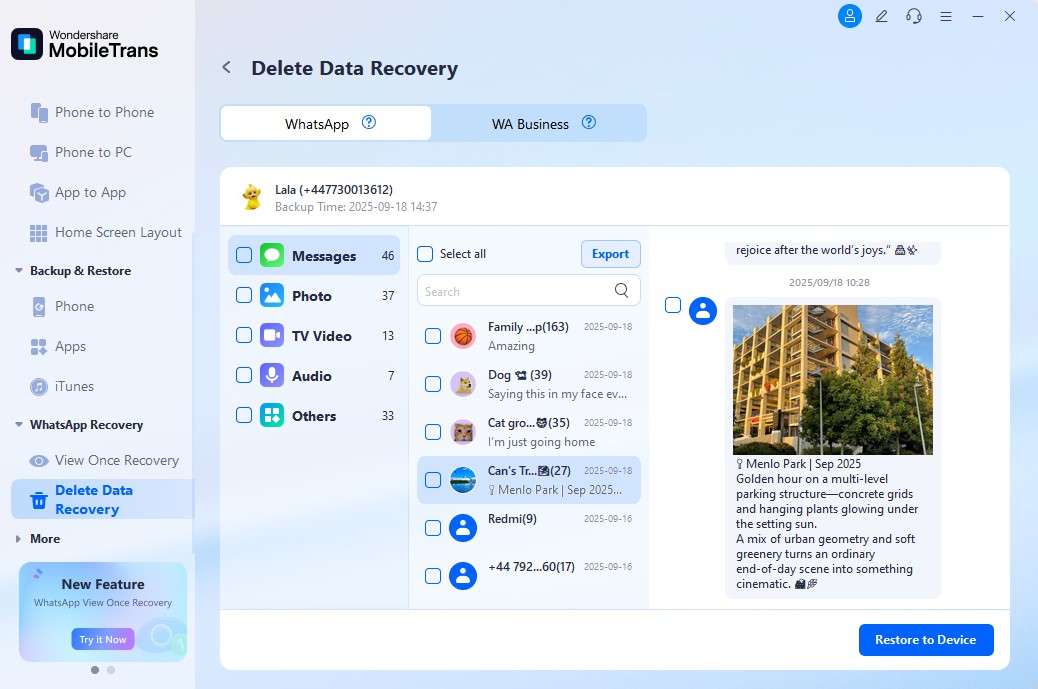
Step 1. Head to the WhatsApp Recovery section and choose the Deleted Data Recovery module.
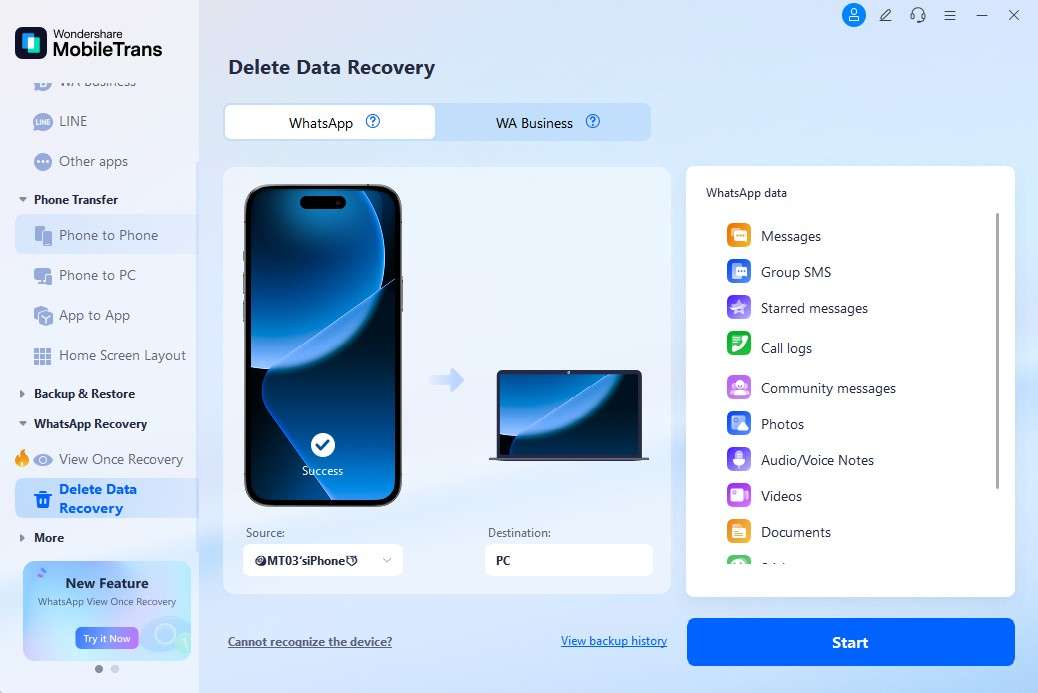
Step 2. Access the WhatsApp tab and connect your smartphone to the computer.
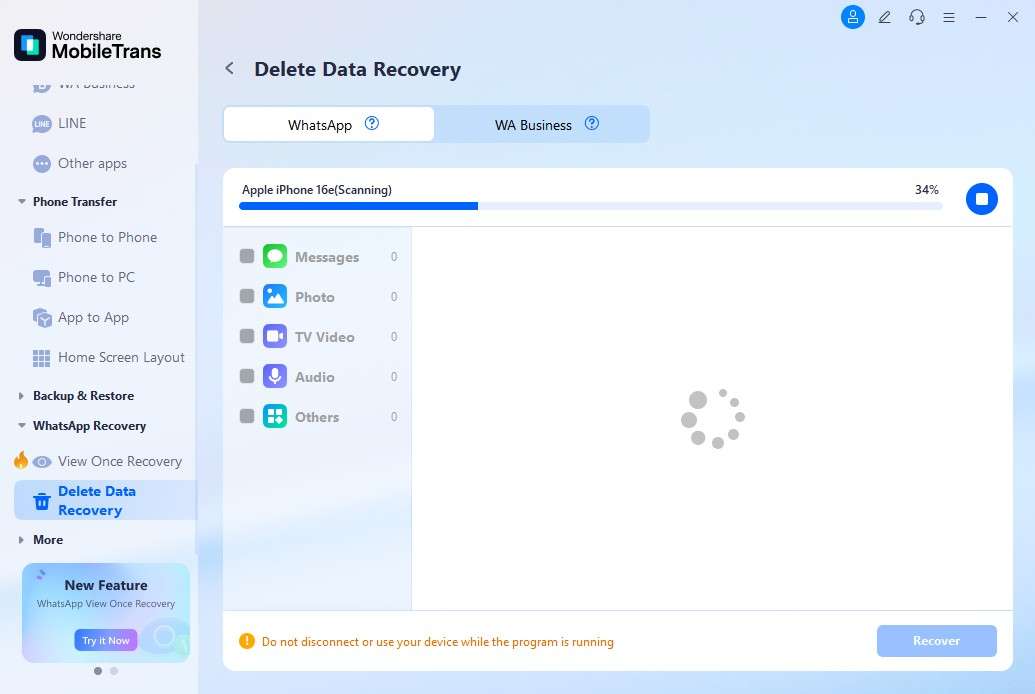
Step 3. Once your deleted WhatsApp messages appear, select the one you prefer and hit Restore to Device.
Conclusion
In summary, recovering lost group messages on your phone can be done without much hassle. However, native methods like iCloud backup or exported chats may work in limited cases. These solutions come with restrictions, including overwriting and dependency on others. For a safer and more effortless option, MobileTrans is highly recommended. It offers a straightforward method for recovering deleted messages from a WhatsApp group on an iPhone.
FAQs
-
How can I back up my WhatsApp chats to prevent losing group messages?
Enabling daily iCloud backups is suggested to ensure the maximum security of group chats. Besides, frequent backups ensure you never miss any important data or chats, even if your phone crashes. Alternatively, you can also perform manual backups to ensure you can safely delete or reinstall the app. -
Are exported WhatsApp group chats usable like normal chats after restoration?
No, exported chats are shared as text or zip files, not restored within WhatsApp itself. You can still open and read them, but they won't function as interactive conversations. This method is most effective for record-keeping, rather than for restoring real-time WhatsApp usage. -
Can I selectively restore group chats without restoring all WhatsApp messages on my iPhone?
When using cloud backups, you cannot selectively restore chat history, as they overwrite the entire chat history. This means all conversations, including personal chats, are restored from the saved backup. If selective recovery is needed, MobileTrans allows you to choose only group messages.










