



As people spend more time chatting online, personalization feels more important. Many users want unique designs that reflect their mood or personality. This is where WhatsApp AI-generated backgrounds bring a fresh experience.
They allow you to create creative, fun, and stylish looks instantly. Instead of boring plain screens, you can enjoy colorful or calming scenes. This article explores how bright backgrounds are changing the way we use WhatsApp.
In this article

Part 1. What Are WhatsApp AI-Generated Backgrounds?
WhatsApp AI-generated backgrounds are custom visuals created with Meta’s AI technology. These can be applied as wallpapers in chats or as unique backgrounds during video calls. Upon typing a short description, users can generate creative or realistic designs that match their style. This feature makes conversations more personal and engaging while adding comfort during calls. Currently, only 10 languages are supported, including English and Spanish.

Hence, AI is transforming background customization by replacing static images with dynamic designs. Users can create unique visuals without needing to edit manually or search online. With WhatsApp AI-generated backgrounds, customization becomes more creative than traditional wallpaper options. This evolution gives users more control and originality within their everyday conversations.
Part 2. Benefits of Using WhatsApp AI-Generated Backgrounds
Using WhatsApp AI-generated backgrounds enhances the experience during chats and calls. Below, we will explore a few benefits of using such backgrounds on your chats:
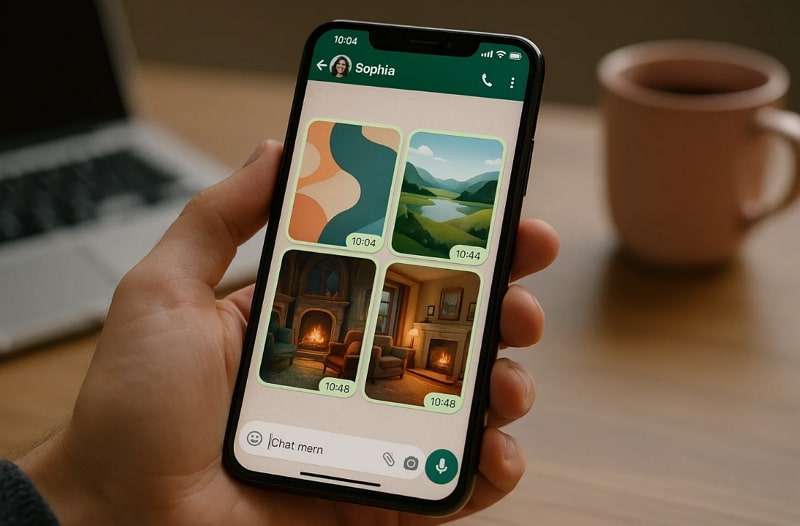
- Personal Touch: These smart backgrounds allow users to reflect their personality through design. Every chat feels special when visuals match the mood, creating closer connections.
- Creative Expression: Users can showcase their style using various colorful AI-driven artistic designs. So, these backgrounds make simple conversations look stylish and more engaging.
- Mood Boost: Bright, calming, or fun visuals can quickly improve mood during chatting. Thus, personalized backgrounds reduce boredom and make conversations feel refreshing and lively.
- Unique Identity: Custom designs help chats stand out from standard default looks. Every user feels special when their conversations reflect a unique digital identity.
- Call Enhancement: Backgrounds add visual interest during video calls, eliminating the need for extra filters. This makes calls more colorful, expressive, and enjoyable for both participants.
Part 3. Popular Styles and Trends in WhatsApp AI-Generated Backgrounds
When it comes to WhatsApp AI-generated backgrounds, users now enjoy countless creative possibilities. In this section, we will explore some trendy styles that offer an artistic look for chats and calls:
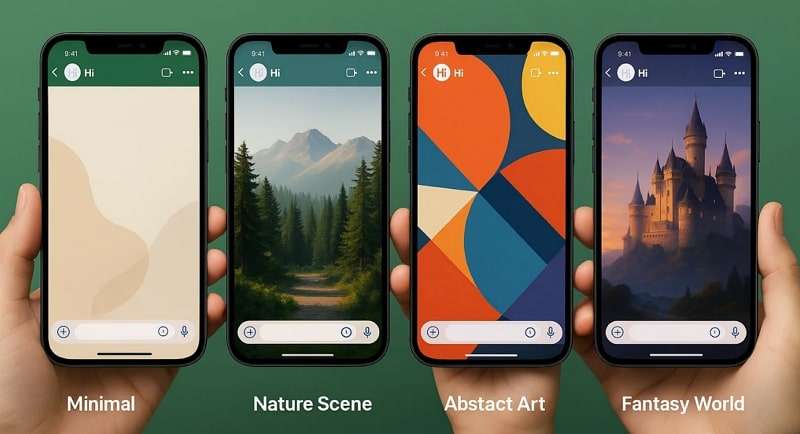
- Minimal Style: Clean lines and soft colors give screens a modern and refreshing look. This trend suits individuals who prefer uncluttered visuals during chats or calls.
- Nature Scenes: Forests and mountains also make screens calming and visually appealing. Such relaxing designs bring outdoor beauty into digital spaces and improve conversation experiences.
- Abstract Art: Geometric shapes with bold colors create striking and highly imaginative backgrounds. This option transforms ordinary chats into a lively and visually exciting digital space.
- Fantasy Worlds: Mystical castles and cosmic skies also deliver adventurous and imaginative experiences. Users love this trend for adding magical touches to everyday conversations.
- Cozy Homes: Fireplaces and warm rooms create familiar feelings of comfort during chatting. Such homely designs suit casual talks by offering warmth and a welcoming vibe.
Part 4. How to Create and Use AI-Generated Backgrounds for Chats & Calls
Once you understand what AI-generated backgrounds are, you should create your own themes. So, the following section will explore how the WhatsApp AI-generated backgrounds feature works:
1. For All Chats
The option to set backgrounds for all chats offers complete customization. It lets users apply one consistent design across every conversation without hassle. You can choose calming or creative backgrounds that reflect your mood. It makes chatting more engaging by adding beauty and enhancing the overall experience. Follow the steps below to find out how you can change the background for all chats:
For iOS
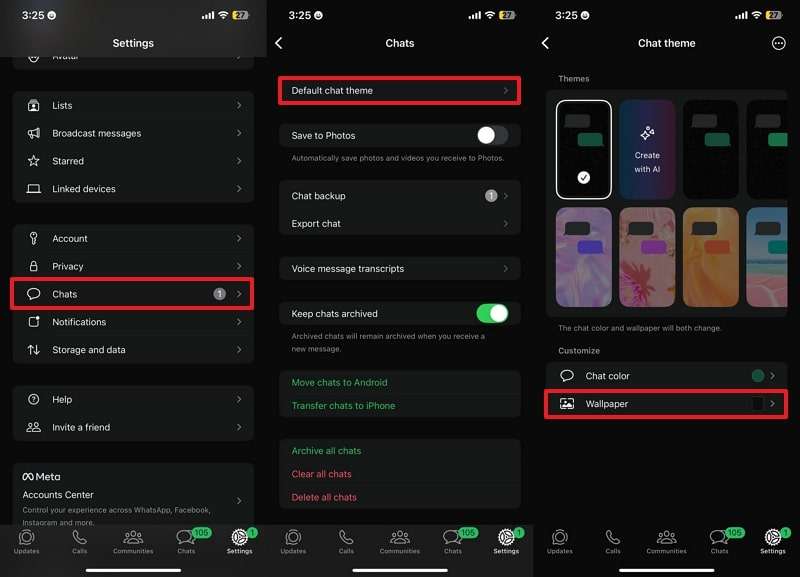
Step 1. Upon heading to the "Settings," access the "Chats" section and tap the "Default Chat Theme" option. After that, select the "Wallpaper" option on the next display.
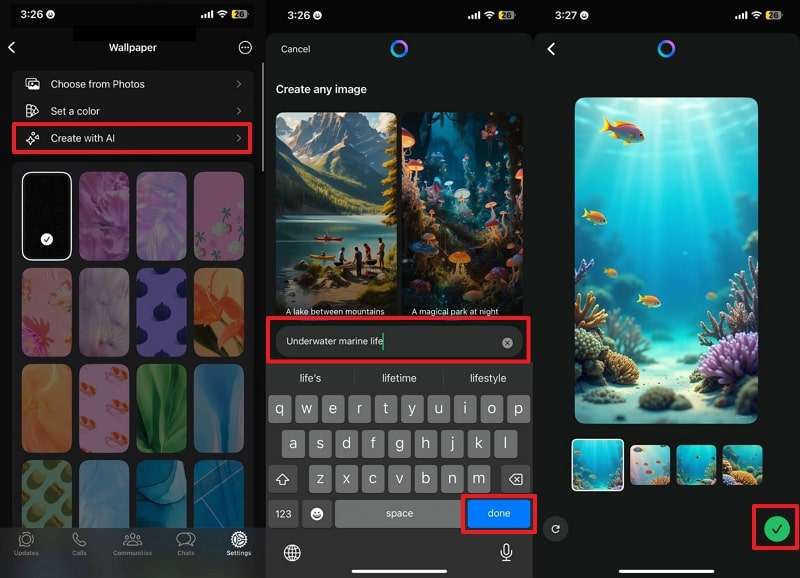
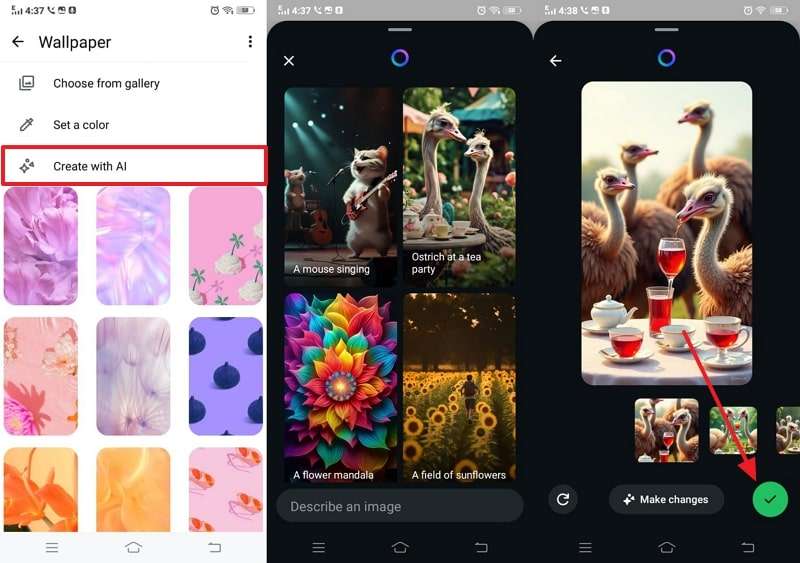
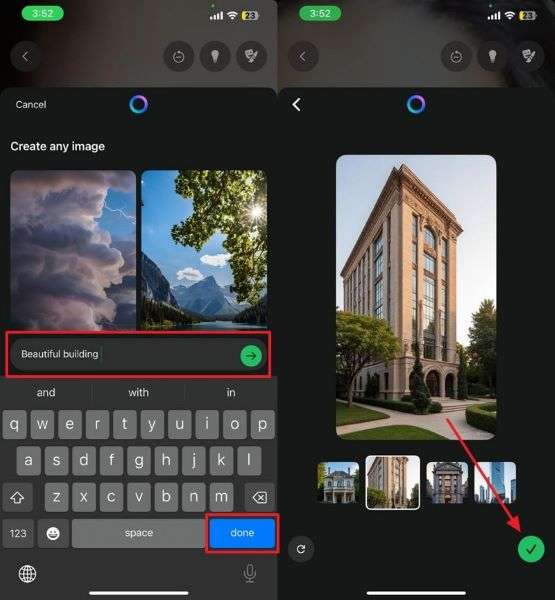
Step 2. Choose “Create With AI” and then select the background or type a prompt to generate your desired one. After typing the prompt, press the “Done” button, choose your preferred one, and tap the “Tick” button to apply it.
For Android
Step 1. To begin, tap the "Three Dots" icon on the main screen to access the app's settings. Then, go to the "Chats" section to choose "Default Chat Theme" and tap the "Wallpaper" option.
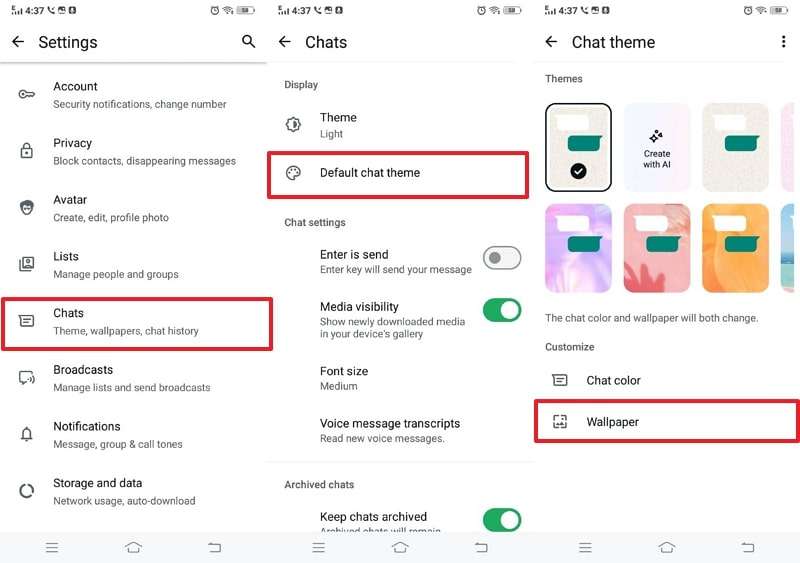
Step 2. To proceed, select "Create With AI," choose your desired background from the prompt, and then press the "Tick" button.
2. For a Specific Chat
With WhatsApp AI-generated backgrounds for a specific chat, users enjoy more flexibility. This feature allows customizing only one conversation without changing the rest. It is helpful when you want a unique theme for personal or essential chats. Thus, go through the following steps to change the specific chat background on your phone:
For iOS
Step 1. As you open the specific chat, tap on the person's name or number and then select the "Chat Theme" option. On the next screen, navigate to the "Wallpaper" section and select the "Create With AI" feature.
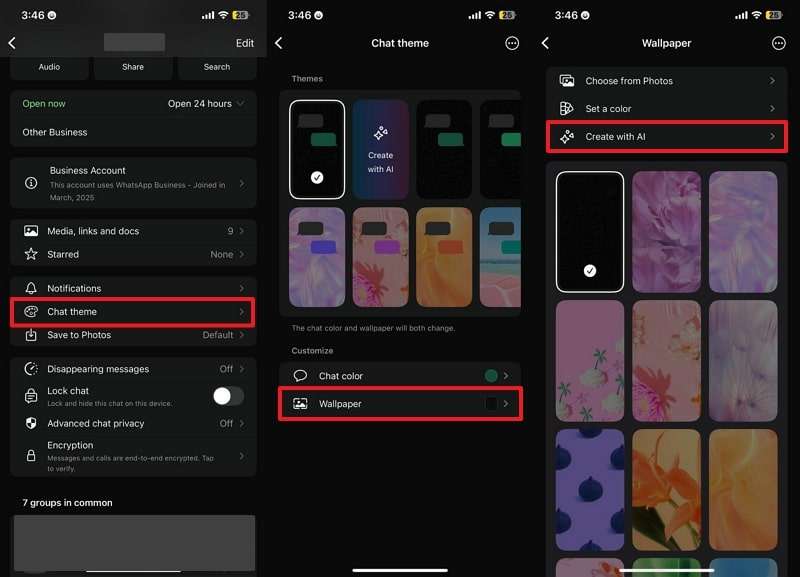
Step 2. Type your preferred prompt and press the “Done” button. When the background is generated, tap the “Tick” button and then hit the “Set” button.
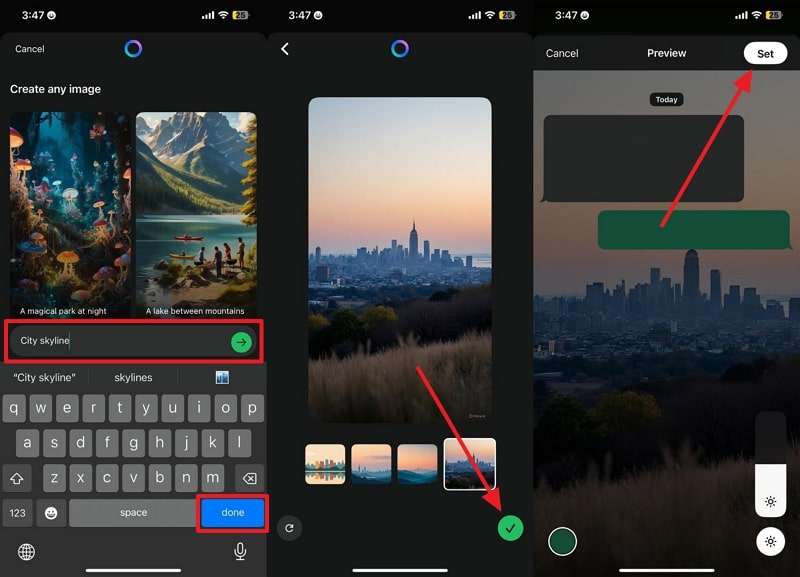
For Android
Step 1. When you reach the specific chat display, tap the “Three Dots” icon to choose the “Chat Theme” option. Afterward, opt for the “Wallpaper” section and select the “Create With AI” option.
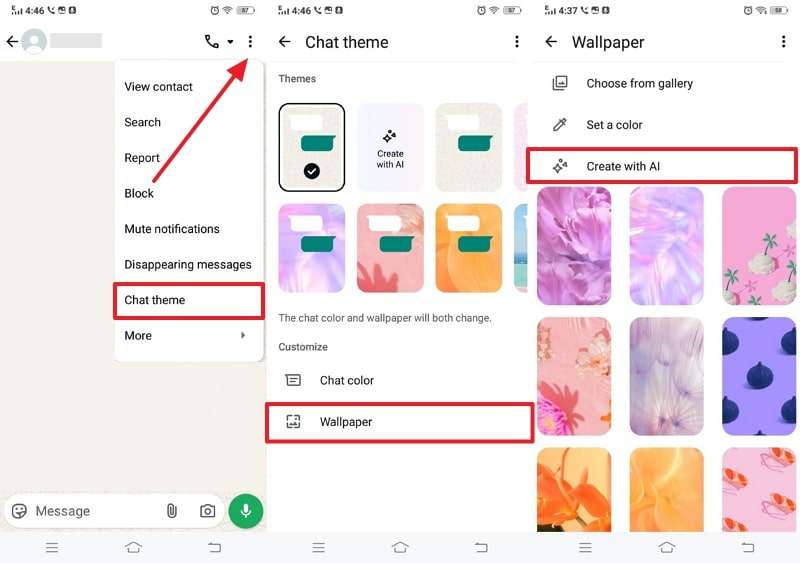
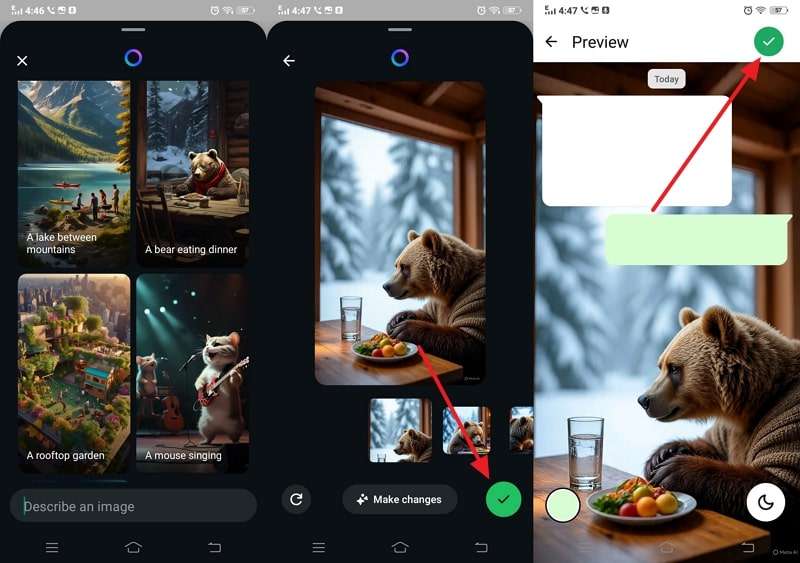
Step 2. Give your AI prompt, select your preferred background, and tap "Tick.” Following that, preview your chosen AI background and hit the “Tick” button.
3. For Calls
This feature allows users to replace plain visuals with more appealing designs. It helps make video calls feel less boring and more visually engaging. Users can choose themes that reflect their mood or even special occasions according to their needs. The option ensures every call looks unique while keeping conversations enjoyable and lively. So, go through the given steps to use WhatsApp AI-generated backgrounds for calls:
For iOS
Step 1. During a video call, tap the “Magic Wand” icon and choose “Create With AI” from the “Background” section.
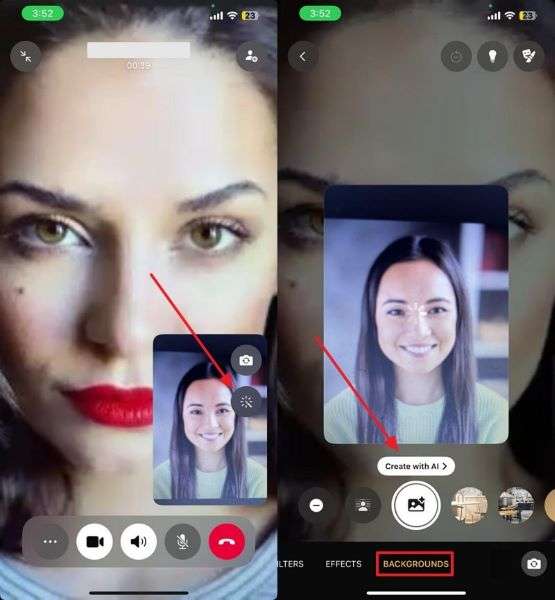
Step 2. Afterward, choose the available background or type a prompt according to your needs. Then, press “Done,” select the generated background, and hit the “Tick” button.
For Android
Step 1. Open your WhatsApp camera, tap the "Magic Wand" icon, and select the "Create With AI" feature.
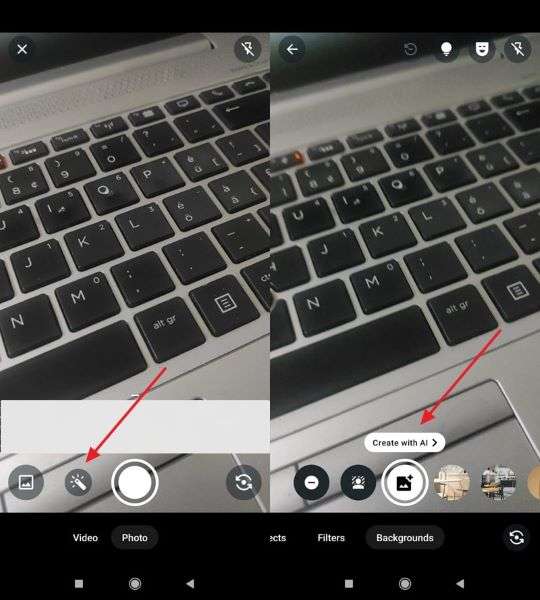
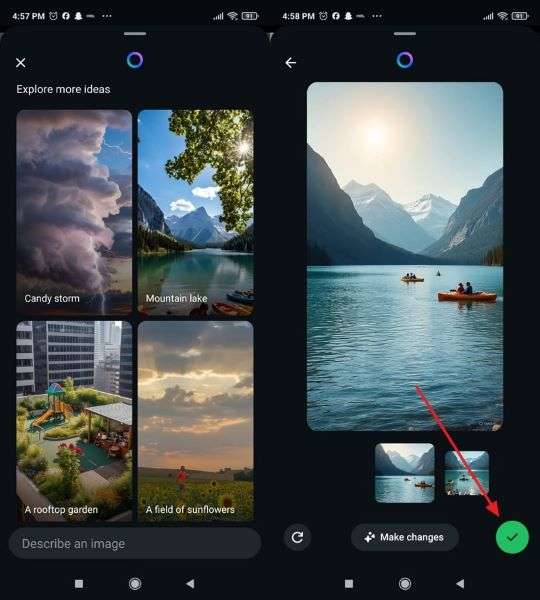
Step 2. Afterward, select the background and press the “Tick” button to apply it to your video calls.
Pro Tip. How to Enhance WhatsApp Communication with WeLastseen
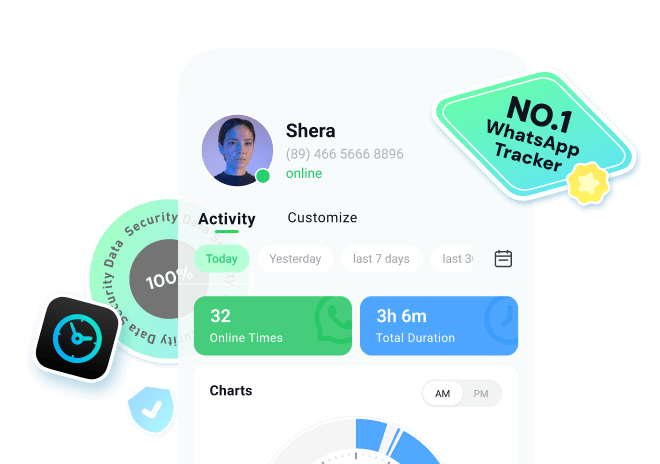
Apart from exploring WhatsApp AI-generated backgrounds, users also seek additional methods to enhance communication effectiveness. One common need is checking online status, especially if they have hidden their last seen. This is where WeLastseen proves to be very useful. It is a WhatsApp tracker that offers several features to improve your experience.
Moreover, it sends instant notifications when contacts go online or offline. You can easily compare the online activity and duration of different users. The app keeps history and allows tagging specific times for precise monitoring. It uses only public data, so your privacy remains safe. The tool also allows you to compare accounts and online durations between two or more people.
Key Features
- Usage Analysis: Observe detailed WhatsApp usage graphs to understand activity trends over time.
- Military-Grade Security: Advanced encryption safeguards your data and identity throughout the tracking process.
- Private Mode: Runs silently in the background, keeping monitoring hidden from tracked contacts.





Guide to Enhance WhatsApp Communication by Tracking Activity via WeLastseen
Review the given comprehensive steps to use WeLastseen and monitor someone’s online and offline activity:
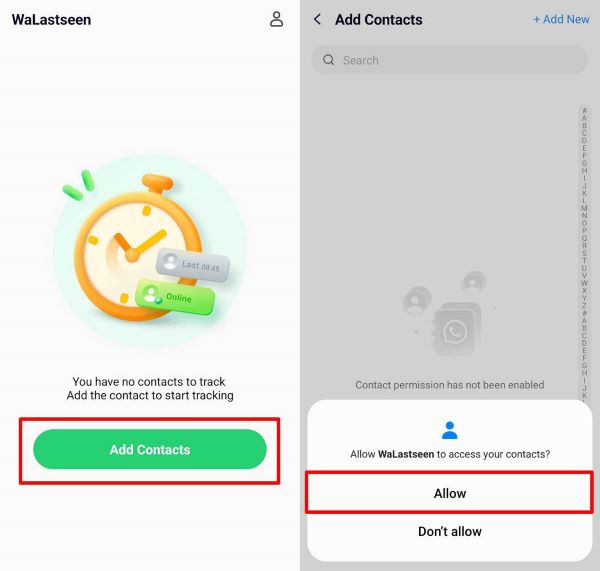
Step 1. Access WeLastseen and Allow Contact Permissions
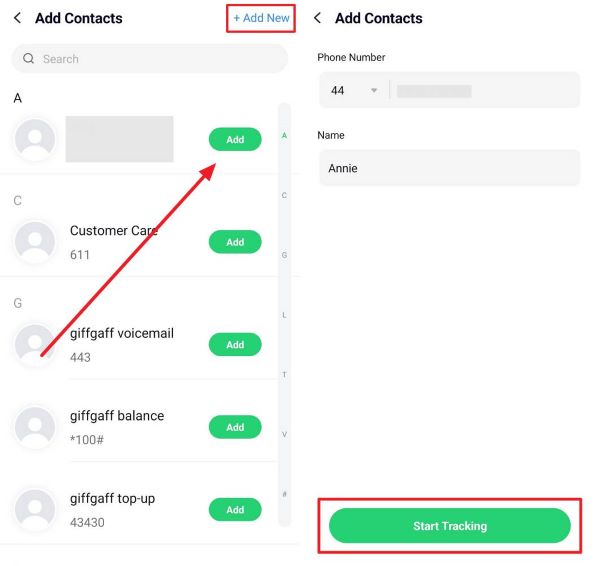
Press the “Add Contacts" button on the app’s main screen and choose "Allow" to grant the app access to your contact list.
Step 2. Add and Start Monitoring a Contact
Afterward, tap the "Add" or “+Add New” button beside the person’s number, enter their name with the country code, and save. Later, press "Start Tracking" and the app will begin spying on that contact’s WhatsApp activity.
Step 3. Check the Online/Offline Activity using WeLastseen
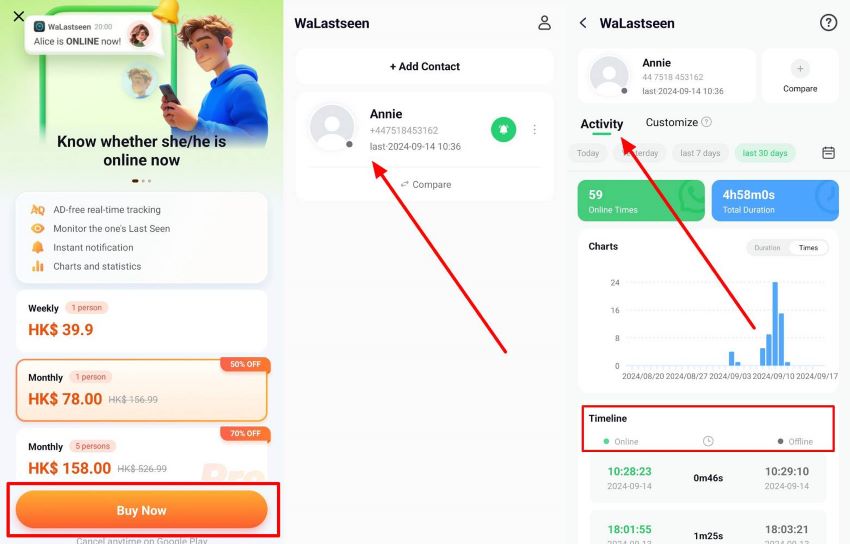
Next, head to the individual’s profile and check the exact time under the “Activity” tab.
Use Cases of Using WeLastseen to Enhance WhatsApp Communication
WeLastseen offers practical uses that improve communication in daily life and special situations. So, this section provides some real-life cases where this tool proves very useful:
- Relationship Insights: Understand when partners are most active to align chat timing better. This helps improve responsiveness and communication flow in relationships.
- Coordination: Track colleagues' online availability to schedule messages or calls at their most convenient times. It ensures faster replies and smoother teamwork remotely.
- Event Planning: Monitor multiple contact activities to determine the best time for group chats. This avoids missed messages and improves group coordination.
- Family Safety: Monitor children's online activities to ensure safe and healthy phone use. Parents can monitor usage patterns to set reasonable online time limits.
- Study Groups: Students know when group members are online for project discussions. This ensures teamwork and timely participation during preparation.
Conclusion
In conclusion, backgrounds make chats and calls more personal and enjoyable. They help users express moods and add creativity within conversations. With such brilliant designs, messaging feels more engaging and less boring every day.
As communication grows, users need both style and more innovative tools for better connections. Thus, along with WhatsApp AI-generated backgrounds, tracking activity becomes essential. This is where WeLastseen reveals when contacts are online, even if they hide their last seen.


FAQs
-
Q1. Do WhatsApp AI-generated backgrounds work without internet?
No, they require an active internet connection for processing. However, once saved, the chosen background remains usable offline for chats and calls. Thus, this ensures continuity even when the internet is not available. -
Q2. Can I customize WhatsApp AI-generated backgrounds for birthdays or events?
You can type prompts like “birthday party theme” to generate event-based visuals. These custom backgrounds add charm and fun to personal or group celebrations. Users enjoy memorable chats and video calls with event-specific themes. -
Q3. How can I track someone’s activity if they hide their last seen?
This is where WeLastseen helps by tracking online and offline times. It offers instant notifications, usage history, and privacy-friendly monitoring features. Users gain clarity on contacts’ activity while staying informed.











