


 TL;DR:
Filemail is an encrypted, peer-to-peer file-sharing service for sending files exceeding 50 GB over the internet, while the MobileTrans app is the specific alternative recommended for direct phone-to-phone data migration.
● Filemail's free tier limits advanced capabilities like comprehensive transfer tracking, requiring users to purchase a paid Pro subscription to access full delivery reports and custom business branding.
● MobileTrans bypasses the need for an active internet connection by using a QR code to establish a local hotspot, making it exclusively suited for transferring contacts, apps, and WhatsApp data between iOS and Android devices.
● Filemail transfers strictly require a continuous internet connection to function, and users must manually configure strong passwords to protect sensitive files during transit.
Ask AI for a summary
 ChatGPT
 Perplexity
 Gemini
 Claude
 Grok
Grok
Sending large files online can be tricky. Most file-sharing tools have limits. They often restrict the maximum file size. Some tools are also very slow. Others may not be secure enough.
This Filemail review is here to help. It gives you a complete guide to the platform. You will find out what Filemail is. You'll learn how it works in simple steps. The review covers its advantages and drawbacks. It also explains how safe Filemail really is.
Looking for mobile-friendly options? The review includes the best alternative to Filemail for mobile users. You'll discover a tool that works better on smartphones and tablets.
In this article
Part 1: What is Filemail?
Filemail is a file-sharing tool. It is made to send very large files online. Many other tools stop you after a few gigabytes. Filemail does not.
It is useful for both people and companies. You can use it to send personal photos or big work projects. It works on the web, desktop apps, and mobile apps. This makes it flexible.
This Filemail review explains why many people trust it. It is simple and secure. For some, it even works as a Filemail alternative to complex cloud tools.
Part 2: Key Features & How to Use Filemail
Filemail comes with many features. These help users send files faster and more safely.
Key Features:
- Send Files of Any Size: Unlike many competitors, Filemail allows users to send files of any size—even beyond 50 GB.
- Fast Speed: It uses peer-to-peer transfer. This means you get much faster speeds.
- File Tracking: You can track your files. It shows when the receiver opens or downloads them.
- Multi-Platform Use: You can use Filemail on Windows, Mac, iOS, and Android. It also works in browsers.
- Secure Transfers: Filemail uses encryption. This keeps your data safe from leaks.
- Custom Branding: Businesses can add their own brand to emails or pages. It looks professional.
How to Use Filemail
Step 1: Go to the Filemail website. Enter your email address and your recipient's email address. Click the"Add Files" button. Select the files or folders you want to send.
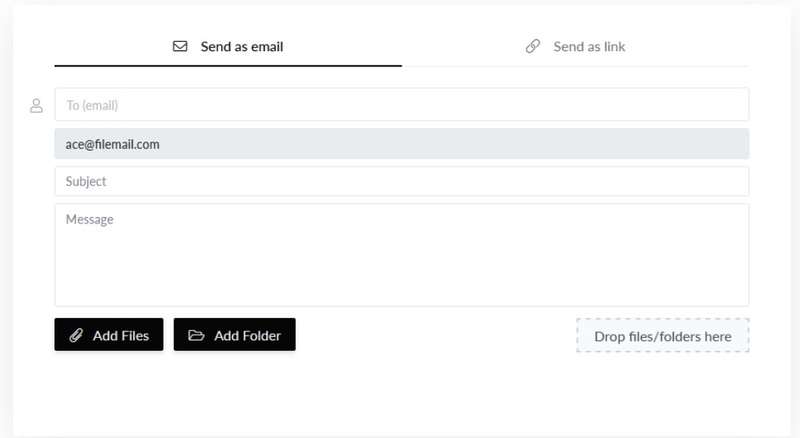
Step 2: Click the"Send" button. Your recipient will get a download link via email. You'll also get a confirmation when the file is downloaded
Part 3: Is Filemail Safe? Can Transfers be Tracked?
Security is a big concern when sending files. Filemail uses strong encryption. This means files are safe while they move. It also adds virus scanning.
Filemail also lets you track transfers. This Filemail review shows that you can see when a file was received and downloaded. This feature gives peace of mind. Some people say it is better than any Filemail alternative for tracking.
Part 4: Pros and Cons of Filemail
Every tool comes with strengths and weaknesses. No software is perfect. Each one has benefits that make it useful. But they also have limitations that can be frustrating.
Filemail is no exception. It offers helpful features for sending large files. Many users find it fast and easy to use. However, it also has some downsides. These may include limited free options or security concerns.
Part 5: The Ultimate Tool for Phone Data Transfer: Meet MobileTrans App
Filemail is great for online file sharing. But if you want to move data from one phone to another, you need something else. This is where MobileTrans comes in. It is the best Filemail alternative for phone data.
MobileTrans can move files between iOS and Android. It can also back up phone data to a PC. It is fast, secure, and designed for everyday phone users.
This Filemail review highlights MobileTrans as a strong choice. If you want a simple way to move contacts, photos, or chats, it is perfect.
Why Use MobileTrans?
- Works on Android, iOS, Windows, and macOS.
- Transfers photos, videos, contacts, and even apps.
- Keeps your data safe and private.
- Works at high speed even for big files.
- No size or format limits.






Steps to Use the MobileTrans App:
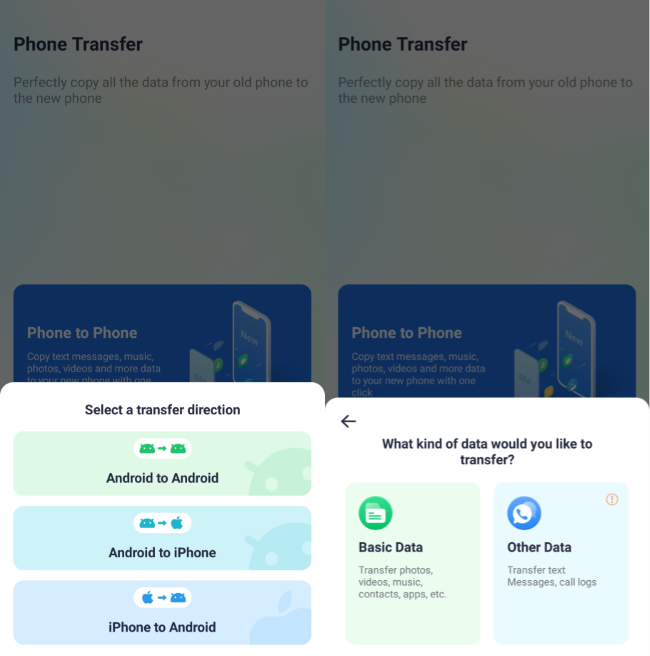
Step 1: Download the MobileTrans app on both devices. Select Phone to Phone.
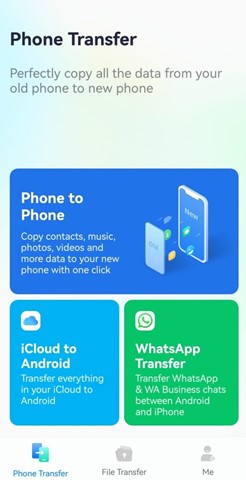
Step 2: Select the correct transfer direction: Android to iPhone. iPhone to Android. Android to Android.
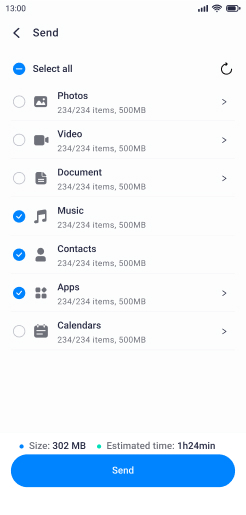
Step 3: Choose the file types you want to share—photos, videos, music, documents, contacts, even WhatsApp data.
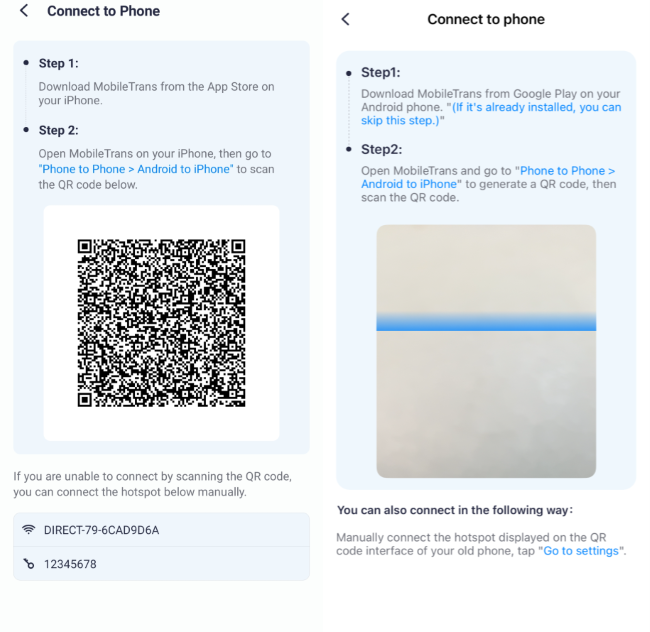
Step 4: Use the app's QR code feature to securely connect the two phones. This sets up a local hotspot—no mobile data needed.
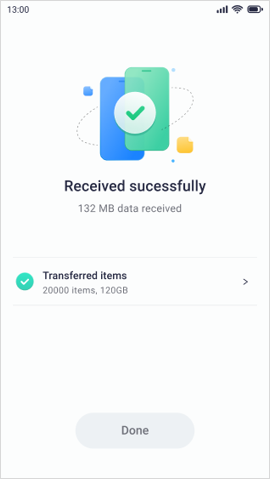
Step 5: MobileTrans will start moving your data to the new device. When it's done, you'll see a message saying the transfer was successful.
Part 6: Avoid Common Mistakes: Essential Tips for Filemail Users
Filemail is easy, but even simple tools can lead to mistakes. Many users lose time or face issues because of small errors. Follow these tips to get the best results.
- Check File Size Early: Always confirm your file size before upload. Some networks are slow for huge files.
- Use Secure Wi-Fi: Public Wi-Fi can break transfers. Use a private, stable internet.
- Protect with Passwords: Add strong passwords for sensitive files. Weak ones can be guessed.
- Track Each Transfer: Do not forget to track. It shows if files reached the right person.
- Verify Email Address: One wrong letter in an email stops the process. Check before sending.
- Update the App Often: New updates fix bugs and improve speed. Do not delay them.
- Check Device Storage: Make sure the receiver has enough space to save large files.
- Keep Backups Always: Do not trust one copy. Store a backup of all important files.
- Avoid Sending Too Many at Once: Large batches can fail. Send in smaller parts if needed.
- Check Transfer History: Look at your past transfers. It helps track old files.
Conclusion
Filemail is one of the best tools for sending large files. It is fast, safe, and works across devices. This makes it useful for both personal and business use.
This Filemail review also showed the value of MobileTrans. It is the best Filemail alternative if you want to move data between phones. Both tools are strong. The choice depends on what you need.
FAQ
-
Q: Is Filemail free to use?
A: Filemail has a free plan. You can send files up to a limit and share them with a link. But most advanced features like tracking and unlimited storage are only in paid plans.
-
Q: Can Filemail work on phones?
A: Yes. Filemail has apps for iOS and Android. You can send and receive files from your phone. The app is easy to use and works just like the web version.
-
Q: What is the best Filemail alternative?
A: MobileTrans is the best Filemail alternative. It is made for phone users. It moves data fast, safely, and without limits. It is perfect for switching phones or backups.










