


 TL;DR:
For users migrating to a new device, the Honor Device Clone app provides a free, encrypted method to transfer standard media locally across Android 7.0+ and iOS 8.0+ devices, though critical file type limitations make third-party tools necessary for comprehensive data migrations.
● Honor Device Clone transfers contacts, photos, and videos at speeds of 1-2 GB per minute without a PC, but it strictly fails to migrate WhatsApp data, social media files, or protected documents, and requires airplane mode to remain off during the Wi-Fi transfer process.
● MobileTrans serves as the most robust cross-platform alternative, capable of migrating full app configurations and files at 30MB/s via a secure local hotspot, but it restricts complete single-attempt transfers behind a mandatory paid subscription.
● Free alternative apps carry distinct functional compromises: CLONEit processes Android transfers without encryption, Xshare limits functionality exclusively to Android devices while displaying ads, and the cross-platform Copy My Data application completely lacks support for text message transfers.
Ask AI for a summary
 ChatGPT
 Perplexity
 Gemini
 Claude
 Grok
Grok
After getting a new phone, you might want an efficient and secure way to migrate your personal data over to the new phone. Though manual transferring is a tedious task and carries privacy risks, users seek another way to transfer selective data. The Honor Device Clone app addressed this issue and offers an encrypted transfer of photos, videos, documents, and more.
This article will help you learn the various essential elements of an Honor device and provide a step-by-step guide on how to clone data. Moreover, you can explore the most recommended alternative data transferring solutions.
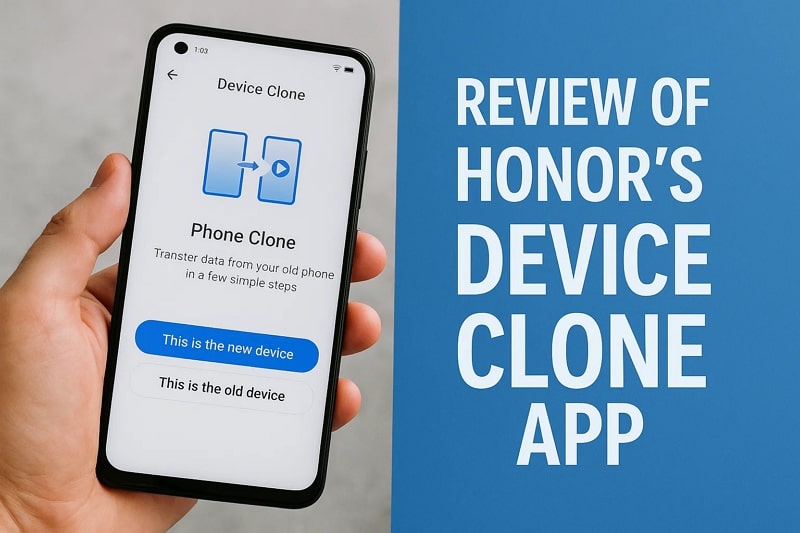
In this article
Part 1. What is Honor Device Clone?
Honor Device Clone app is a free and very handy tool that is meant to simplify the process of transferring data between your old phone and a new one very easily. It allows users to safely and expeditiously transfer a large diversity of data sorts, such as contacts, photographs, videos, and others, without utilizing cables. Moreover, the app uses a QR code with a fast data transfer speed without consuming the internet.
This all runs on apps, like Android 7.0, iOS 8.0, and supports cross-brand transfer between Android, Huawei, and other devices. Therefore, the Honor Device Clone app (Android & iOS) is a reliable app that can help you transfer data without any issues. For users switching to a new Honor Device is a great choice, as this offers fast transfer, security features, and many more.
Part 2. Key Features of Honor Device Clone App
If you are going to transfer data from the Honor Device Clone app, then go through the following key features of this app to learn more about it:
- Seamless Data Transfer: You can easily migrate data from one device to another without any interruptions or lag.
- Fast Transfer Rates: This app can transfer as fast as 1-2 GB per minute, unlike conventional Bluetooth transfer.
- Data Security: This app can be used by everyone because the connections and file transfer are encrypted throughout the migration.
- Multitask Support: This app allows you to move contacts, messages, call logs, data in third-party apps, etc., very easily.
- Convenient Interface: Its simple interface offers easy and clear steps and does not require login or complex setup.
- Easy Setup: The Honor Device Clone app has a quick pairing process, and you can scan devices via a QR code to establish a direct phone-to-phone connection.
Part 3. How to Use Honor Device Clone to Migrate Data from an Android/iPhone/iPad
After understanding the capabilities of the Honor Device Clone app, you can now learn its comprehensive migration process. The following are the easy steps on how to migrate data from an old device to a new Honor device:
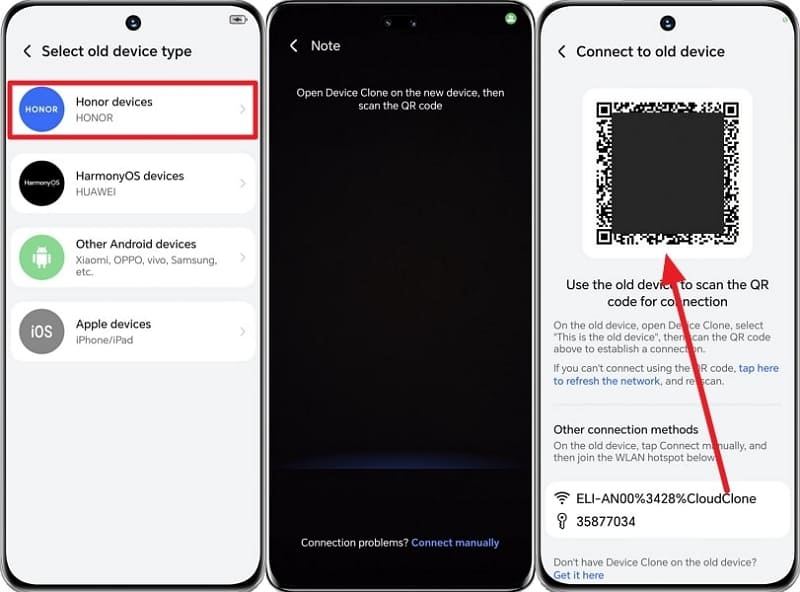
Step 1. On the new Honor device > go to Settings > System & Updates > Device Clone. Tap This is the new device, and This is the old device, on the old device, after opening the app.
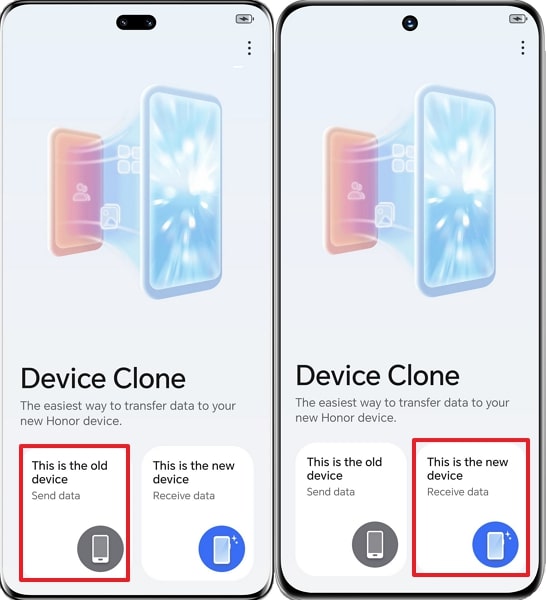
Step 2. Choose the old device type on the new Honor device, such as Honor. Here, follow the on-screen instructions to establish the connection.
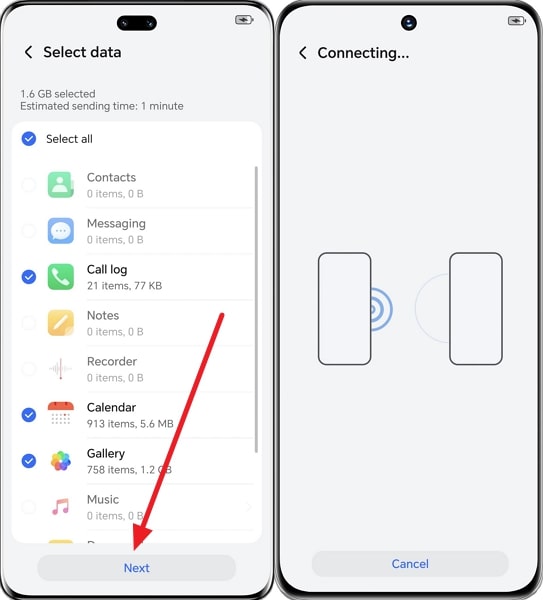
Step 3. Select data on the old phone > Hit Next > and begin migration of data.
Part 4. Limitations of Using Honor Device Clone to Move Data
These limitations suggest that while Honor Device Clone is a user-friendly data migration tool, users may face unstable connections during transfer:
- Connection Stability: Since the transfer depends on a direct Wi-Fi connection, interruptions (distance, interference, weak hardware) can slow down or stop migration.
- Limited Data Types: It transfers contacts, photos, videos, and apps, but doesn't support WhatsApp, social media apps data, or protected files.
- No Airplane Mode: The cloning process cannot be performed when devices are in airplane mode, and you need to use other phone features for data transfer.
- Large Data Volume May Slow Transfer: It can be complex to transfer very large amounts of data with this app.
- PC Version Limitations: Honor Device Clone has no PC version at all. Data migration is only phone-to-phone via the app. For PC use, you'd need Huawei HiSuite or third-party tools.
Part 5. 5 Best Alternatives to Honor Device Clone
Now, let's go through the following top alternatives to the Honor Device Clone app, so that you don't have to face such limitations:
1. MobileTrans App [Most Recommended Choice] (Android & iOS)
If you are looking for an excellent and reliable Device Clone app alternative, MobileTrans is your best bet. This can help you move multiple types of data from images to notes from Android to iPhone and vice versa. Moreover, it offers fast transfer speeds, as it can migrate data up to 30MB/s, 200 times quicker than Bluetooth.
With this, you can easily transfer huge files, including a 1GB video, in a 30-second span. It also offers complete WhatsApp, File, and App Transfer for seamless migration. Besides, the two devices can be connected through QR code, irrespective of the device. The speed, full data support, and high security levels combine to make MobileTrans one of the best options when it comes to transferring data between phones in a seamless manner.
Key Features
- No Data Consumption: MobileTrans utilizes a local hotspot for data transfer and does not use any mobile data during the transfer process.
- Data Security: This application is merely a data transfer tool, and it guarantees the complete transfer of all data to a new device without any leftover data.
- Backup and Restore: You can easily save all your transferred information, SMS, call logs, etc., without any hassle.






Follow these steps to understand how you can use the best app for transferring photos from Android to iPhone:
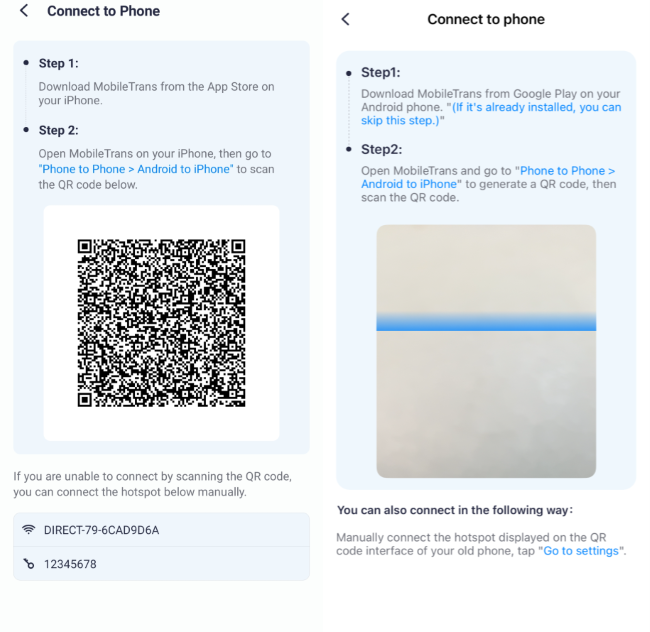
Step 1. Access the MobileTrans App on your new device, tap Phone to Phone on your old phone> Android to iPhone > Basic Data.
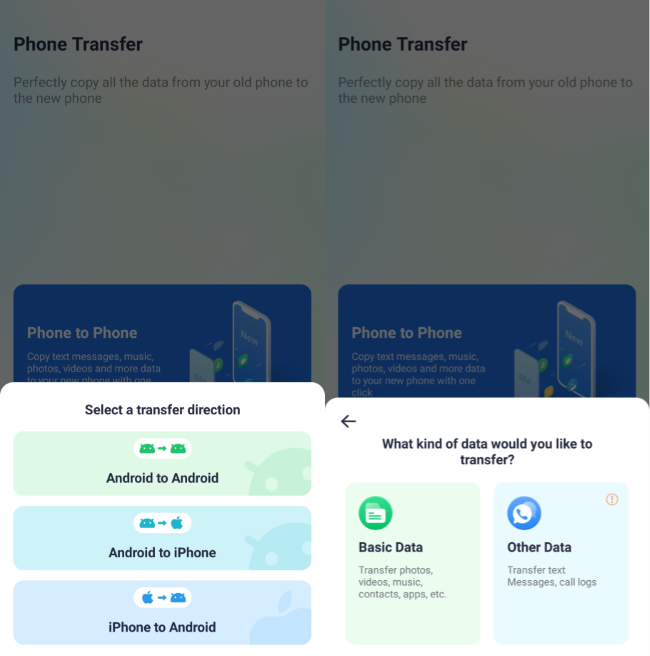
Step 2. Now, select the desired data and hit the Send button.
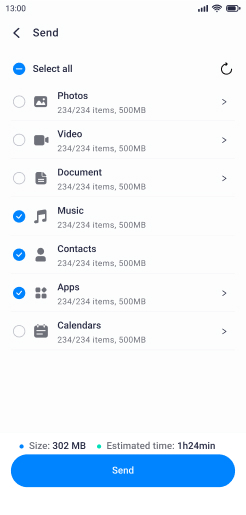
Step 3. Choose Phone to Phone on the new device > Android to iPhone > Basic Data > Scan the QR to receive data.
Limitation
- You need to buy a subscription to transfer the complete in a single attempt.
2. CLONEit (Android)
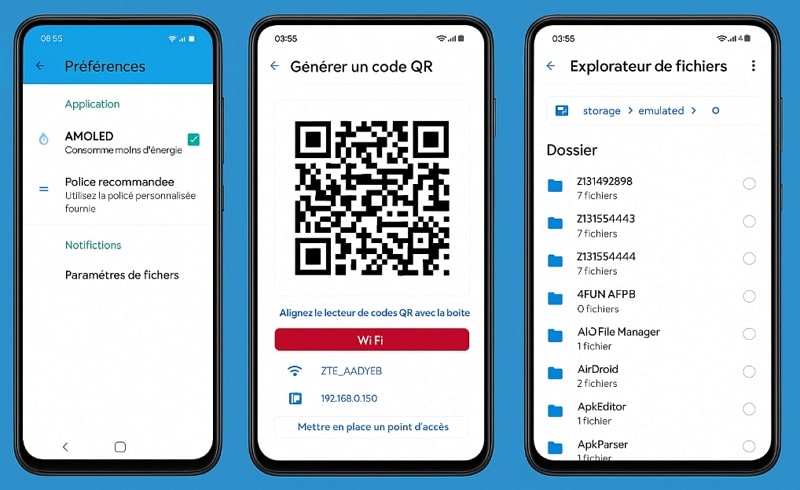
It enables users to transfer all types of mobile data, like contacts, messages, apps, and more, from one device to another without needing cables or the internet. This Honor Device Clone alternative uses Wi-Fi hotspot connection with transfer speeds up to 20 MB/s, depending on device capabilities and network conditions. Moreover, it makes it a convenient and efficient tool for phone-to-phone data migration without any hassle.
Limitations
- The app does not encrypt the data, raising potential privacy risks during transfer.
- CLONEit doesn't offer a native app for iOS users to move data.
3. Copy My Data (Android & iOS)
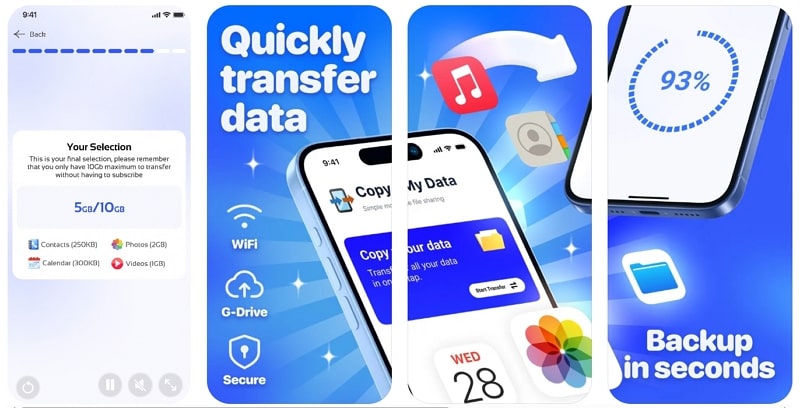
This Device Clone app alternative can be used to transmit data between Android and iOS devices using a Wi-Fi network without any issues. It also offers a cross-platform, easy-to-use, and simple process of transferring data. You can even restore your already transferred data in case some of it was lost or corrupted accidentally. Furthermore, Copy My Data provides a seamless QR code connectivity method between two devices.
Limitations
- Does not support text messages or the transfer of WhatsApp files.
- Contains ads and offers in-app purchases for premium features.
4. InShare (Android & iOS)
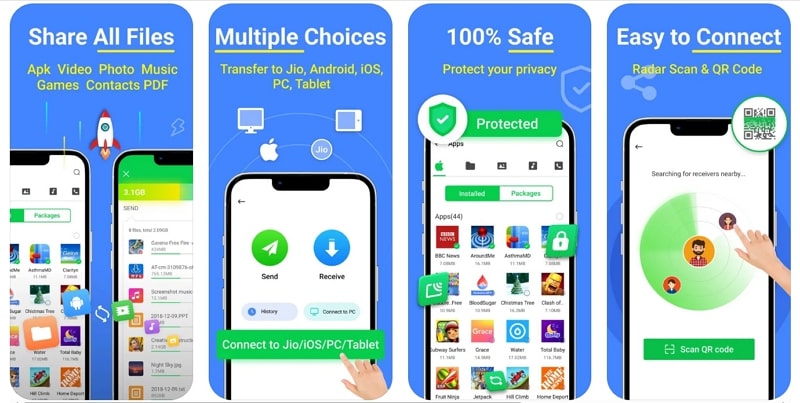
With this file-sharing app, users can migrate different files such as photos, videos, music, and documents at high speeds. The app offers QR code connectivity, a progress bar for transferring files, and more. Additionally, you can connect this app to the PC as well for data transfer and even access the history. If the QR code doesn't work, try the invitation feature to call in on different devices for data transfer.
Limitations
- The transfer range of the two devices with this is very short.
- It lacks cloud storage or backup integration, which compromises data safety.
5. Xshare (Android)
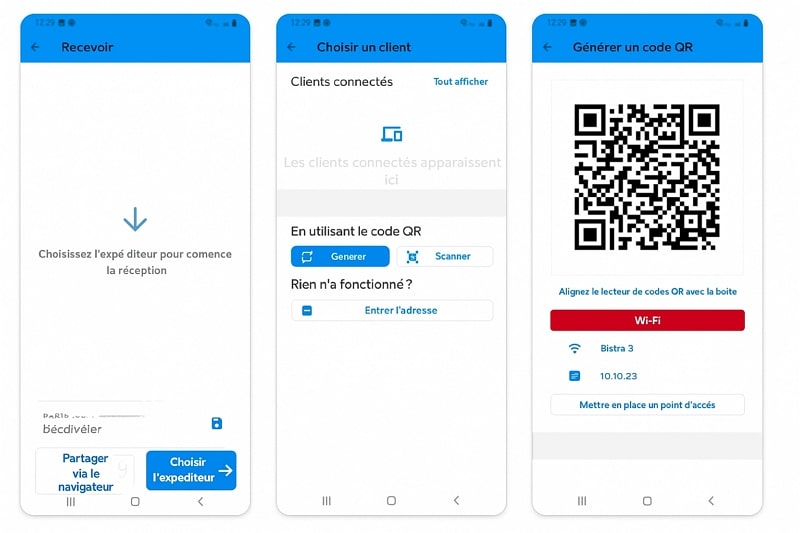
Xshare is an Android file-sharing and Honor Device Clone alternative that provides an all-inclusive transferring procedure. Users can seamlessly send photos, apps, documents, and more to other Android devices without needing an internet connection. Moreover, you can access all its features for free and without any interference. It even supports batch transfers and allows users to connect devices using QR code scanning.
Limitations
- Xshare currently supports only Android devices, limiting functionality for iOS users.
- Contains unnecessary ads during connecting, transferring, and accessing data.
Conclusion
In the end, this article provided users with a basic understanding of the Honor Device Clone app, its step-by-step guide, and its limitations. To overcome these limitations, you explored the 5 best alternative methods to move data between the old and the new device. Out of these choices, the most seamless app is MobileTrans, which offers effortless one-click and quick transfer.










