


 TL;DR:
MobileTrans provides a faster, stable, and bidirectional data transfer solution for the iPhone 17 that works at any time, while Apple's official Move to iOS app is strictly limited to basic Android-to-iPhone migrations during the initial device setup.
● Move to iOS requires a factory-reset or brand new iPhone to function and relies on a local Wi-Fi network that may stall on large media files, forcing users to completely restart the iPhone setup process.
● MobileTrans facilitates encrypted, offline data migration via PC or Mac, allowing users to selectively transfer over 18 data types—including apps and WhatsApp Business data—between over 6000 Android and iOS devices without overwriting existing phone content.
● While Move to iOS is a free option for importing basic contacts and message history, it does not keep Google contacts synced post-transfer and lacks the continuous data backup and iTunes restore capabilities provided by MobileTrans.
Ask AI for a summary
 ChatGPT
 Perplexity
 Gemini
 Claude
 Grok
Grok
The launch of the new iPhone 17 has sparked excitement among both frequent Apple users and first-time users. Its refined design, super-thin body, and immersive pro display are already redefining the smartphone experience. Anyway, an important query does arise among many users about how to transfer their data to iPhone 17, without risking data loss.
Now, you might get into weighing the benefits of MobileTrans vs Move to iOS to choose the one for your peace of mind. To get sorted, continue reading the guide and reveal both platforms with respect to strengths, limitations, and transfer guidelines.
In this article
Part 1. MobileTrans vs Move to iOS: Understanding the Basics
Although both platforms promise to simplify the switch, their approaches and capabilities might differ. To transfer data to iPhone 17, you'll first need to explore basic understandings of each solution, as discussed below:
What is MobileTrans?
MobileTrans is a professional-level data transfer program that supports over 18 types of data, including messages and more. It offers a one-click solution to transfer your important details from one phone to another without any tedious steps. The app supports over 6000 mobile devices and runs on both new and old Android and iOS systems. More impressively, you're allowed to transfer photos, videos, and other data from Android/iPhone to your computer.
The software offers faster data transmission speeds compared to other transferring methods, such as Bluetooth or apps. Here, you're free to transfer any data from any device without worrying about the overwriting issue. The possibilities are countless when you can transfer 5 kinds of data directly from a computer to any mobile device. Plus, it allows one to move all iCloud data to their Android devices directly without any difficulty.






What is Move to iOS?
Move to iOS is Apple's official app to simplify the process of transferring content from an Android device to an iPhone 17. This app integrates with the iOS setup process, appearing as a transfer option right when you power on a new iPhone. It creates a private Wi-Fi network and finds your nearby Android devices running the app for data transfer.
As soon as you connect both devices, the app will automatically transfer all your data to the upgraded iPhone 17. Through this approach, you can migrate nearly all sorts of content, including contacts, message history, or mail accounts. Apart from iPhones, the app supports data transferring to your new iPad from any Android device.
Part 2. MobileTrans vs Move to iOS - Detailed Comparison
Once you're ready to transfer your essentials to a new iPhone 17, the decision often comes down to Move to iOS vs MobileTrans. For a better understanding, we've compared their performance, reliability, and other aspects in the section below:
|
Capabilities |
MobileTrans |
Move to iOS |
|
Device Compatibility |
Android/iPhone → iPhone |
Android → new/factory-reset iPhone only |
|
Supported Data Types |
18+ types including apps & in-app data. |
Contacts, messages, WhatsApp, photos, and Google data. |
|
Transfer Speed & Reliability |
Fast, stable; handles large files well. |
Wi-Fi based; slow, may drop on large data. |
|
Special Features |
● Batch transferring ● Selective data transfer ● Backup and restore feature ● Selective/Batch WhatsApp data transfer ● Import from Google account |
● Integrated with iOS setup ● Free migration for basic content ● Imports Google account data |
|
Security & Privacy |
Encrypted, offline transfers. |
Apple secured, relies on cloud backups. |
|
Ease of Use & User Experience |
Guided desktop & mobile app. |
Simple in setup, restart needed if errors. |
Part 3. How to Use MobileTrans to Migrate Data
After weighing MobileTrans vs Move to iOS, follow the tutorial and give MobileTrans a try to test its data transferring capabilities yourself:
Step 1. Choose Phone Transfer > Select Phone to Phone > Connect old and new iPhone 17 devices to PC/Mac.

Step 2. Select data to transfer > Specify Source and Destination devices > Tick Clear Data Before Copy if needed > Press Start button.

Part 4. How to Use Move to iOS to Send Data
Even though MobileTrans offers far more flexible migration, some users might prefer sticking to Move to iOS for their peace of mind. If you're one of those, explore the guidelines and transfer data to iPhone 17 through Move to iOS:
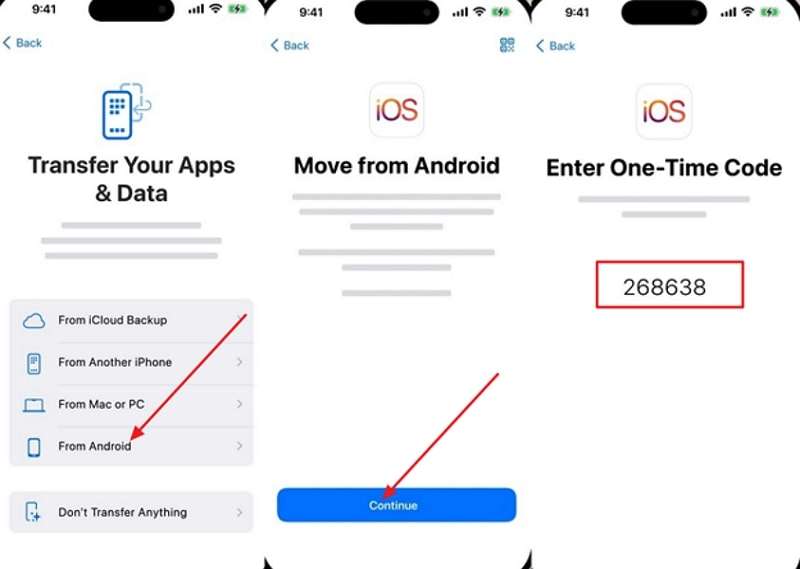
Step 1. During setup, choose From Android > Pick Continue > Fetch one-time code to scan your Android.
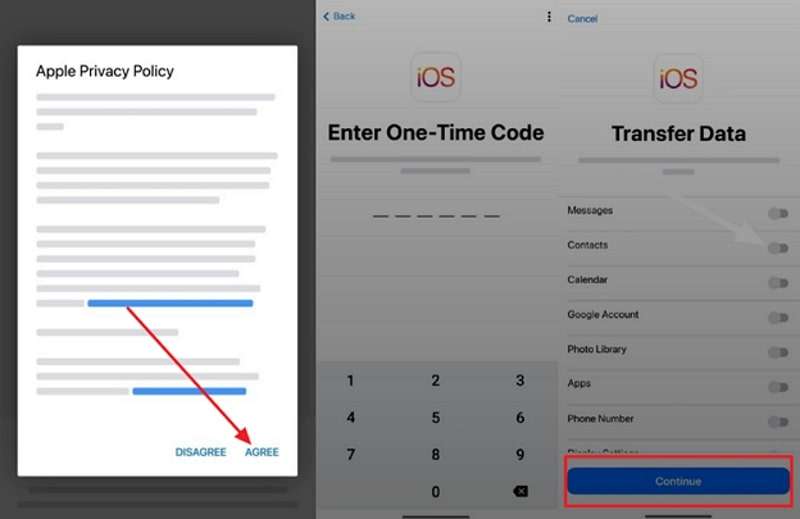
Step 2. On Android, select Agree > Enter 6-digit code > Toggle required data types to transfer > Press Continue button.
Part 5. What Makes MobileTrans the Best Option?
Even though Apple's app is built-in and simple, it has clear drawbacks that can overwhelm users during a large transfer. When comparing Move to iOS vs MobileTrans, these limitations of Move to iOS become quite apparent for anyone wanting a seamless transfer:
- Works only during the setup, meaning you can transfer data from Android to iPhone 17 while setting up.
- Move to iOS moves your data once and doesn't keep Android or Google contacts synced afterward.
- It does not support transferring data from iPhone to Android, nor additional data after setup.
- The app may stall with large media, and restarting means starting the entire iPhone setup over again.
Faced with these restrictions, it's no surprise that many people start searching for something faster, more reliable, like MobileTrans. In evidence of this statement, explore the following additional features that make MobileTrans more than just an alternative:
- WhatsApp and WhatsApp Business Transfer: This feature enables users to transfer WhatsApp messages between over 6000 iOS and Android devices, including photos and stickers.
- Move Apps & App Data: Besides WhatsApp, you can easily migrate apps with app data to your new iPhone 17 without any hassle.
- Phone Back and Restore: The platform facilitates backup and restore of more than 18 kinds of data, including messages, contacts, and more.
- Restore iTunes Files: It further assists users in restoring their iTunes essentials to Android and iOS devices directly.
Conclusion
In conclusion, an instant switch to the iPhone 17 lineup offers a chance to enjoy Apple's most advanced technology and its striking lightweight. After the decision is made, the real hassle comes when you have to transfer data and end up with MobileTrans vs Move to iOS. Although Move to iOS is a built-in competitor, MobileTrans is an all-around program that offers more capabilities than just transferring apps.










