


 TL;DR:
SwissTransfer is a free, secure platform ideal for sharing individual files up to 50 GB without an account, while MobileTrans is the required paid alternative for users needing to migrate comprehensive data directly between mobile devices.
● SwissTransfer secures uncompressed files on Swiss servers with optional passwords, enforcing strict operational limitations including a 30-day maximum expiry, a 250-download cap, and no capability to resume failed uploads or operate in 55 restricted countries.
● The service distributes files via auto-generated links or emails to a maximum of 20 addresses per transfer, offering real-time download status notifications that confirm file access without identifying the downloader.
● MobileTrans serves as a selective, offline data migration tool capable of transferring over 18 data types—such as apps and chats—between iOS and Android devices without the 50 GB size limitation.
Ask AI for a summary
 ChatGPT
 Perplexity
 Gemini
 Claude
 Grok
Grok
The need to send large files online is now part of daily life for students, workers, and creators. Many individuals struggle with email size limits or complex file-sharing platforms that require signups and logins. That's the actual reason simple and effortless tools are now becoming more famous across different user levels. Among the available options, SwissTransfer is a service that lets you send big files easily without creating an account.
It's useful for anyone who needs to move documents, videos, or images quickly from one person to another. Therefore, this article explains everything about how SwissTransfer works and what it offers. We will discover its key features, along with the real user opinions to help you decide whether to choose it. Besides, you will find an advanced alternative tool that lets you migrate your data between phones effortlessly.
In this article
Part 1. What Is SwissTransfer and How Does SwissTransfer Work?
As explored, SwissTransfer is a free platform that lets you send large files online without needing to create an account. You can share files by email or create a download link to send directly to others. When using email, the receiver gets a notification with a simple way to access the file.
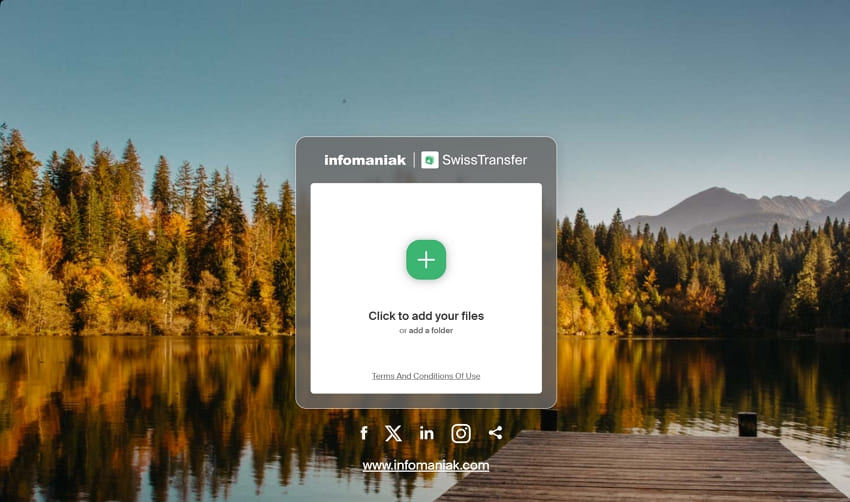
Besides, the platform even includes an "Advanced Parameters" option for basic control of each file transfer. When you select this option, you may pick the file availability limit that suits you best, e.g., 1, 7, 15, or 30 days. Moreover, it allows the sender to restrict the number of downloads of their files to 1, 20, 100, or 250.
The user has the option to choose the language of email notifications, e.g., English or German. Nonetheless, this SwissTransfer review further highlights its simplicity and speed, making for effortless online file sharing.
Part 2. Key Functions of SwissTransfer
In addition to the above, the platform offers several more helpful features that make sending large files secure and straightforward for everyone. Below, we will discover additional key features to help you understand more about SwissTransfer:
- File Size: You can transfer large files up to 50 GB without the need to divide them into parts.
- Data Store: Your uploaded files are safely stored on Swiss servers, which offer strong privacy and legal protection while complying with GDPR and FADP.
- Sharing Options: The platform enables you to either transfer your files through email or by using its link service.
- Batch Transfer: Users can even migrate multiple files or folders to their desired person from various devices.
- Password Protection: When transferring a sensitive document, you can add a password to it, and only people who have the password can open it.
- Daily Transfers: Professionals can transfer files up to 500 times per day and have no usage limit or restriction.
- Expiry & Download Limit: Users can set the expiry period of the file ranging between 1 and 30 days and the download limit to a maximum of 250.
- Multi-Platform Support: SwissTransfer works via any modern web browser and is available as a browser extension for Chrome, plus dedicated Android and iOS mobile apps.
- Multi-Language Support: The service supports several languages, catering to a broader international audience.
- Download Tracking & Notifications: Users receive notifications when a recipient downloads the file, allowing the sender to track progress or download attempts for peace of mind.
Part 3. Is SwissTransfer Free and What Are the Usage Limits? Pros and Cons of SwissTransfer
Although it comes with useful features designed for safe and fast file sharing with minimal steps, it still has limitations. So, this SwissTransfer review section covers its strengths and cons to help users decide if it fits their needs for daily or occasional file transfers:
Part 4. Is SwissTransfer Trustworthy? Security, Privacy & Reliability
SwissTransfer is a secure site as it pays attention to the privacy of users and has good data protection procedures. Infomaniak is a Swiss company that respects user rights and digital ethics and runs this service. All files are transferred using HTTPS, which helps protect connection data from being seen by others online.
Although it does not share full details about encryption, it still follows secure methods during file transfers. Swiss laws also support strong privacy rules, which makes the service more reliable for handling personal or business files. Even when you're sending large or sensitive documents, SwissTransfer works quickly without putting your privacy at risk.
Part 5. What Do Users and Media Say About SwissTransfer?
Many users appreciate this platform for its free service and ability to handle large files. In this SwissTransfer review, we will discover what most users say about it by exploring a few common forums:
Positive Review
- I love using SwissTransfer. It's a free alternative to WeTransfer. But instead of 2GB, you can send up to 50GB. And instead of it being available for one week, it's available for one month. - Antonio (Tony) Seeler.
- Excellent service wherever I am in the world. Fast and working 100% of the time. I've been using their service for years now, and I know I can count on this website any time. Professional and easy to use website. - Silvere D.
- Until now, I've used SwissTransfer because it's free, doesn't require registration, and allows you to send up to 50 GB per transfer, which is very convenient. - Interesting_Winner64.
Negative Review
- So a client just sent about 50GB of RAW footage over swisstransfer.com to me. It's the first I've heard of this site. I have now been downloading for 12 hours, and it's estimating it'll take another 8 hours. - deanini.
- Works with small files, but is unable to send a file of about 3GB, despite numerous attempts over several days. - ROS.
- I'm actually dependent on Swiss Transfer for my job as a photographer, and the outage is a disaster. Everything was fine until now, but as of yesterday, I can no longer send my photos. As soon as I press the + button, my desired images no longer appear, but instead a large mask with the number of my images appears, covering the small mask below where the + is. - Michael Wintgen.
Part 6. How to Use SwissTransfer: A Brief Step‑by‑Step Guide
As discovered above, this platform is designed to make file sharing easy, even for people with no technical background or skills. It lets you share files by email or direct link and offers password protection for extra safety. Plus, you can even set download limits, choose how long files stay online, and select different email languages. Hence, let's explore how you can use SwissTransfer to send your files to others:
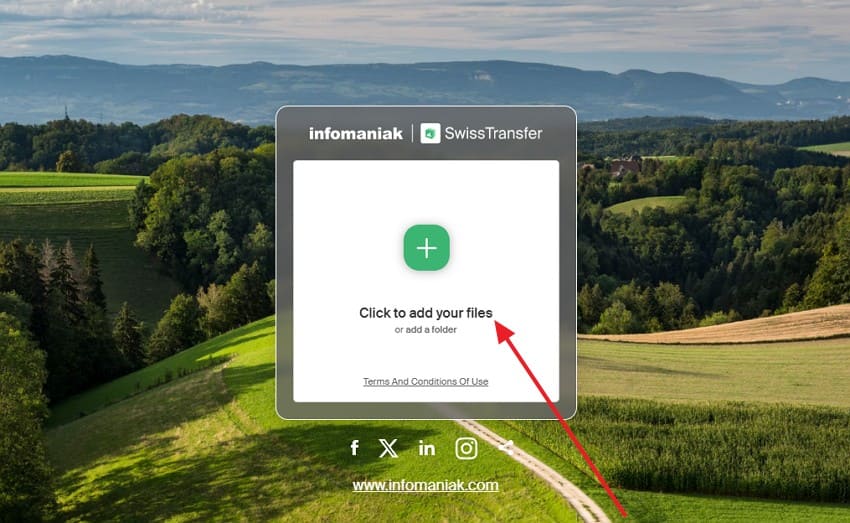
Step 1. Once you access "SwissTransfer," click the "+" button to upload a file.
Step 2. Head to the "Link" tab to customize the settings, like a message or Advanced Parameters. Hit the "Transfer" button.
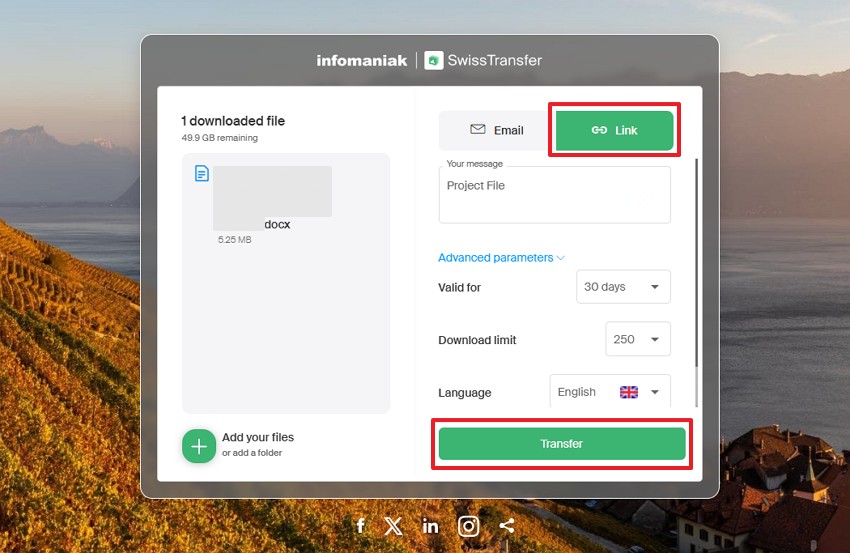
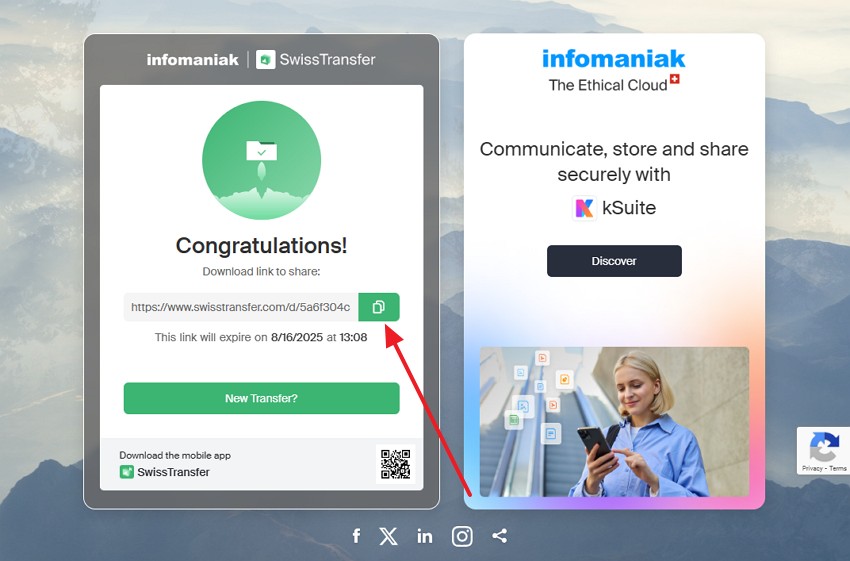
Step 3. After waiting for a while, click the "Copy" button to copy and share the file's link.
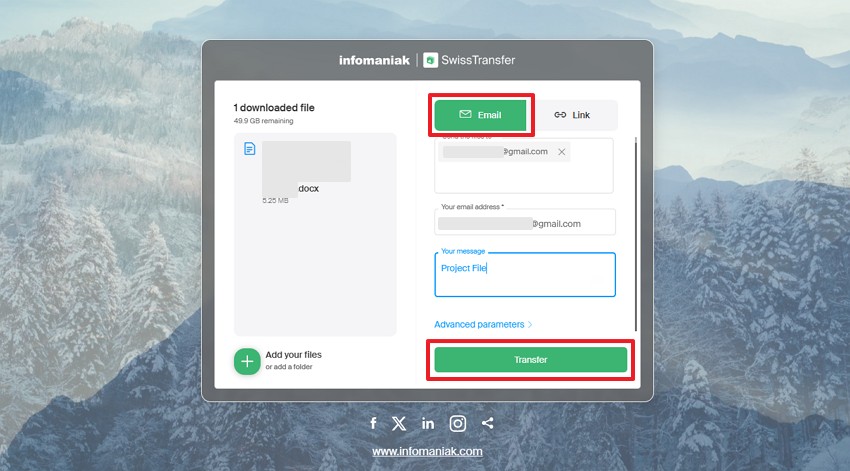
Step 4. Use the "Email" tab to add yours and the receiver's email address before you click "Transfer."
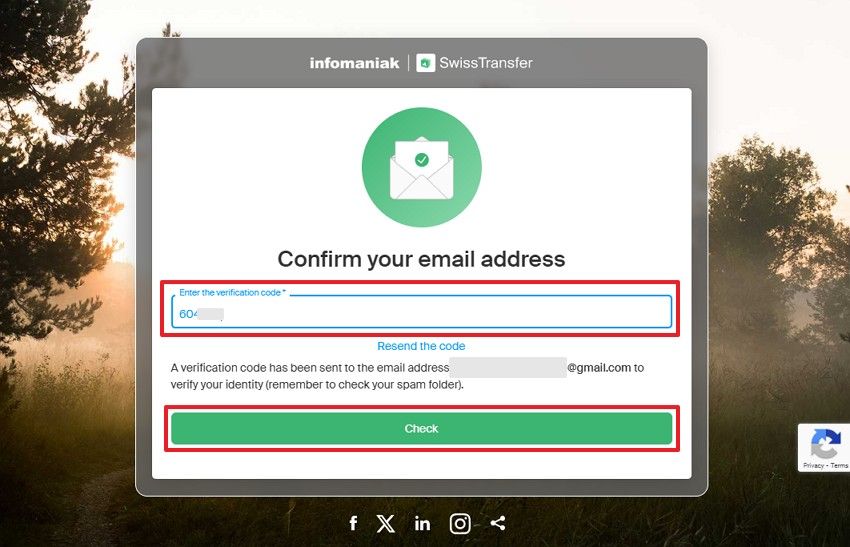
Step 5. You need to enter the verification code received in your email and hit "Check."
Part 7. MobileTrans - Best SwissTransfer Alternative for Data Transfer Between Devices
In this SwissTransfer review, if you need multiple files to move between devices, like from one phone to another, this platform can't do that due to the file size limit. In such cases, we recommend using MobileTrans, as it offers a dedicated phone-to-phone feature to overcome this challenge. You can move more than 18 types of data, including apps or music, from one device to another effortlessly.
Key Features
- Device Support: This advanced software works well with more than 6000 smartphones and tablets running Android or iOS.
- iCloud Data Transfer: During Android migration, it lets you move your iCloud data directly to it without needing an iPhone.
- Selective Transfer: Before transferring, you can review your data and select specific items to ensure everything is accurate and nothing is missed.






Step-by-Step Manual to Transfer Data Between Devices Using MobileTrans
After exploring this tool, you can follow the steps to migrate your preferred data from one phone to another:
Step 1. Run MobileTrans, go to the "Phone-to-Phone" tab. Connect both mobiles to the PC/Mac > determine Source and Destination.

Step 2. Choose the data you want to transfer from the old smartphone and press the "Start" button.

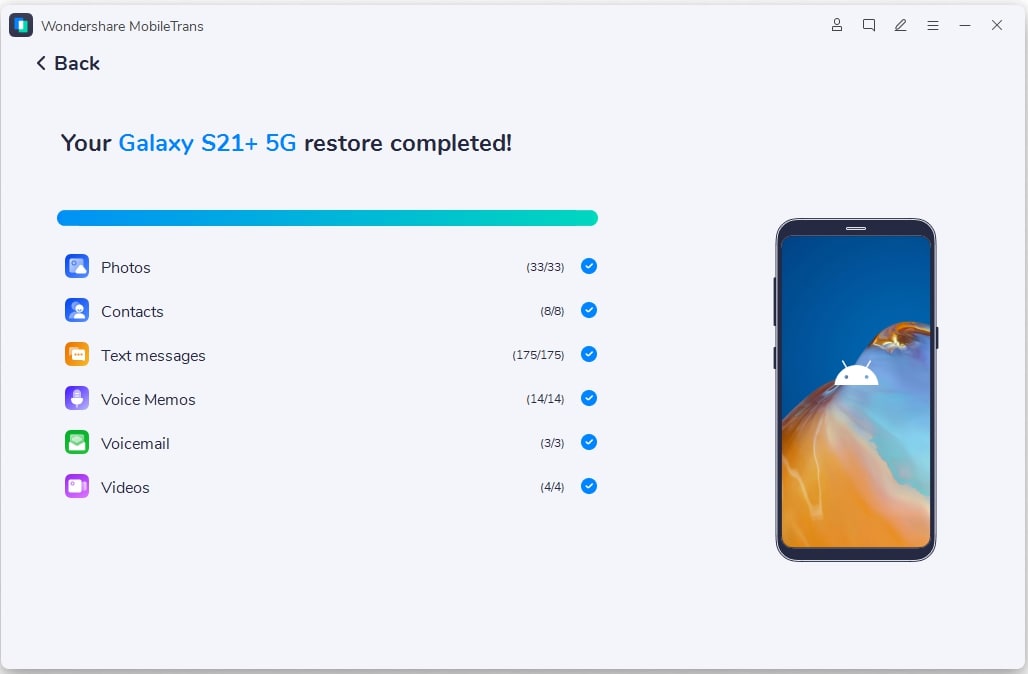
Step 3. You will see a confirmation display after completing the transfer process.
Conclusion
In simple words, SwissTransfer is an excellent option for sending files under 50 GB without downloads or signups. This free platform offers a secure process by addressing the need for file sharing for everyday users.
However, if you want to move more files between phones or across systems, you definitely need a more advanced option. For that, MobileTrans is the highest recommended tool that offers 18+ data types between your preferred phones.
FAQ
-
Q: Can I track if someone has downloaded my SwissTransfer file?
A: You will know whether your SwissTransfer file has been downloaded or not, but you will not be able to determine who downloaded it. SwissTransfer offers real-time download notifications, which means you will be aware of file access or download status after sharing it. Nevertheless, it fails to show the individual who downloaded the file.
-
Q: Does SwissTransfer compress my files before sending them?
A: It does not change or reduce your file size before sending it to your contact. Whatever file you upload will be shared in its original size, quality, and format without any changes. This is helpful for people who want their files to be sent without losing quality during the process.
-
Q: Is there a better tool to transfer apps, chats, and settings between phones?
A: Multiple tools are available, but MobileTrans stands out as the best option to address this need. Unlike SwissTransfer, it can handle full phone-to-phone transfer, including settings and app data. Moreover, this software supports both Android and iPhone and lets you move 18+ data types effortlessly.










