


 TL;DR:
TransferNow is a secure, browser-based tool ideal for quick online file sharing with limits of 5GB for free users and 50GB for premium subscribers, while MobileTrans is the recommended software alternative for users needing offline, cross-platform device data migration without file size caps.
● TransferNow requires a continuous internet connection to upload or download files, and all shared links automatically expire and delete the files after a few days unless upgraded to a paid plan.
● MobileTrans requires installing an application and purchasing a paid plan for full access, but it excels at moving complete phone backups, contacts, and WhatsApp data directly between Android and iOS devices using offline cable connections.
● For maximum security and success regardless of the tool used, always compress large files to prevent failed uploads, apply password protection to sensitive links, and maintain a local backup drive copy before initiating any transfer.
Ask AI for a summary
 ChatGPT
 Perplexity
 Gemini
 Claude
 Grok
Grok
Sharing files online has become part of daily life. People send work files, photos, and videos to friends and teams. But large files often cause problems.
TransferNow is one of the many tools built to fix this. It promises fast transfers, safe use, and no stress. This TransferNow review will guide you through its features, safety, pros, and cons. We will also compare it with an alternative app to see if it's worth it.
In this article
Part 1: Overview of TransferNow
TransferNow is an online tool that lets users send large files. It removes the need for USB drives or cloud storage sign-ups. You can share files with people anywhere in the world.
This TransferNow net review shows that the tool is easy to use. It works directly from your browser. You don't need to install anything. Both free and premium versions are available.
TransferNow works on phones, tablets, and desktops. It supports password protection and expiration dates. This makes it a flexible tool for safe file sharing.
Who Owns Transfer Now?
TransferNow is owned by Highsense SAS. It is a French company. The office is in Garches, France. It is registered in Nanterre.
Part 2: Key Features of TransferNow: Using TransferNow Step Guide
TransferNow offers useful features for personal and business needs.
Key Features:
- Send up to 50GB with a premium plan. Ideal for transferring large videos, high-res images, or bulk project files without compression.
- No account needed for free use. Start sharing files instantly—no sign-up or login required for basic transfers.
- Password protection for files: Add a layer of security by setting a password so only intended recipients can access your files.
- File transfer tracking. Monitor delivery status and download activity to ensure your files reach the right people.
- Works on phones, tablets, and desktops. Compatible across devices, making it easy to send or receive files wherever you are.
Steps to Use TransferNow:
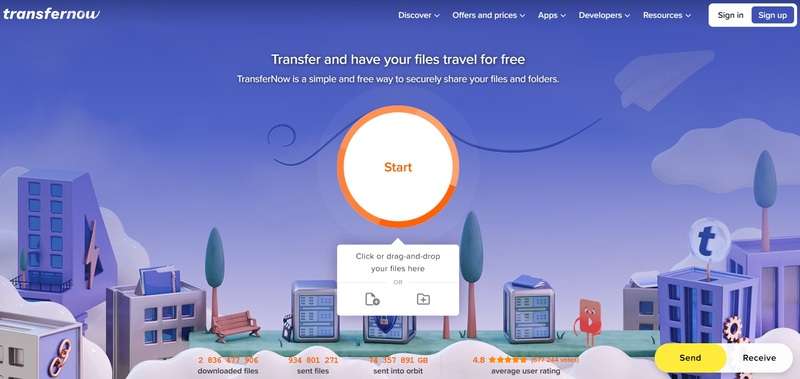
Step 1. Go to the TransferNow website. Click "Start" and either drag-and-drop your files or select them manually. You can upload documents, photos, videos, or entire folders.
Step 2. Enter the recipient's email or create a shareable link. You can also add a message, set a password, or choose an expiration date for extra security.
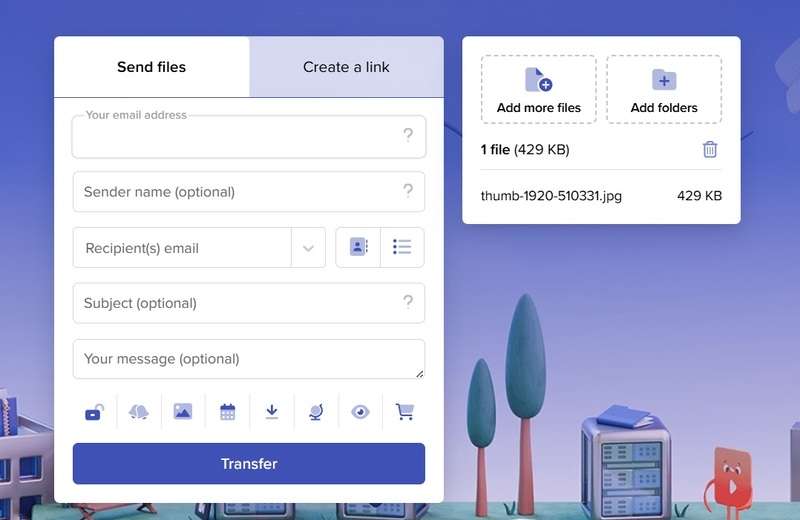
Step 3. Click "Transfer" to start uploading. Once done, you'll get a confirmation and can track downloads from your dashboard.
Part 3: Is TransferNow Safe to Use? A Deep Dive into Security
Safety is a key concern when using file transfer tools. This TransferNow review shows that it uses SSL encryption. That means data is locked during the transfer process.
TransferNow also lets you add passwords to files. This makes sure only the right person opens them. While safe for most cases, very sensitive data may need more advanced solutions.
Part 4: Pros and Cons of TransferNow
Every tool has strong points and weak points. TransferNow is no different. This part of the TransferNow review will show the good and the bad sides in simple terms.
Part 5: A Powerful Alternative to TransferNow: MobileTrans App
MobileTrans is a file transfer app designed for fast sharing. Unlike TransferNow, it works offline too. This makes it better for those who want more control.
The app is built by Wondershare, a trusted software maker. It is used worldwide for phone-to-phone transfer, backups, and restores. Many call it a one-stop transfer solution.
This TransferNow net review also finds MobileTrans more flexible. It does not rely on email links. You can move data straight between devices without the internet.
Key Features:
- Move all your WhatsApp data, including messages, media, and attachments, from one phone to another in just a few taps.
- Easily switch between different operating systems. Send contacts, photos, music, and more from iPhone to Android or vice versa.
- Save your phone's data to a secure location. Restore it anytime if you switch devices or lose important files.
- Transfer large files quickly. There's no cap on file size. Move everything at once without delays.
- Available on Windows, macOS, Android, and iOS systems. Support over 6000 devices.






Steps to Use the MobileTrans App:
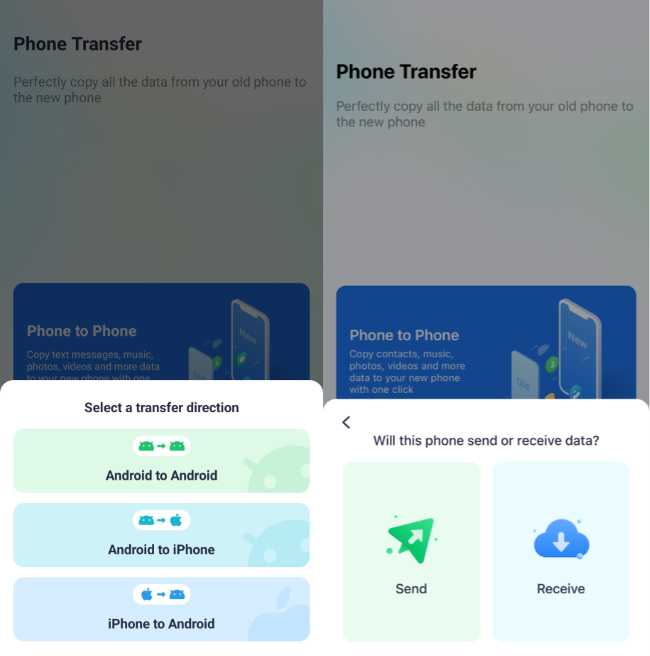
Step 1. Download the MobileTrans app. Open the app and choose the type of transfer you want—such as phone-to-phone.
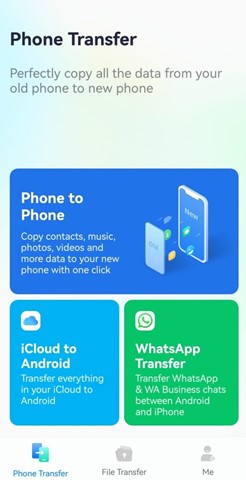
Step 2. Choose how you want to transfer—like Android to iPhone or iPhone to Android. On your old phone, tap "Send." On your new phone, tap "Receive."
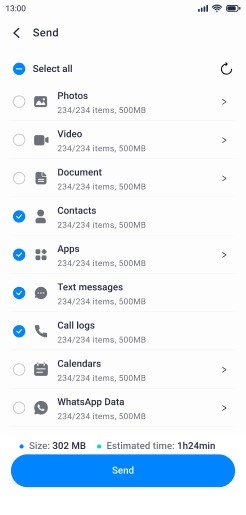
Step 3. Choose the data you want to move—contacts, photos, messages, etc. Tap "Send".
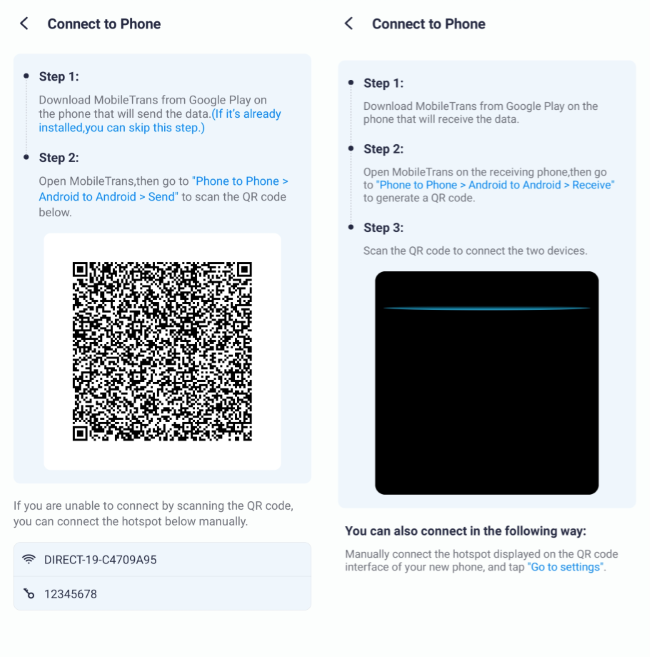
Step 4. Connect the phones. Allow the app to use your phone. Then, scan the QR code on your new phone using your old phone.
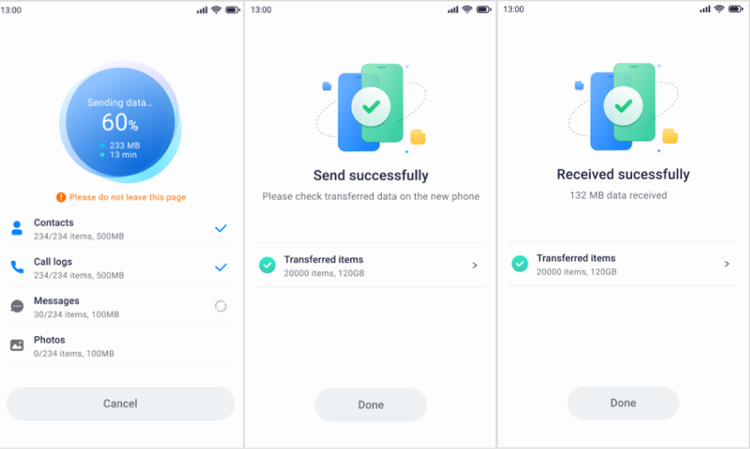
Step 5. The app will start moving your data to the new phone. In a few seconds, you'll see a message saying the transfer is complete.
Part 6: Expert Tips for Flawless File Transfers
Even the best transfer tools can face problems if not used properly. Slow internet, expired links, or weak passwords can ruin the process. To make sure your file transfers go smoothly, follow these expert tips. They will help you keep your data safe and speed up your workflow.
- Use a strong internet connection: A stable and fast Wi-Fi or wired network will cut down transfer time and prevent failed uploads.
- Compress files before sending: Zip or compress large files to reduce their size. This makes transfers quicker and less likely to fail.
- Protect files with passwords: Always set a password for sensitive files. This adds a layer of safety if the link is shared by mistake.
- Keep backup copies: Save a copy of your files on your computer or an external drive before sending. Backups protect you if transfers fail.
- Update your tools regularly: Make sure the app or browser you use is updated. Old versions may have bugs or weaker security.
- Avoid free plans for sensitive data: Free services often have weaker security and shorter file life. For business or private files, use a paid plan.
- Use wired transfers when possible: Tools like MobileTrans allow cable transfers. They are faster, safer, and don't depend on internet speed.
- Check expiry dates of links: Shared links often expire after a set time. Always confirm that the receiver downloads the file before the deadline.
Conclusion
This TransferNow review shows the tool is simple and useful. It works well for quick transfers and everyday needs. Safety is also strong enough for regular files.
But TransferNow has limits. If you want more control and features, MobileTrans is a better option. This TransferNow net review finds MobileTrans faster, safer, and more flexible for heavy use.
FAQ
-
Q: How long are files available on TransferNow?
A: On the free plan, files sent through TransferNow are kept online for a limited time, usually a few days. After that, the links expire and the files are deleted. If you choose a premium plan, you can keep the files available for a longer period, which makes it more useful for projects or work that needs extended access.
-
Q: Can TransferNow send files without email?
A: Yes, TransferNow allows you to share files without email. Instead of typing in an address, you can generate a direct download link. This link can then be copied and shared through chat apps, messages, or social media. It is a quick option for sending files to people when you don't want to use email.
-
Q: Is MobileTrans free to use?
A: MobileTrans does offer a free trial, but the trial has limited features. To unlock its full abilities, such as unlimited transfers and complete access to phone-to-phone data moves, you need to buy a paid plan. Many users choose the paid version because it supports more file types and offers better transfer speeds.










