


 TL;DR:
To stop your iPhone from overheating after installing the iOS 18/26 update, immediately disable Background App Refresh, update all third-party apps to resolve compatibility strains, and enable Optimized Battery Charging.
● Since the iOS 18/26 beta requires approximately 15 GB of operating space, use the MobileTrans tool to offload large files to a PC if your local storage is critically low.
● If the beta software remains fundamentally incompatible with your hardware, connect the device to a computer and use the Dr.Fone application to downgrade the operating system back to iOS 17.
● Never place an overheating device in a fridge or cooler, as the rapid temperature drop creates internal condensation that permanently damages the iPhone components.
Ask AI for a summary
 ChatGPT
 Perplexity
 Gemini
 Claude
 Grok
Grok

One of the common problems users experience after updating to a new iOS is the iPhone overheating issue. Many users complain that their iPhone gets hot when running the latest iOS 18/26 software.
If an iPhone gets hot, it can cause other problems like battery drain and slow response, so it's essential to fix the issue immediately.
So, why is your iPhone running hot after the update? Is it usual to notice your iPhone overheating after an update? And how do you cool your iPhone after an update?
This guide reveals answers to all these questions, including quick and easy ways to stop your iPhone from overheating after the iOS 26 update.
In this article

Part 1: Why is my iPhone Heating Up After the Update to iOS 18/26?
Here are common reasons your iPhone is overheating after the iOS 26 update.
- Background Running Apps: If you have several running apps in the background, your iPhone may overheat after an update because running apps draw data and power, even when you are not using them.
- Insufficient Storage: The new iOS 18/26 beta version is about 15 GB, so you need sufficient storage space to run the software, or your device will overheat.
- Battery Problems: If you notice that your iPhone heats up after an update, it might be caused by a swollen, weak, or bad battery.
- Charging Accessory not Supported: Always use a compatible iPhone charger to prevent the iPhone from getting hot after the updat
- Incompatibility Issues: If the new iOS 26 beta is not compatible with your iPhone model, it may put a strain on your device, causing it to overheat and shut off unexpectedly.




Part 2: How to Fix iPhone Overheating After iOS 26 Update
Is your iPhone heating up after updating to iOS 26? Don't worry, you are not alone. Here are ten easy ways to fix the problem.
1. Close Background Apps
When your iPhone is getting hot after an update, you should close all background and running apps to save power and data.
Swipe up on your iPhone and close the apps you don't need presently.

2. Turn Off App Refresh
App refresh automatically refreshes the content on your iPhone, so your apps stay updated. Turn off this feature to save power and stop the iPhone from overheating after the update issue.
- Open Settings on your iPhone and go to

- Tap on Background App Refresh and turn off the feature. You can also turn off the feature for specific apps.

3. Reinstall and Update Apps
If your iPhone is getting hot after an update, outdated apps may not be fully compatible with the new iOS 26 beta.
You should update all your iPhone apps to their latest version to stop overheating.
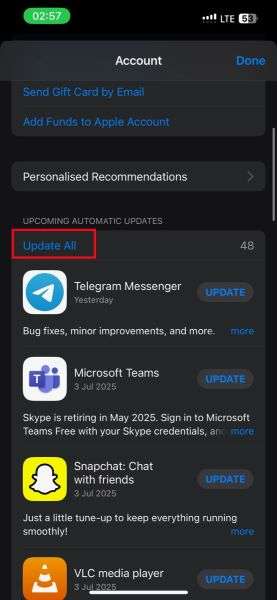
- Connect your iPhone to a b Wi-Fi.
- Open the App Store on your iPhone and tap on your Profile icon at the top-right corner of your screen.

- Scroll down to the Upcoming Automatic Updates tab and tap on Update All.
4. Fix iPhone Overheating After Update via iTunes Restore
Another way to stop your iPhone from heating up after updating to iOS 18/26 is to restore iPhone settings via iTunes.
- Use a USB cable to connect your iPhone to a computer.
- Open the latest version of iTunes on the computer and tap on your iPhone icon near the top-left of the iTunes window.

- Tap on Summary > Restore and follow the onscreen instructions.

iTunes will restore your iPhone to its latest backup when connected to Wi-Fi. If you wish to back up your iPhone without Wi-Fi, use the next solution.
5. Downgrade iOS 26 to iOS 17
If the iOS 18/26 beta version is not compatible with your iPhone, you can downgrade your iOS in 3 steps using the Dr. Fone app:
- Install the Dr.Fone app on your laptop.
- Connect your iPhone to your computer. Then launch Dr.Fone and select the "iPhone" module.
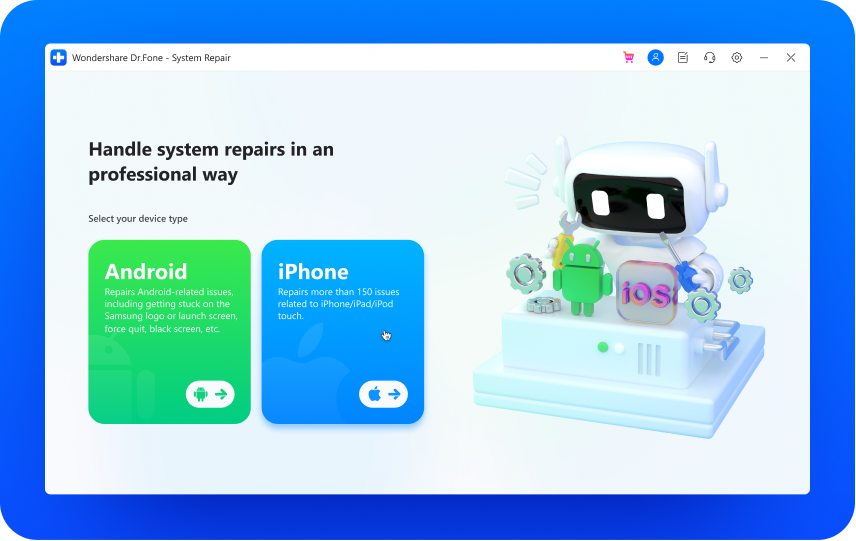
- Click on "iOS Upgrade/Downgrade" and then tap on "Downgrade iOS."
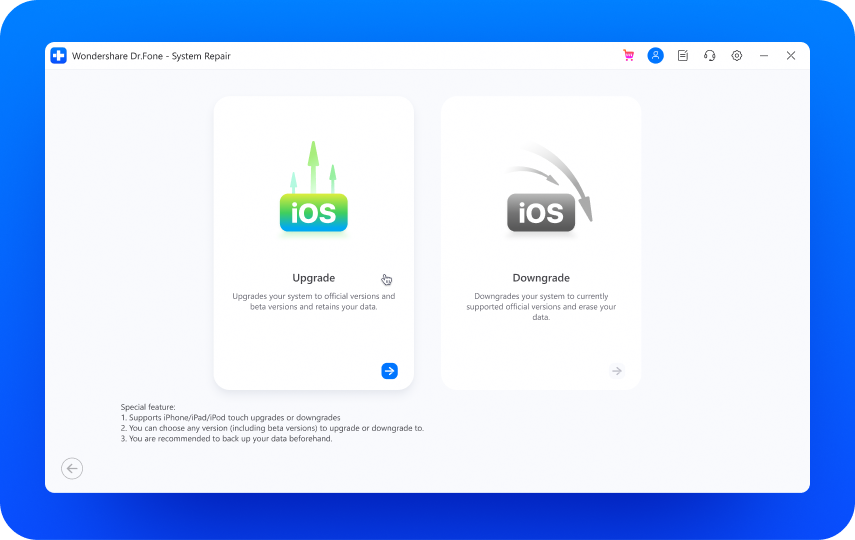
- Choose the previous iOS version you want to downgrade to and start downloading the firmware package.
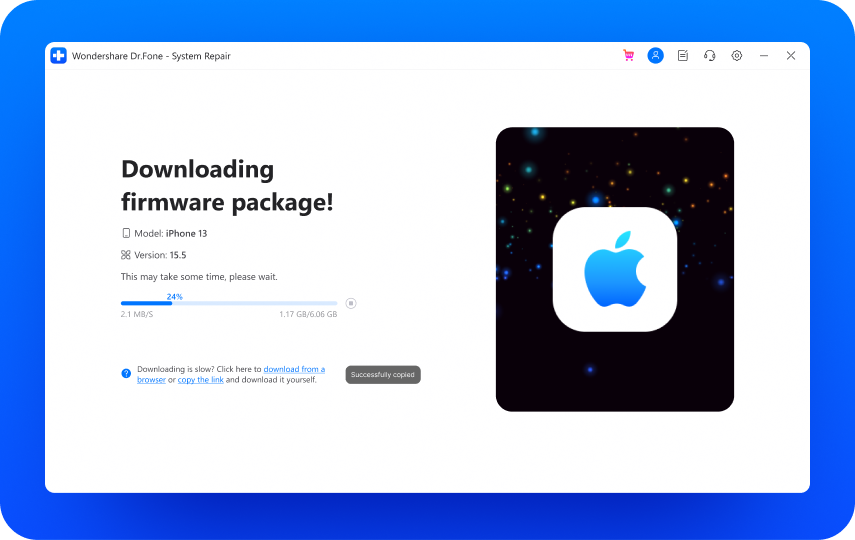
After you downgrade the iOS, your iPhone should stop overheating. If your iPhone is still running hot, try other solutions below.
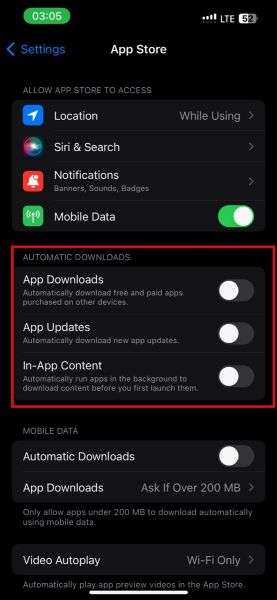
6. Disable Automatic Downloads
Auto downloads allow your iPhone to download software updates without your permission, and this may cause overheating problems. Disable automatic downloads to stop iPhone overheating after update.
- Go to Settings > App Store.
- Turn off App Downloads, App Updates, In-App Content, and Automatic Downloads.
7. Reset iPhone Settings to Fix iOS 26 Overheating Issue
If your iPhone is still heating up after the update, you should reset the device settings.
- Open Settings on your phone and tap on General.
- Scroll down to Transfer or Reset iPhone. Tap on Reset and choose Reset All Settings.
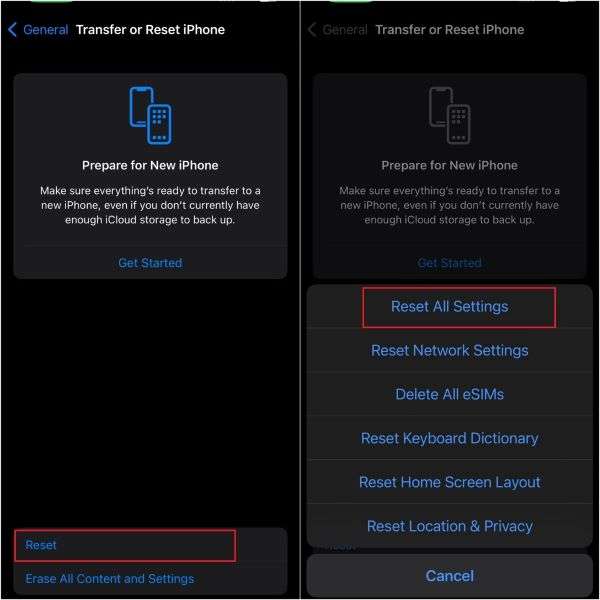
- Confirm the prompt and follow the onscreen instructions to reset all iPhone settings. This should stop the iPhone overheating issue.
8. Repair and Replace Hardware
Check for swollen batteries, defective chargers, and tight phone cases. Replace all damaged parts to stop your iPhone from overheating after the update.
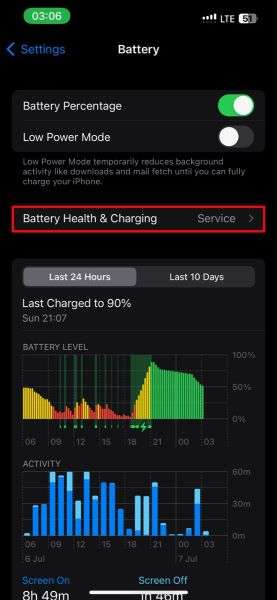
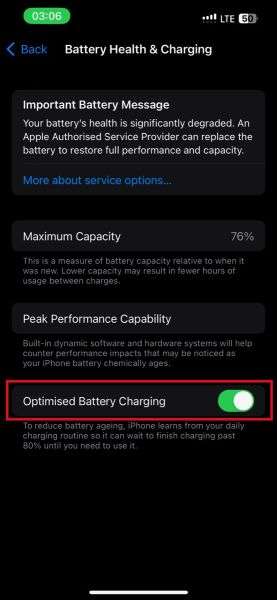
9. Optimize iPhone Battery Performance to Stop Overheating
Usually, when an iPhone gets hot after an update, it means many apps and widgets are currently running. So, optimize battery charging and performance to stop overheating.
- Go to Settings on your iPhone and tap on Battery.
- Tap on Battery Health & Charging.
- Turn on the Optimized Battery Charging
10. Contact Apple Support
If none of the steps above solved the iPhone heating up after update problem, you should contact Apple support for help.
Other Common Solutions to Fix iPhone Overheating After an Update
- Turn off Airplane mode.
- Force restart the iPhone.
- Take off the silicone phone case/pouch.
- Pause charging for a while.
- Lower screen brightness.
Bonus: Transfer Large Files to PC to Stop iPhone From Overheating After Update
If you don't have enough space on your iPhone to download or run iOS 26 beta, you should transfer large files and videos to your PC with MobileTrans. This will prevent your device from overheating after the update.
MobileTrans is a secure and user-friendly tool that lets you transfer large files and data from your iPhone to your computer without Wi-Fi.

How to Back Up iPhone on iOS 18/26
Step 1: Launch MobileTrans
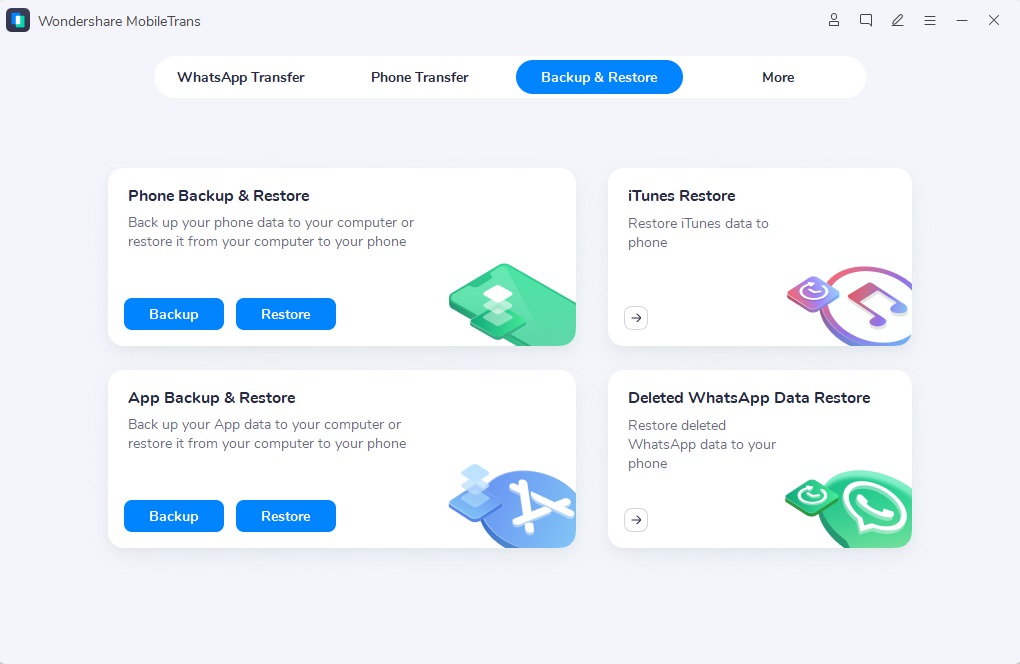
Open the MobileTrans app on your PC. Tap on the Backup and Restore module and select Phone Backup.
Step 2: Start Backup
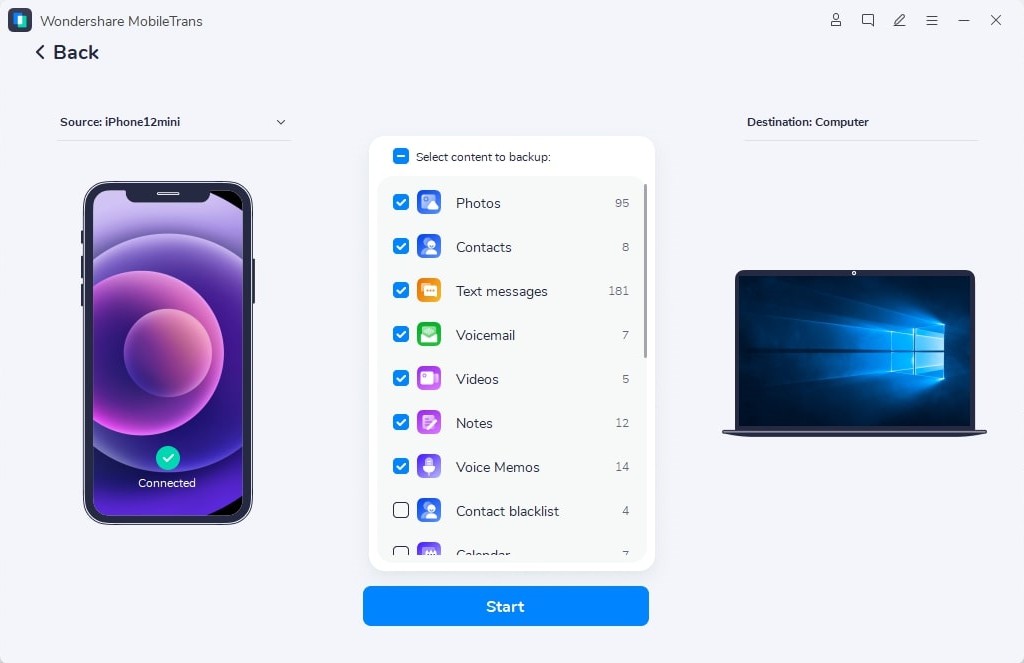
Connect your iPhone to the computer using a USB cable and choose the files you want to back up. Then click Start.
Step 3: Backup Complete
Wait for the backup complete notification and disconnect your iPhone.
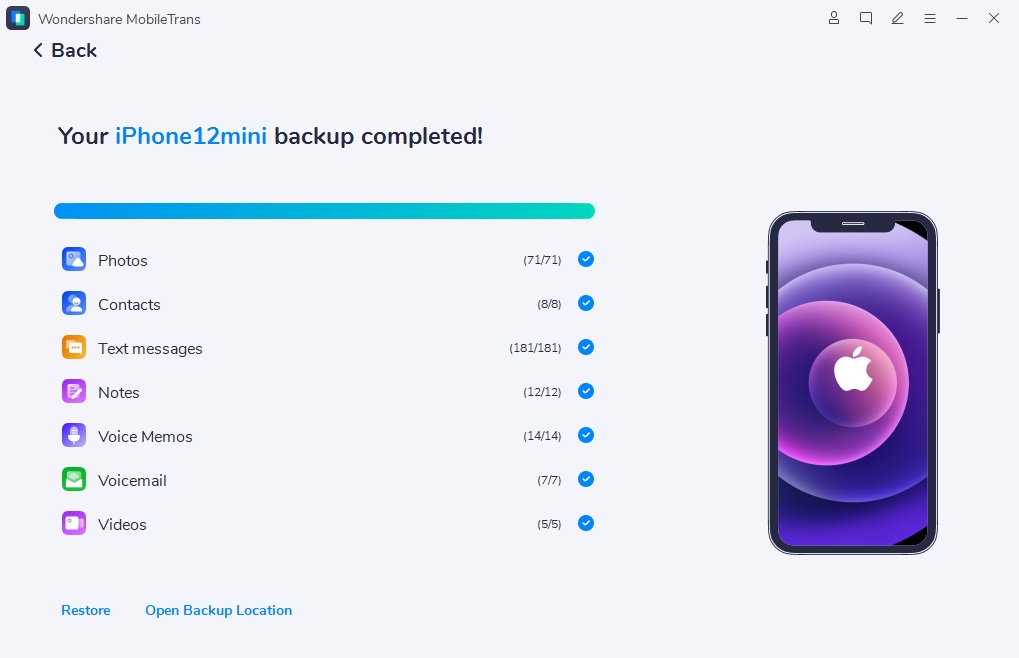
You can use the MobileTrans app to restore your files to your iPhone after fixing the overheating issue. Tap on Restore from the main menu and follow the onscreen instructions.
Conclusion
When your iPhone gets hot after an update, there are different possible reasons for this. It could be insufficient storage space, incompatible software, or charging problems.
The best way to fix the problem is to find out why the iPhone is running hot after the update. Then use the appropriate solution from the list above. Usually, improving battery performance and freeing up iPhone storage would fix the problem.
If you want to run iOS 26 successfully on your iPhone, you should send large files to your computer using MobileTrans. This way, you have more storage space to run the software without your phone getting hot.
FAQs
-
Does iPhone 15 have a cooling system?
No, your iPhone 15 does not have a cooling system, unlike some Android devices. Instead, the device uses other cooling methods, such as the phone's metal frame and graphite thermal pads, to disperse heat. If your iPhone 15 gets hot after an update, it is likely due to software bugs or insufficient storage, and not the lack of a cooling system. -
Can you put your iPhone in the fridge or a cooler to stop overheating?
It's not recommended to put your iPhone in the fridge or a cooler when it is overheating because extreme temperature changes, especially from hot to cold, can damage the device. For instance, condensation may form inside the phone and damage the internal components. Instead, protect your iPhone from direct sunlight, remove the case, and let the device cool down in a well-ventilated area. -
Why does my iPhone get hot and shut off after the iOS 26/18 update?
Possible reasons include insufficient storage, a bad battery, and background apps. Ensure to keep your iPhone charged using a compatible charger and turn off running apps in the background. You should also turn off connectivity features like hotspot and Bluetooth sharing to extend battery performance. -
What is the safest way to cool an iPhone that is overheating after an update?
The safest way to cool an iPhone that is overheating after an update is to transfer large files from your phone to your PC using the MobileTrans app. This method frees up storage on your phone so that you can download the iOS18/26 beta software, and it ensures your files are kept secure on your computer.










